
MCP server · Research
NewsCatcher CatchAll MCP server
by Newscatcher
Lets your AI run deep web searches that find events and articles beyond the usual top results.
This is a helper that connects your AI assistant to NewsCatcher's CatchAll web search. Instead of only chatting, your AI can go out and search the open web for you, then bring back matching articles and events. It is handy if you research news, track companies, or keep an eye on a topic over time.
What is an MCP server? The 30-second version
On its own, your AI can only talk with you using what it already knows. An MCP server is a small helper program that gives your AI a new skill or a connection to an app or service. This one connects your AI to NewsCatcher's CatchAll web search. So when you ask a question, your AI can actually go search the web through NewsCatcher and hand you back real results.
What this MCP server does
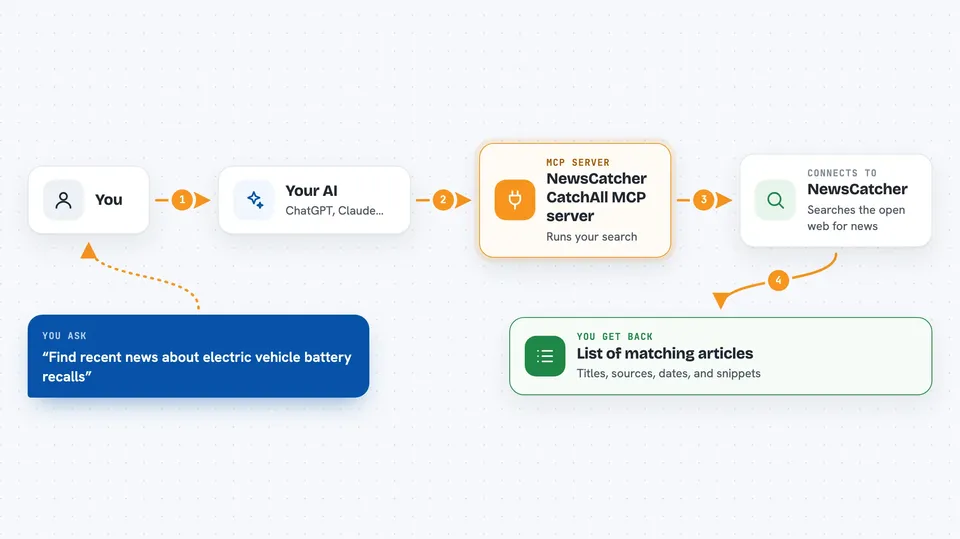
You ask your AI something like find recent news about a company. Your AI sends that request to this helper, which talks to the NewsCatcher CatchAll service on your behalf. NewsCatcher runs the search across the open web and gathers matching articles and events. Your AI then shows you what came back, and you can ask it to narrow, expand, or save the search. You can also set up monitors so the same search keeps running on a schedule.
 Click to zoom
What you can do with it
- Search the open web for news and events on a topic
- Filter results by date range and by the kind of thing you want
- Check the status of a search while it is still running
- Pull the full results of a finished search
- Download results as a CSV file
- Set up a monitor so a search runs again on a schedule
- Organize your searches, monitors, and results into projects
Try asking your AI
- “Find recent news about electric vehicle battery recalls in the last two weeks”
- “Search for articles mentioning our main competitor and summarize what they say”
- “Set up a monitor that checks for news about our company every day”
- “Pull the results of my last search and give me a short summary”
What it gives back to you
You get back a list of matching articles and events, usually with titles, sources, dates, and short snippets. Your AI can turn that into a summary, a table, or a CSV file you can download. If you set up a monitor, you get fresh results each time it runs. While a search is still working, you can also see how far along it is.
Before you start
What you need
- A NewsCatcher account and a CatchAll API key (a kind of password for apps; you get one from platform.newscatcherapi.com)
- An AI assistant that supports MCP servers, like Claude Desktop or Claude Code
Good to know
Searches and monitors can use up your NewsCatcher plan credits, and some actions like delete_job or delete_project remove things for good, so check before you confirm.
Install it with your AI
Add NewsCatcher CatchAll MCP server to your AI, no technical skills needed
You don't install anything by hand. You copy one prompt, paste it into an AI that can work on your computer, and it checks, installs and connects the server for you, asking you when it needs something.
Sign in to get the install prompt
Members get a ready-made prompt that lets the Claude desktop app check NewsCatcher CatchAll MCP server, install it and connect it for them, step by step. You don't need any technical skills: you copy, paste and answer a few questions. Your connected AI can also find and install any of the 4,361 MCP servers here for you.
Who it's for
People who research news or track topics over time, such as analysts, journalists, marketers, and anyone doing competitive or market research.


