MCP server · Design tools
Maket MCP server
by ng-galien
Let your AI design flyers, labels and documents on a real canvas, then export them to PDF.
Maket is a design workspace that your AI assistant can use. Instead of only writing text, your AI can lay out pages, apply your brand colors and fonts, and fill in data like names or prices. It is handy if you need flyers, labels, certificates or simple reports but you are not a designer.
What is an MCP server? The 30-second version
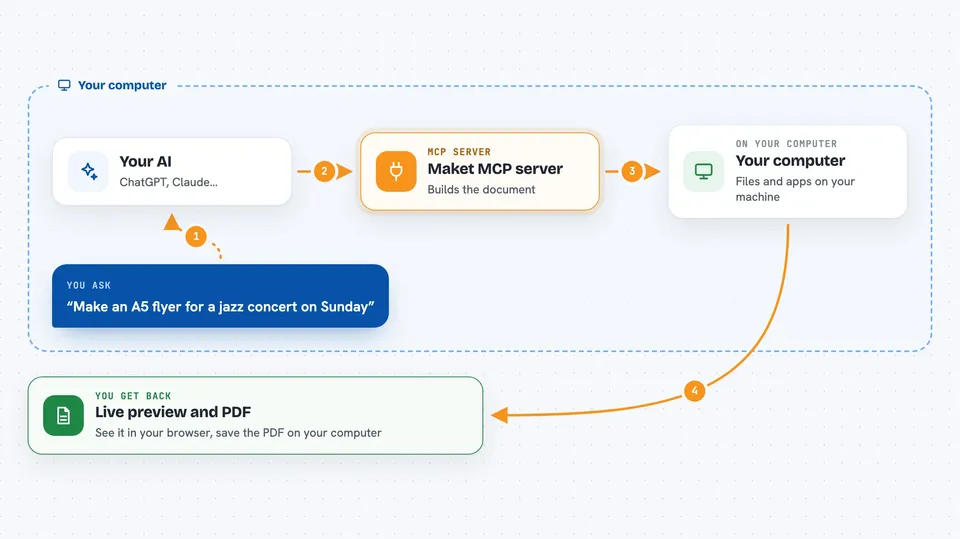
On its own, your AI can only chat with you. An MCP server is a small helper program that gives your AI a new skill or a connection to another tool. This one connects your AI to Maket, a design canvas that runs on your own computer. Once connected, your AI can create pages, change them, and export them when you ask.
What this MCP server does
You describe what you want, like a flyer or a set of product labels. Your AI uses this helper to create a document and write the page layout for you. Maket shows a live preview in your browser, so you see the result right away. You can click on anything in the preview and leave a note, and your AI reads that note and adjusts the design. When you are happy, it exports the finished file as a PDF.
 Click to zoom
What you can do with it
- Create a new document in a paper size like A5 or A4
- Apply your brand colors, fonts and spacing
- Fill in names, prices or dates from a list of rows
- Click an element in the preview and send feedback to your AI
- Preview one row or the whole series of a repeated document
- Export the finished document as a PDF
- Hand off an email document to Gmail as a draft
Try asking your AI
- “Make me an A5 flyer for a jazz concert on Sunday evening, warm and cozy mood”
- “Create a series of product labels with the name and the price”
- “Make the date on the flyer bigger”
- “Export the whole label series to PDF”
What it gives back to you
You get a live preview in your browser that updates as your AI works. You also get the finished PDF file saved on your computer. In the chat, your AI tells you what it changed and where the file was saved. If something does not validate, like a missing field in your data, you get a clear message about what to fix.
Before you start
What you need
- The Maket app for your computer, or Node.js 22 or newer if you use the npm route
- An MCP-compatible AI client like Claude Code, Claude Desktop, Codex or Gemini
- A web browser to see the live preview
Good to know
It can change or delete your documents and data rows, so review the preview before you export or hand anything off.
Install it with your AI
Add Maket MCP server to your AI, no technical skills needed
You don't install anything by hand. You copy one prompt, paste it into an AI that can work on your computer, and it checks, installs and connects the server for you, asking you when it needs something.
Sign in to get the install prompt
Members get a ready-made prompt that lets the Claude desktop app check Maket MCP server, install it and connect it for them, step by step. You don't need any technical skills: you copy, paste and answer a few questions. Your connected AI can also find and install any of the 4,361 MCP servers here for you.
Who it's for
Anyone who needs simple visual documents like flyers, labels, badges or reports but does not have design software or design skills.