
MCP server · Productivity
Rustpad MCP server
by ni-c
Let your AI read and edit pads in your own Rustpad collaborative editor.
This is a small helper that connects your AI assistant to a Rustpad instance, which is a self-hosted collaborative text editor. Once it is set up, you can ask your AI to open a pad, read it, add text to it, or change parts of it. It is handy if you and your colleagues already use Rustpad and want your AI to work in the same shared documents.
What is an MCP server? The 30-second version
On its own, your AI can only chat with you. An MCP server is a small helper program that gives your AI a new skill or a connection to an app. This one connects your AI to Rustpad, your own collaborative text editor. So when you ask about a pad, the AI can actually go and look at it or make changes there for you.
What this MCP server does
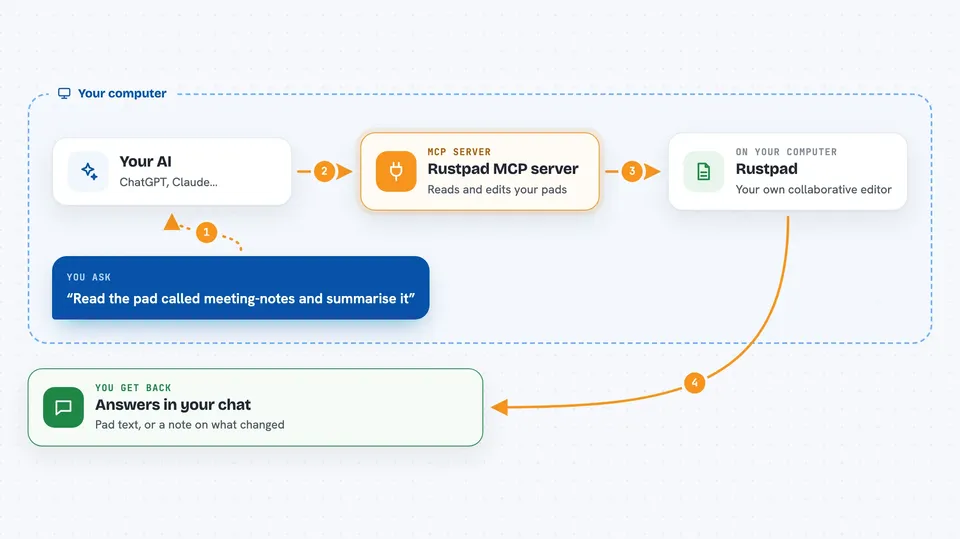
You ask your AI something about a Rustpad pad, like reading it or adding a line. The AI passes your request to this helper program. The helper talks to your Rustpad server, either reading the pad or writing to it. Because it uses proper editing, anything you or your colleagues type at the same time is kept, not overwritten. Then you get the result back in the chat, such as the pad's text or a short note that your change was made.
 Click to zoom
What you can do with it
- Read the full text of a pad
- Check how long a pad is and who is editing it right now
- Create a new pad with a chosen or random name
- Append text to the end of a pad
- Search and replace text inside a pad
- Replace the whole content of a pad (asks you first)
- Set the syntax highlighting language for a pad
Try asking your AI
- “Read the pad called meeting-notes and summarise it for me”
- “Add this paragraph to the end of the pad called ideas”
- “In the pad called todo, replace the word draft with final”
- “Create a new pad called standup and put today's date at the top”
What it gives back to you
You get back plain answers in the chat, like the text of a pad, its length, who is editing it, or a short note saying what was changed. For example, it might say it appended 12 characters and the pad now has 137. The two big changes, replacing a whole pad and replacing text in several places, ask you to confirm first. Everything is shown as text you can read, not as code.
Before you start
What you need
- A Rustpad instance you can reach (self-hosted; no login needed)
- Node.js version 22 or newer, or Docker
- The address of your Rustpad instance, like https://rustpad.example.net
Good to know
Pads are temporary and anyone who knows a pad id can read and write it, so never put secrets in a pad, and the two big changes ask you to confirm before they happen.
Install it with your AI
Add Rustpad MCP server to your AI, no technical skills needed
You don't install anything by hand. You copy one prompt, paste it into an AI that can work on your computer, and it checks, installs and connects the server for you, asking you when it needs something.
Sign in to get the install prompt
Members get a ready-made prompt that lets the Claude desktop app check Rustpad MCP server, install it and connect it for them, step by step. You don't need any technical skills: you copy, paste and answer a few questions. Your connected AI can also find and install any of the 4,609 MCP servers here for you.
Who it's for
Teams and individuals who already run their own Rustpad editor and want their AI assistant to help with those shared pads.





