
MCP server · Developer tools
Agent Bridge WordPress MCP server
by nipun-arora
Lets your AI safely edit WordPress SEO fields, schema, and content snapshots, with every change verified and reversible.
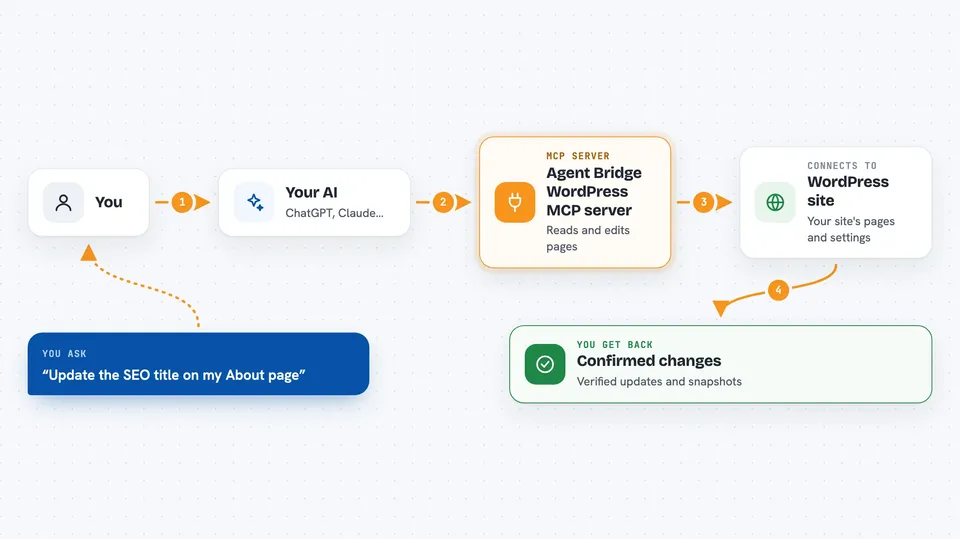
Agent Bridge is a WordPress plugin that lets an AI assistant work on your site's SEO and content in a careful, verifiable way. It is made for self-hosted WordPress sites where you want an AI helper to touch Rank Math SEO fields, schema, and page content without quietly wrecking things. If you already use an AI tool like Claude Code or Cursor to help with your site, this is the safety layer that goes with it.
What is an MCP server? The 30-second version
On its own, your AI can only chat with you. An MCP server is a small helper that gives your AI a new skill or a connection to an app, and here it connects your AI to your WordPress site. Once it is set up, your AI can look up and change SEO fields, schema, and content snapshots on your site when you ask it to. Agent Bridge adds extra care on top: it reads every change back from the database before saying it worked, and it keeps snapshots so you can undo things.
What this MCP server does
You ask your AI to update something on your WordPress site, like a page's SEO title or its schema. Your AI uses this helper, which talks to your WordPress site through a secure connection. Agent Bridge writes the change, then reads it back from the database to confirm it actually stuck. It also keeps a snapshot of the page's content, SEO, and schema so you can restore it later if needed. If you try to change a page that existed before the plugin was turned on, it refuses unless the AI first reads the page's current state.
 Click to zoom
What you can do with it
- Read and update Rank Math SEO fields on any post or page
- Read and write JSON-LD schema entries for a post
- Take a snapshot of a page's content, SEO, and schema
- Restore a page back to a previous snapshot
- Check whether any page has changed since you last looked
- Purge the LiteSpeed cache after making changes
- Check plugin and theme versions plus site health
Try asking your AI
- “Update the SEO title and meta description on my About page to focus on our new service”
- “Add a FAQ schema entry to my pricing page”
- “Take a snapshot of the homepage before I make edits”
- “Show me which pages have changed since yesterday”
What it gives back to you
You get clear answers in your chat: the SEO fields it read, confirmation that a write was saved and verified, a list of pages with their change status, or a full snapshot document you can keep. When something fails, it tells you the field name, what it tried to write, and what the database actually holds. Restores hand back the resulting page state so you can see it converged.
Before you start
What you need
- A self-hosted WordPress site (WordPress.org, not WordPress.com) running version 6.9 or later
- PHP 8.1 or later on your server
- HTTPS enabled on your site
- A WordPress Application Password for the account your AI will use
- Rank Math plugin, if you want the SEO and schema features
Good to know
It can change or delete SEO fields, schema, and page content on your live site, so make sure you have snapshots and use an account with only the permissions it needs.
Install it with your AI
Add Agent Bridge WordPress MCP server to your AI, no technical skills needed
You don't install anything by hand. You copy one prompt, paste it into an AI that can work on your computer, and it checks, installs and connects the server for you, asking you when it needs something.
Sign in to get the install prompt
Members get a ready-made prompt that lets the Claude desktop app check Agent Bridge WordPress MCP server, install it and connect it for them, step by step. You don't need any technical skills: you copy, paste and answer a few questions. Your connected AI can also find and install any of the 4,066 MCP servers here for you.
Who it's for
Site owners, marketers, and content editors who use an AI assistant to help manage WordPress SEO and content and want a safety net.


