MCP server · API
Glyphcall agent data tools
by Nutshell2000
Lets your AI look up company and VAT records, sanctions lists, crypto prices, web pages and more, paying a few cents per call.
This is a large catalog of small lookup and conversion tools that your AI assistant can use on your behalf. It covers things like EU company registers, VAT checks, sanctions screening, crypto prices, turning web pages or PDFs into text, weather and currency rates. It is handy if you often need quick facts from official sources or public data without opening ten different websites.
What is an MCP server? The 30-second version
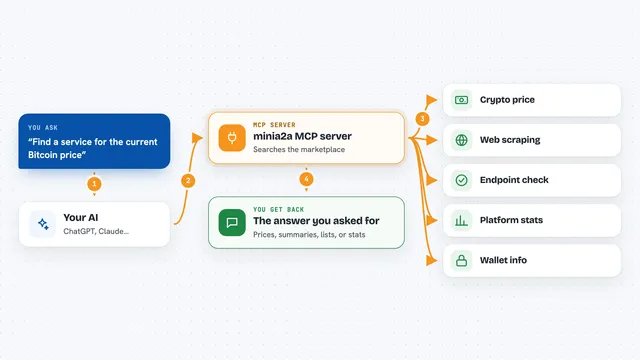
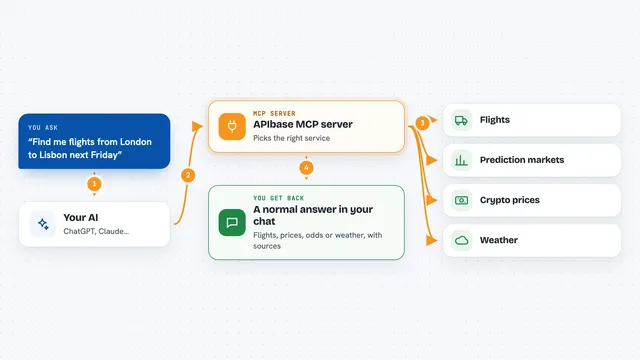
On its own, your AI can only chat with you using what it already knows. An MCP server is a small helper program that gives your AI a new skill or a connection to a service. This one connects your AI to Glyphcall, a service that runs hundreds of lookup tools, so when you ask for a VAT check or a token price, the AI can actually go and fetch it. You stay in the chat, and the helper does the running around.
What this MCP server does
You ask your AI a question, like whether a VAT number is valid or what a web page says. The AI passes that request to this helper, which picks the right tool from its catalog. The helper then contacts the actual source, such as a company register, a sanctions list, a crypto network or a web page, and gets the answer back. Your AI shows you the result in the chat, often as a short summary or a list. Each successful call costs a small amount, usually around one cent, and failed calls are not charged.
What you can do with it
- Check whether an EU VAT number is valid
- Look up company details in Swedish, Norwegian, Finnish or French registers
- Screen a name against OFAC sanctions lists
- Get current crypto token prices and wallet balances
- Turn a web page or PDF into clean text your AI can read
- Check the weather or convert currency rates
- Validate an email address without sending mail
Try asking your AI
- “Is VAT number SE556677889901 valid, and what company is behind it?”
- “Check this name against the OFAC sanctions list: Ivan Petrov”
- “What is the current price of Bitcoin in euros?”
- “Turn this page into text for me: https://example.com/report”
What it gives back to you
You get back plain answers in the chat: a yes or no on a VAT check, a short company profile, a list of sanctions matches, a price number, or a block of cleaned-up text from a page or PDF. Some tools return small structured lists, like wallet balances or weather forecasts. The AI usually summarizes it for you, and you can ask follow-up questions.
Before you start
What you need
- An AI app that supports MCP connections, like Claude Desktop, Claude Code, Cursor or VS Code
- Node.js 20.19 or newer if you use the npx setup command
- A way to pay after the free calls run out: either a prepaid card key from the Glyphcall credits page, or a crypto wallet set up for USDC payments
Good to know
Each successful call costs money, usually about one cent, so keep an eye on usage once your free calls are used up, and only connect a payment method you are comfortable spending from.
Install it with your AI
Add Glyphcall agent data tools to your AI, no technical skills needed
You don't install anything by hand. You copy one prompt, paste it into an AI that can work on your computer, and it checks, installs and connects the server for you, asking you when it needs something.
Sign in to get the install prompt
Members get a ready-made prompt that lets the Claude desktop app check Glyphcall agent data tools, install it and connect it for them, step by step. You don't need any technical skills: you copy, paste and answer a few questions. Your connected AI can also find and install any of the 4,960 MCP servers here for you.
Who it's for
People who regularly check company records, VAT numbers, sanctions lists, crypto data or web pages for work, such as compliance staff, finance teams, researchers and analysts.