
MCP server · Developer tools · official
PNTR MCP server
by oddunits · official
Let your AI register free pntr.dev subdomains, manage DNS, read test emails, and catch webhook requests.
PNTR gives developers free subdomains like yourname.pntr.dev, plus a throwaway email inbox and a place to catch webhook requests. This MCP server connects your AI assistant to PNTR so you can set all of that up just by asking. It is handy if you test websites, deploy small projects, or debug webhooks and signup emails.
What is an MCP server? The 30-second version
On its own, your AI can only chat with you. An MCP server is a small helper program that gives your AI a new skill or a connection to an app or service. This one connects your AI to PNTR, so it can register subdomains, change DNS records, check an inbox, or look at captured webhook requests for you. You ask in normal words, and the helper does the clicking.
What this MCP server does
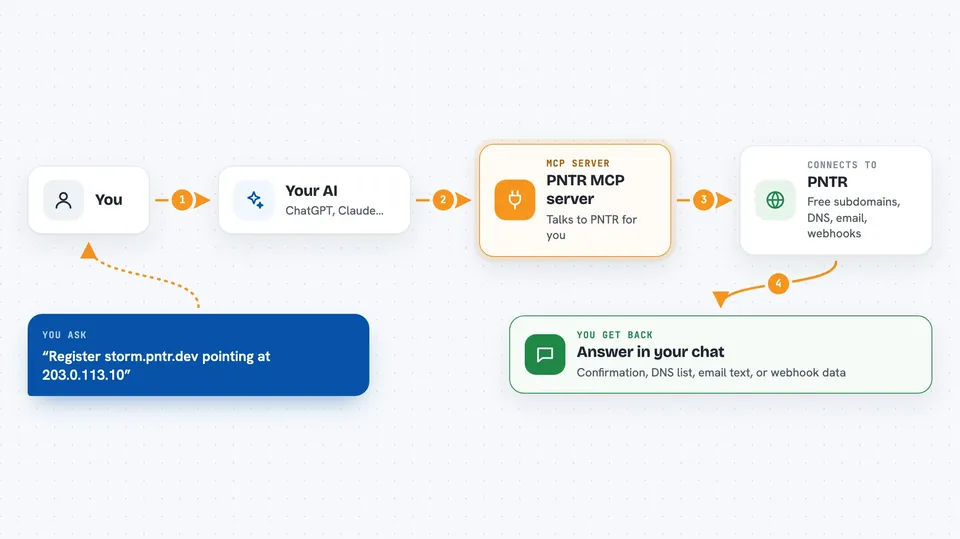
You ask your AI something like "register storm.pntr.dev pointing at 203.0.113.10". The AI uses this helper, and the helper talks to PNTR on your behalf. PNTR creates the subdomain or updates the DNS record, and the answer comes back in your chat. The same flow works for turning on a disposable inbox, waiting for a verification email, or catching an incoming webhook request so you can read its headers and body.
 Click to zoom
What you can do with it
- Register a free subdomain under pntr.dev
- Add, replace, or delete DNS records on your subdomains
- Turn a subdomain into a disposable email inbox
- Wait for a specific test email and read its content
- Turn a subdomain into an HTTP request bin for webhooks
- Read captured webhook requests, including headers and body
- Enable or disable a subdomain, or delete it when you are done
Try asking your AI
- “Register storm.pntr.dev pointing at 203.0.113.10”
- “Enable email on storm and watch for the verification code”
- “Read the latest email on storm.pntr.dev”
- “Show me the last webhook request that hit my capture subdomain”
What it gives back to you
You get answers in plain chat: lists of your subdomains and their DNS records, confirmation that something was created or changed, the text of a received email, or the headers and body of a captured webhook request. When you ask it to wait for an email or a request, it holds on until one matches or the wait times out. Email and captured content is marked as untrusted data, so your assistant treats it as something to read, not as instructions to follow.
Before you start
What you need
- A PNTR account (free subdomains are included)
- Node.js 18 or newer if you run the local helper
- An AI client that supports MCP, like Claude Desktop, Claude Code, or Cursor
Good to know
This helper can create, change, and delete your subdomains and DNS records, so ask your AI to confirm before it removes anything.
Install it with your AI
Add PNTR MCP server to your AI, no technical skills needed
You don't install anything by hand. You copy one prompt, paste it into an AI that can work on your computer, and it checks, installs and connects the server for you, asking you when it needs something.
Sign in to get the install prompt
Members get a ready-made prompt that lets the Claude desktop app check PNTR MCP server, install it and connect it for them, step by step. You don't need any technical skills: you copy, paste and answer a few questions. Your connected AI can also find and install any of the 4,609 MCP servers here for you.
Who it's for
Developers and testers who deploy small projects, test signup or OTP emails, or debug webhooks will get the most out of this.



