MCP server · Developer tools
Markdown MCP server
by ofershap
Lets your AI search and pull sections out of your local Markdown files, like wikis and guides.
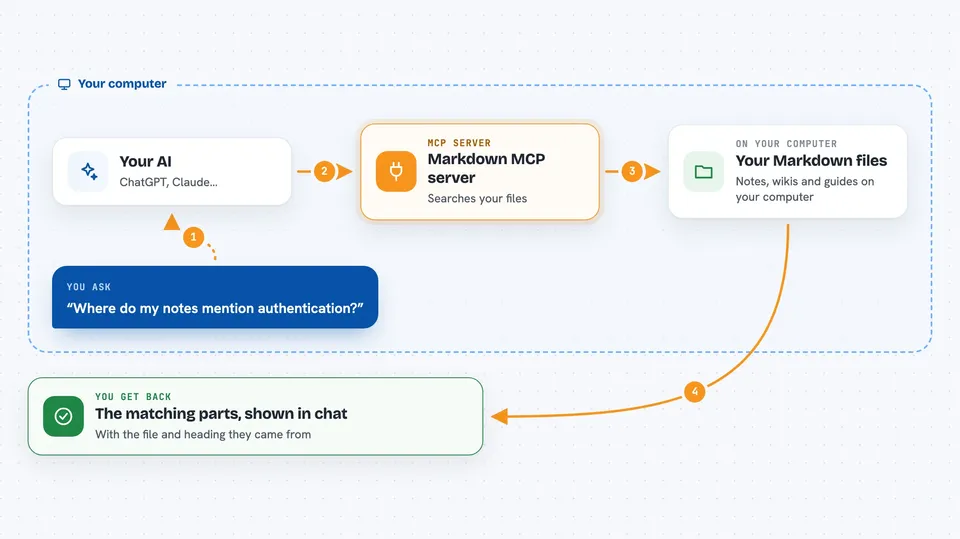
This is a small helper that lets your AI read and search the Markdown files sitting on your computer. Markdown files are just plain text notes with simple formatting, the kind used for project docs, wikis, and guides. If your team keeps its notes in these files, this makes them easy to ask questions about.
What is an MCP server? The 30-second version
On its own, your AI can only chat with you. An MCP server is a small helper program that gives your AI a new skill or a connection to something. This one connects your AI to the Markdown files on your disk, so it can look things up there when you ask. You point it at a folder, and it reads the files for you.
What this MCP server does
You ask your AI a question about your notes, like where something is mentioned. The AI passes that request to this helper. The helper opens your Markdown files and searches through them. It understands headings, sections, and code blocks, not just raw text. Then it hands the answer back, and the AI shows it to you in the chat.
 Click to zoom
What you can do with it
- Search all your Markdown files for a word or phrase
- Pull out one section by its heading
- List the headings in a file as a table of contents
- Find code examples in your docs, filtered by language
- Read the frontmatter metadata at the top of a file
- List every Markdown file in a folder
Try asking your AI
- “Search all docs in ./docs for mentions of authentication”
- “Show me the API Reference section from README.md”
- “List all headings in CONTRIBUTING.md”
- “Find all TypeScript code blocks in the docs”
What it gives back to you
You get back answers in plain chat: matching lines from your files, a section of text, a list of headings, or a list of code blocks. It shows you what it found and where. Nothing is changed in your files, it only reads them.
Before you start
What you need
- Node.js installed on your computer (the free program that runs this helper)
- An MCP client like Claude Desktop, Cursor, or VS Code Copilot
- The folder path where your Markdown files live
Good to know
It only reads files, it does not change or delete anything, so it is safe to try.
Install it with your AI
Add Markdown MCP server to your AI, no technical skills needed
You don't install anything by hand. You copy one prompt, paste it into an AI that can work on your computer, and it checks, installs and connects the server for you, asking you when it needs something.
Sign in to get the install prompt
Members get a ready-made prompt that lets the Claude desktop app check Markdown MCP server, install it and connect it for them, step by step. You don't need any technical skills: you copy, paste and answer a few questions. Your connected AI can also find and install any of the 4,361 MCP servers here for you.
Who it's for
People who keep their project docs, wikis, or guides as Markdown files and want to ask their AI questions about them.