MCP server · Developer tools
Project Context MCP server
by ericbrown
Lets Claude Code read your project's own docs when you type @ in a chat.
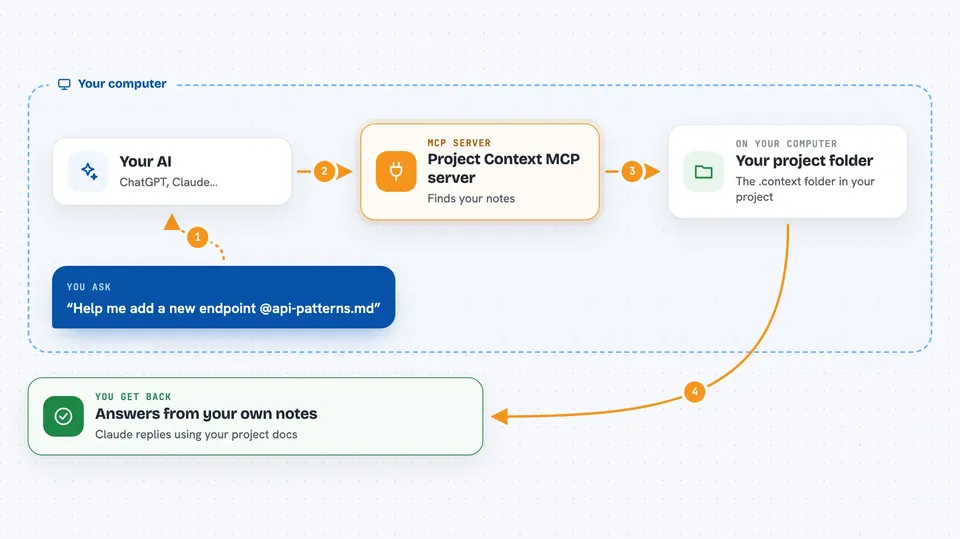
This is a small helper that lets Claude Code read your own project notes. You put your docs in a folder called .context, and then you can pull any of them into a chat by typing @. It is handy if you keep explaining the same project rules to your AI over and over.
What is an MCP server? The 30-second version
On its own, your AI can only chat with what you type or paste in. An MCP server is a small helper program that gives your AI a new skill or a connection to something else. This one connects Claude Code to a folder inside your project called .context. Once it is running, your AI can see the files in that folder and pull them into the conversation when you ask.
What this MCP server does
You create a folder named .context in your project and drop your notes in it, like architecture.md or conventions.md. When you type @ in Claude Code, this helper sends the list of those files to the AI so they show up as suggestions next to your regular code files. You pick one, and the file's content is added to your question. Claude then answers using your own project knowledge instead of guessing. It runs quietly in the background and only looks at that one folder.
 Click to zoom
What you can do with it
- Pull your coding conventions into a chat by typing @conventions.md
- Add your architecture notes when asking for a refactor
- Include your database schema doc before asking for a new table
- Bring in a glossary so Claude uses your team's own words
- Share a gotchas file so Claude avoids known traps
- Use subfolders to keep big doc sets organized and still reachable with @
Try asking your AI
- “Help me add a new API endpoint @api-patterns.md”
- “Why is this test failing? @architecture.md @testing-patterns.md”
- “Add a new database table @database-schema.md @conventions.md”
- “Refactor this function so it matches our style @conventions.md”
What it gives back to you
You get your own doc files offered as suggestions when you type @, each with a short name and a one-line description so you can pick the right one. Once you choose a file, its content is added to your prompt and Claude answers using it. You do not get a separate report; the doc just becomes part of the conversation.
Before you start
What you need
- Claude Code installed
- Python with uvx or pip available on your computer
- A folder named .context in your project with your docs inside
Good to know
It only reads files inside your project's .context folder, so do not put secrets or private notes there unless you are fine with them being sent to your AI.
Install it with your AI
Add Project Context MCP server to your AI, no technical skills needed
You don't install anything by hand. You copy one prompt, paste it into an AI that can work on your computer, and it checks, installs and connects the server for you, asking you when it needs something.
Sign in to get the install prompt
Members get a ready-made prompt that lets the Claude desktop app check Project Context MCP server, install it and connect it for them, step by step. You don't need any technical skills: you copy, paste and answer a few questions. Your connected AI can also find and install any of the 4,609 MCP servers here for you.
Who it's for
Developers and technical teams who use Claude Code on a project and want it to follow their own conventions and notes.