
MCP server · Developer tools
FAF project context MCP server
by Wolfe-Jam
Give your AI a memory of your project so every chat starts with the right context.
This is a small helper that gives your AI a written memory of your project, stored in a file called project.faf that sits inside your project folder. Instead of re-explaining what you are building at the start of every chat, you answer a few questions once and the AI reads them from then on. It is handy for anyone who uses Claude or another AI assistant on a coding project and is tired of repeating themselves.
What is an MCP server? The 30-second version
On its own, your AI can only chat with you. An MCP server is a small helper program that gives your AI a new skill or a connection, and here it connects your AI to your project's own context file. Once it is added, your AI can read and update that file for you when you ask. So instead of you pasting the same background every morning, the AI already knows your project.
What this MCP server does
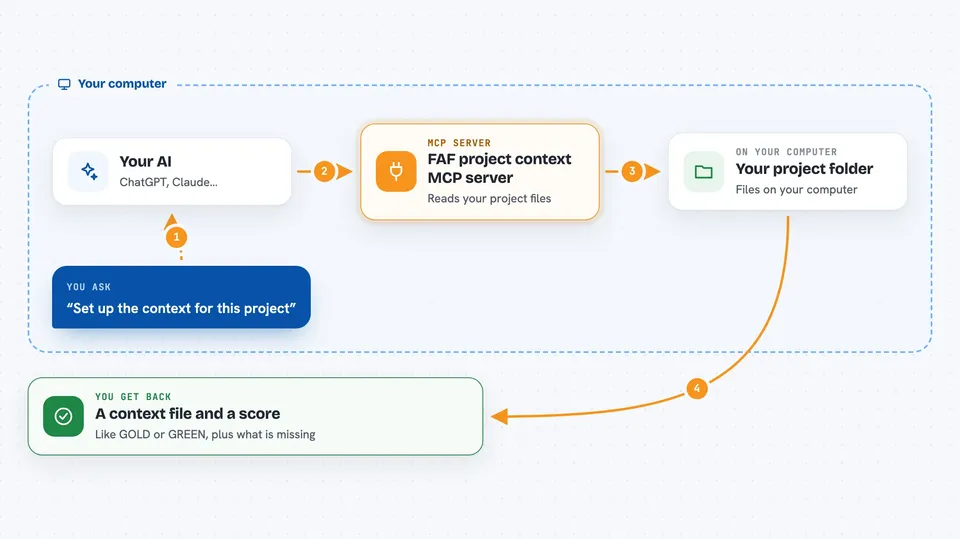
You ask your AI something like "set up the context for this project." The AI uses this helper, which looks at the files already in your folder and works out your language, framework and tools. It then writes a project.faf file with what it found and asks you only the things it cannot guess, like who the project is for and why you are building it. From then on, every new chat can start from that file, and it can also write a CLAUDE.md or MEMORY.md file so the context travels with your code.
 Click to zoom
What you can do with it
- Create a project.faf context file for a folder
- Fill in the parts your AI can detect from your existing files
- Answer a few questions to add the goal and the who, what, why
- Score how well your project context is set up, from 0 to 100 percent
- Write a CLAUDE.md file so Claude starts each session grounded
- Save decisions across sessions so your AI remembers them
- Check the context file and tell you what is missing
Try asking your AI
- “Set up the FAF context for this project”
- “Score my project context and tell me what is missing”
- “I'm building a booking app for small gyms because scheduling by phone is painful”
- “Remember that we decided to use Postgres instead of MongoDB”
What it gives back to you
You get back a score out of 100 with a short label like GOLD or GREEN, plus a list of what is filled in and what is still empty. It also tells you which tool fixes each gap. When it writes files, it tells you which ones it created or updated, and you can read the whole context file in the chat if you ask.
Before you start
What you need
- Node.js 22 or newer
- The Claude desktop app or Claude Code
- A project folder on your computer
Good to know
It writes and updates files inside your project folder, so it is worth checking what it changed the first few times you use it.
Install it with your AI
Add FAF project context MCP server to your AI, no technical skills needed
You don't install anything by hand. You copy one prompt, paste it into an AI that can work on your computer, and it checks, installs and connects the server for you, asking you when it needs something.
Sign in to get the install prompt
Members get a ready-made prompt that lets the Claude desktop app check FAF project context MCP server, install it and connect it for them, step by step. You don't need any technical skills: you copy, paste and answer a few questions. Your connected AI can also find and install any of the 4,609 MCP servers here for you.
Who it's for
Developers and small teams who use Claude or another AI assistant on a code project and want it to remember the project without re-explaining it every time.


