MCP server · Copywriting
OSP Marketing Tools
Your AI can write product value maps, SEO metadata, and edit your marketing content using OSP's methods.

This is a small helper that gives your AI a set of marketing writing skills from Open Strategy Partners. It is handy if you write product pages, blog posts, or technical docs and you want a second pair of eyes. You paste your text, ask for help, and it comes back with a cleaner version.
What is an MCP server? The 30-second version
On its own, your AI can only chat with you. An MCP server is a small helper program that gives your AI a new skill or a connection to a service. This one gives your AI the writing and editing methods from Open Strategy Partners. So when you ask for a value map or an edit, the AI uses this helper behind the scenes and answers you in the chat.
What this MCP server does
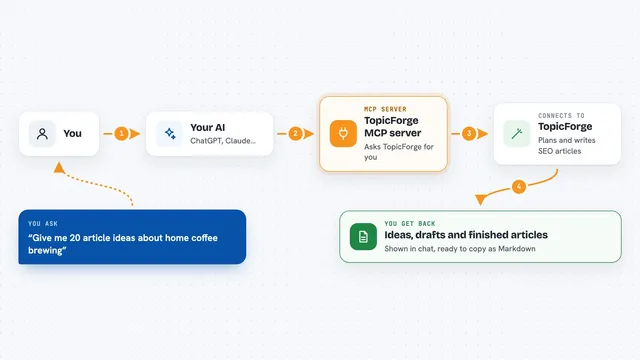
You ask your AI for something, like a value map for your product or a review of a draft. The AI passes your request to this helper. The helper applies OSP's writing guides, editing codes, and SEO checklists to your text. Then the AI shows you the result in the chat, such as a structured map, new titles, or a marked up version of your draft.
 Click to zoom
What you can do with it
- Build a product value map with taglines, personas, and value cases
- Write SEO titles, meta descriptions, and URL slugs for an article
- Review a draft using OSP editing codes with before and after notes
- Follow the OSP technical writing guide to draft a tutorial or reference doc
- Check your page against on-page SEO rules like search intent and headings
- Suggest clearer phrasing and more inclusive wording
Try asking your AI
- “Generate an OSP value map for our project management app, aimed at small team leads, with these features: shared boards, time tracking, and weekly reports”
- “Use the OSP meta tool to write metadata for an article about password managers. Primary keyword: password manager, audience: office workers, content type: guide”
- “Review this paragraph using OSP editing codes: Our tool is really good and helps you do stuff faster than before”
- “Apply the OSP writing guide to draft a short tutorial about setting up a shared calendar for new staff”
What it gives back to you
You get text back in the chat. That can be a structured value map, a set of titles and meta descriptions with character counts, or an edited version of your draft with notes on what changed and why. Sometimes it also gives you checklists or suggestions you can copy into your own document.
Before you start
What you need
- The Claude desktop app or another AI app that supports MCP
- Python 3.10 or newer
- uv installed on your computer
Good to know
It only reads the text you paste in, so avoid pasting anything private or confidential you would not want sent to your AI provider.
Install it with your AI
Add OSP Marketing Tools to your AI, no technical skills needed
You don't install anything by hand. You copy one prompt, paste it into an AI that can work on your computer, and it checks, installs and connects the server for you, asking you when it needs something.
Sign in to get the install prompt
Members get a ready-made prompt that lets the Claude desktop app check OSP Marketing Tools, install it and connect it for them, step by step. You don't need any technical skills: you copy, paste and answer a few questions. Your connected AI can also find and install any of the 4,361 MCP servers here for you.
Who it's for
Marketing writers, content designers, and product marketers who write about technical products and want a structured editing and SEO helper.