
MCP server · Coding
wcgw MCP server
by rusiaaman
Let your AI run shell commands, read and edit files, and build code right on your own computer.
wcgw is a helper that connects your AI chat app to your own computer. Once it is set up, you can ask the AI to run commands, look at your files, and write or fix code for you. It is made for people who work with code on a Mac, Linux, or Windows with WSL and want the AI to actually do things instead of just talking.
What is an MCP server? The 30-second version
On its own, your AI can only chat. An MCP server is a small helper program that gives your AI a new skill or a connection to something. This one connects your AI to your computer's command line and files, so it can run commands and open, read, or change files when you ask. Think of it as giving your AI hands to work on your machine, with you in charge of what it does.
What this MCP server does
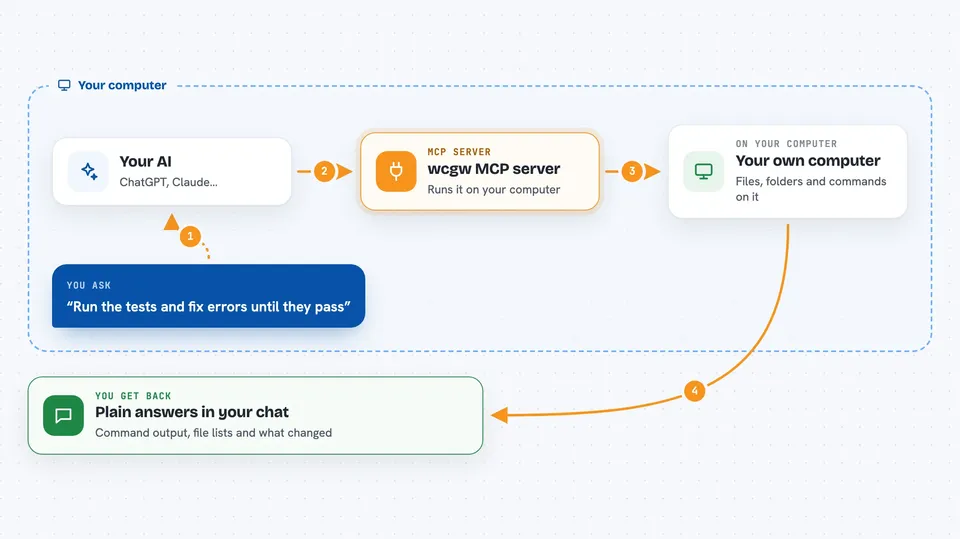
You ask your AI to do something, like run a command or fix a file. The AI uses this helper to send that request to your computer. The helper runs the command or makes the file change, then sends the result back. Your AI reads the result and tells you what happened, or keeps going until the job is done. It can also keep an eye on long-running commands and check on them until they finish.
 Click to zoom
What you can do with it
- Run shell commands on your computer and see the output
- Read files and folders in a project you point it to
- Create new files or edit existing ones
- Run your code and check for errors while it works
- Save a task checkpoint so you can pick it up later
- Switch between planning mode, code-writing mode, and full mode
- Attach to the same terminal the AI is using so you can watch or step in
Try asking your AI
- “List the files in my project folder and tell me what this project does”
- “Run the tests and keep fixing errors until they all pass”
- “Create a new file called notes.txt with a short summary of this project”
- “Use architect mode to plan how to add a login page before writing any code”
What it gives back to you
You get back plain answers in the chat: command output, lists of files, summaries of what the AI found, and notes about changes it made. If it edited a file, it tells you which file and what changed. If a command is still running, it tells you the status and checks again later. You can also get a saved context file you can reopen or share with another AI.
Before you start
What you need
- The Claude desktop app (or another app that supports MCP servers)
- uv installed on your computer (a small tool that runs Python programs; on Mac you install it with Homebrew)
- A project folder on your computer you want the AI to work in
Good to know
This helper gives the AI full access to your computer's commands and files with no restrictions, so it can change or delete things by mistake; only use it if you understand and accept that risk.
Install it with your AI
Add wcgw MCP server to your AI, no technical skills needed
You don't install anything by hand. You copy one prompt, paste it into an AI that can work on your computer, and it checks, installs and connects the server for you, asking you when it needs something.
Sign in to get the install prompt
Members get a ready-made prompt that lets the Claude desktop app check wcgw MCP server, install it and connect it for them, step by step. You don't need any technical skills: you copy, paste and answer a few questions. Your connected AI can also find and install any of the 4,361 MCP servers here for you.
Who it's for
Developers, coders, and technical people who want their AI to run commands and edit files directly on their own machine.


