
MCP server · Developer tools
Codebase Context MCP server
by PatrickSys
Lets your AI learn your team's coding patterns and check what a change will affect before it edits.
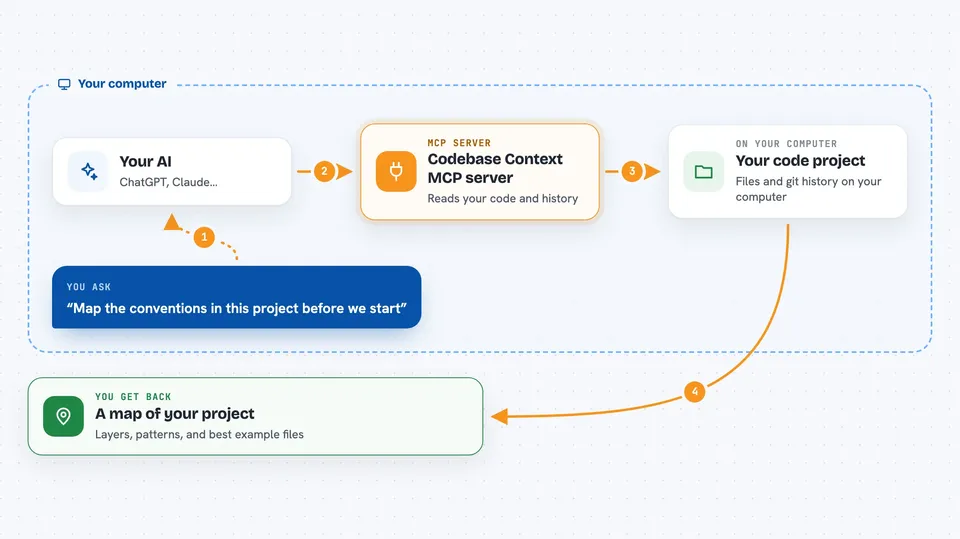
Codebase Context is a helper that teaches your AI how your team actually writes code, instead of guessing from generic examples. It reads your project and your git history, then shows the patterns, the best example files, and what a change might touch. It is handy for developers and anyone who uses an AI assistant to work inside a shared codebase.
What is an MCP server? The 30-second version
On its own, your AI can only chat with you. An MCP server is a small helper program that gives your AI a new skill or a connection to something. This one connects your AI to your own code project, so it can look up your conventions and files when you ask. It runs on your computer, so your code stays with you by default.
What this MCP server does
You ask your AI to work on your project. The AI calls this helper, and the helper reads your code and your git history to build a map of how your team builds things. It finds the strongest local examples, spots which patterns are growing or fading, and checks whether a change is safe to make. Then the AI answers you with that context, or warns you when there is not enough to trust an edit.
 Click to zoom
What you can do with it
- See your project's architecture layers and main patterns
- Find the best local example file to copy from
- Check which files a change will likely affect before editing
- Record a team decision so the AI remembers it later
- Spot when two approaches are both common and conflict
- Detect circular imports between files
- Refresh the index after you change files
Try asking your AI
- “Map the conventions in this project before we start”
- “Search for the auth middleware and show me the best example”
- “Is it safe to edit this file, and what else will it affect?”
- “Remember that we use the repository pattern for data access”
What it gives back to you
You get back a short map of your project: architecture layers, active patterns, and the files that best show them. Searches come back as a ranked list with file names, short summaries, and pattern signals. When you ask about editing, you also get a small decision card saying whether it is safe to proceed and what else might be affected.
Before you start
What you need
- A code project on your computer
- Node.js installed (the helper runs through npx)
- An AI client that supports MCP, like Claude Code or Cursor
Good to know
It reads your project files and git history to build its map, so point it only at code you are comfortable having indexed.
Install it with your AI
Add Codebase Context MCP server to your AI, no technical skills needed
You don't install anything by hand. You copy one prompt, paste it into an AI that can work on your computer, and it checks, installs and connects the server for you, asking you when it needs something.
Sign in to get the install prompt
Members get a ready-made prompt that lets the Claude desktop app check Codebase Context MCP server, install it and connect it for them, step by step. You don't need any technical skills: you copy, paste and answer a few questions. Your connected AI can also find and install any of the 4,609 MCP servers here for you.
Who it's for
Developers and teams who use an AI assistant inside a shared codebase and want it to follow the team's real patterns.




