
MCP server · Notes
AI Loop Library MCP server
by paultaki
Your AI can look up ready-made work loops and turn one into a step-by-step plan you can follow.
This is a small helper that connects your AI to the AI Loop Library, a public collection of over 60 ready-made work loops. A loop is just a repeatable way of working: one small change at a time, a way to check it worked, a stopping point, and a budget. It is handy if you use an AI to plan or run ongoing tasks and want a clear recipe instead of a vague chat.
What is an MCP server? The 30-second version
On its own, your AI can only chat with you. An MCP server is a small helper program that gives your AI a new skill or a connection to something outside the chat. This one connects your AI to the AI Loop Library, so when you ask about a goal, your AI can look up loops there and hand you back a plan. You do not need to know how it works under the hood. You just ask, and the AI uses this helper for you.
What this MCP server does
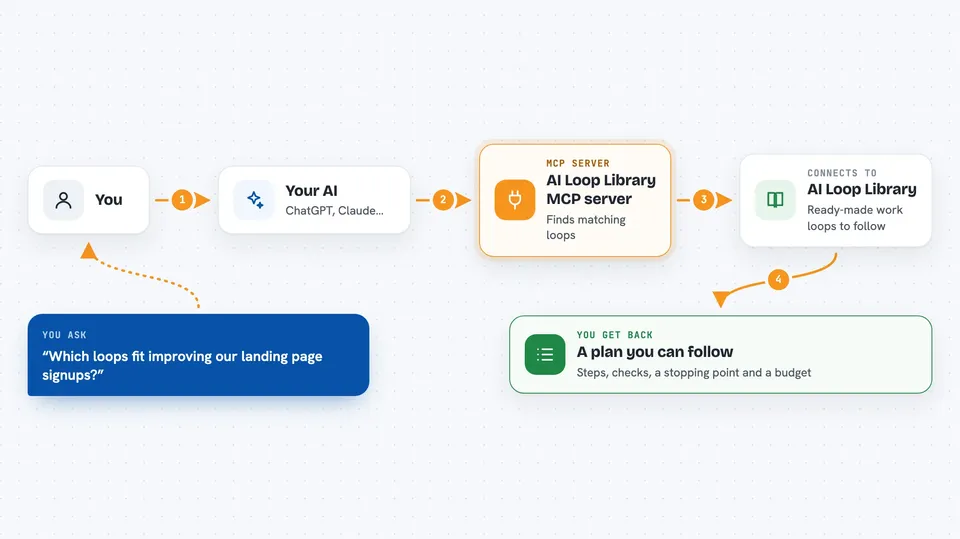
You tell your AI what you are trying to get done. The AI asks this helper to look through the AI Loop Library and find loops that fit. The helper sends back a short list with reasons, not one blind answer. When you pick one, the AI can ask the helper to turn it into a written plan with steps, a way to check progress, a stopping point, and a budget. You end up with something you can actually follow.
 Click to zoom
What you can do with it
- Browse the whole loop library in one go
- Search loops by keyword or category
- Get the full details of any single loop
- Pick a shortlist of loops that fit your goal
- Turn a chosen loop into a step-by-step written plan
- Check a loop idea against a list of common mistakes
- Draft a brand new loop when nothing in the library fits
Try asking your AI
- “I want to improve our landing page signups. Which loops fit?”
- “Show me the full details of the loop about weekly SEO checks.”
- “Turn that loop into a plan I can follow this week.”
- “Critique this loop idea: change the homepage headline every day and see what happens.”
What it gives back to you
You get back plain text in the chat: lists of loops with short reasons, full details for one loop, or a written plan in markdown you can copy. The plan includes the goal, the steps, how to check each step, when to stop, and a budget. Nothing is changed anywhere. It only reads and writes text back to you.
Before you start
What you need
- Python 3.9 or newer on your computer
- The server file, either from the GitHub repo or downloaded from ailooplibrary.com
- An MCP-capable app like Claude Code or Cursor
Good to know
This server only reads and returns text, so it cannot change or delete anything on your computer or online.
Install it with your AI
Add AI Loop Library MCP server to your AI, no technical skills needed
You don't install anything by hand. You copy one prompt, paste it into an AI that can work on your computer, and it checks, installs and connects the server for you, asking you when it needs something.
Sign in to get the install prompt
Members get a ready-made prompt that lets the Claude desktop app check AI Loop Library MCP server, install it and connect it for them, step by step. You don't need any technical skills: you copy, paste and answer a few questions. Your connected AI can also find and install any of the 4,066 MCP servers here for you.
Who it's for
People who use an AI to plan or run ongoing work, like marketers, founders, writers, and anyone who wants a repeatable recipe instead of a one-off chat.




