
MCP server · Developer tools
DevRecall MCP server
by pavelpilyak
Lets your AI search your past commits, PRs, tickets and docs and cite them when you ask.
DevRecall is a small program that keeps a private, searchable record of your work life: commits, pull requests, Jira and Linear tickets, Confluence pages, Slack threads, calendar events and more. It stores everything on your own computer, not in the cloud. Its MCP server is the part that lets your AI assistant look things up in that record for you.
What is an MCP server? The 30-second version
On its own, your AI can only chat with you using what it already knows. An MCP server is a small helper program that gives your AI a new skill or a connection to something else. This one connects your AI to DevRecall's local index of your past work. Once it is set up, your AI can search that index and answer questions like what you shipped last month, with links to the actual commits and tickets.
What this MCP server does
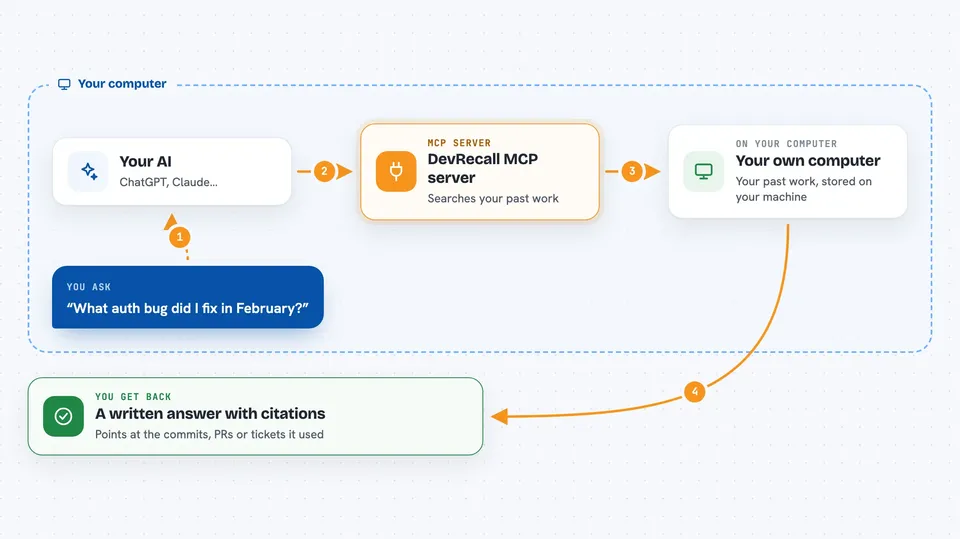
You ask your AI a question about your own past work, like what auth bug you fixed in February. Your AI passes the question to the DevRecall MCP server running quietly on your machine. The server searches its local database of commits, pull requests, tickets, docs and messages. It sends back the matching items with short citations. Your AI then writes the answer for you in the chat, pointing at the specific commits, PRs or tickets it found.
 Click to zoom
What you can do with it
- Recall which commits, PRs or tickets relate to a topic you ask about
- Find the ticket or pull request behind a change you remember vaguely
- Pull together what you worked on in a given week or month
- Look up Slack threads or Confluence pages you were part of
- Check which meetings you attended around a certain date
- Search your Claude Code sessions tied to a repo or branch
- Get cited answers instead of guesses about your own history
Try asking your AI
- “What auth bug did I fix in February?”
- “Show me the PRs I reviewed last sprint.”
- “Which Jira tickets did I close in March?”
- “What did I work on the week of the 14th?”
What it gives back to you
You get a written answer in the chat, plus short citations pointing at the commits, pull requests, tickets or documents it used. The citations usually include titles, dates and IDs so you can check them yourself. If nothing matches, it says so instead of making something up.
Before you start
What you need
- A Mac, or Linux/WSL on Windows (the desktop app is macOS only)
- DevRecall installed and at least one source connected (for example GitHub, Slack or Jira)
- An MCP-compatible coding tool such as Claude Code, Cursor, Codex, Continue or Zed
- Homebrew on macOS or Linux to install it the easy way
Good to know
It reads your private work data (commits, messages, tickets, calendar) from your machine, so only connect the sources you are comfortable having indexed locally.
Install it with your AI
Add DevRecall MCP server to your AI, no technical skills needed
You don't install anything by hand. You copy one prompt, paste it into an AI that can work on your computer, and it checks, installs and connects the server for you, asking you when it needs something.
Sign in to get the install prompt
Members get a ready-made prompt that lets the Claude desktop app check DevRecall MCP server, install it and connect it for them, step by step. You don't need any technical skills: you copy, paste and answer a few questions. Your connected AI can also find and install any of the 4,361 MCP servers here for you.
Who it's for
Developers and engineers who want their AI assistant to remember and cite their own past commits, tickets and docs.


