
MCP server · Social media
PostFast MCP server
Let your AI schedule and check social media posts on many networks straight from chat.
PostFast is a tool that schedules and manages your social media posts in one place. This MCP server connects your AI assistant to your PostFast account, so you can plan, publish and review posts just by typing normal instructions. It is handy for anyone who runs several brand or personal accounts and wants less clicking around dashboards.
What is an MCP server? The 30-second version
On its own, your AI can only talk. An MCP server is a little helper program that plugs a real service into your AI so it gains new abilities. Here, that helper links your AI to PostFast. Once it is connected, your AI can send your request to PostFast, and PostFast goes off and creates the post, checks stats or lists your accounts for you.
What this MCP server does
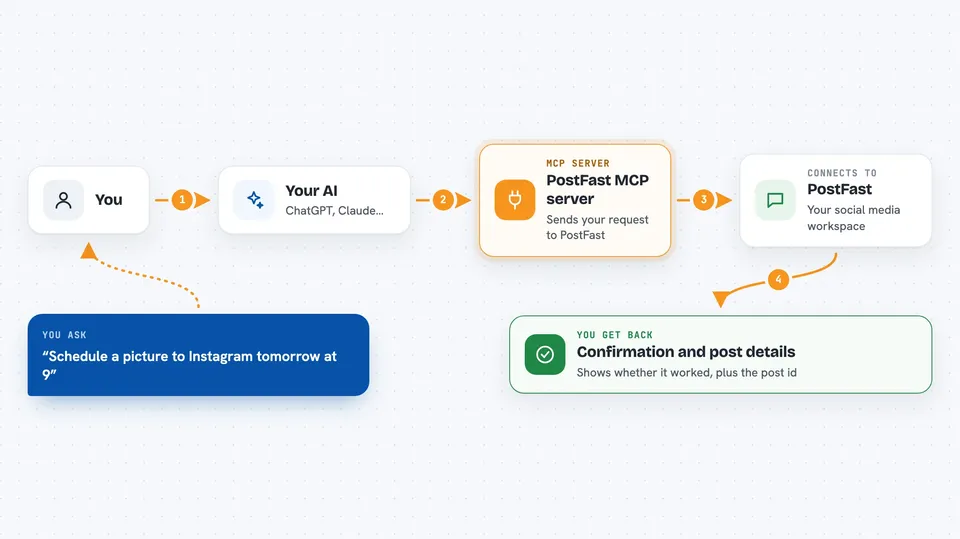
You tell your AI something like 'schedule a picture to Instagram tomorrow at 9'. The AI passes that instruction to this PostFast helper. The helper sends it along to your PostFast workspace through PostFast's system. Then PostFast queues the post for the right time and network. Finally, your AI tells you whether it worked and hands back details such as the post id or a summary of results.
 Click to zoom
What you can do with it
- See all your connected social accounts and how they're doing
- Write and schedule posts to one or many networks at once
- Attach images or videos by uploading them during the same task
- Check likes, reach and follower counts for recent posts
- Read and answer comments sitting in your PostFast inbox
Try asking your AI
- “Which social accounts have I connected to PostFast?”
- “Schedule a post saying we launch Friday to Instagram and LinkedIn for next Tuesday at noon.”
- “How did my last five Instagram posts perform this month?”
- “Any unanswered comments waiting in my inbox?”
What it gives back to you
Depending on what you asked, you might see a tidy list of your linked accounts, upcoming posts grouped by day, raw engagement figures pulled fresh from each network, or confirmation lines showing which actions were carried out. For longer tasks the AI usually wraps the facts into a couple of readable paragraphs rather than dumping tables everywhere. Either way, whatever comes back appears right inside the chat window where you typed the question.
Before you start
Good to know
Some commands really act online – erasing entries hides discussions forever – therefore double-check names plus wording prior confirming anything irreversible.
Install it with your AI
Add PostFast MCP server to your AI, no technical skills needed
You don't install anything by hand. You copy one prompt, paste it into an AI that can work on your computer, and it checks, installs and connects the server for you, asking you when it needs something.
Sign in to get the install prompt
Members get a ready-made prompt that lets the Claude desktop app check PostFast MCP server, install it and connect it for them, step by step. You don't need any technical skills: you copy, paste and answer a few questions. Your connected AI can also find and install any of the 4,361 MCP servers here for you.
Who it's for
Social media managers, marketers, freelancers and busy owners juggling multiple profiles who want posting handled mostly by chatting with their AI.





