MCP server · Coding
Code Guardian Studio MCP server
Lets your AI scan your code, spot messy files, and suggest safe ways to clean them up.
Code Guardian Studio is a helper for your AI that looks at a folder of computer code and points out the parts that are hard to read or risky to change. It is made for people who work with code every day, like developers and technical leads. If you have ever opened an old project and wondered where to start, this is for you.
What is an MCP server? The 30-second version
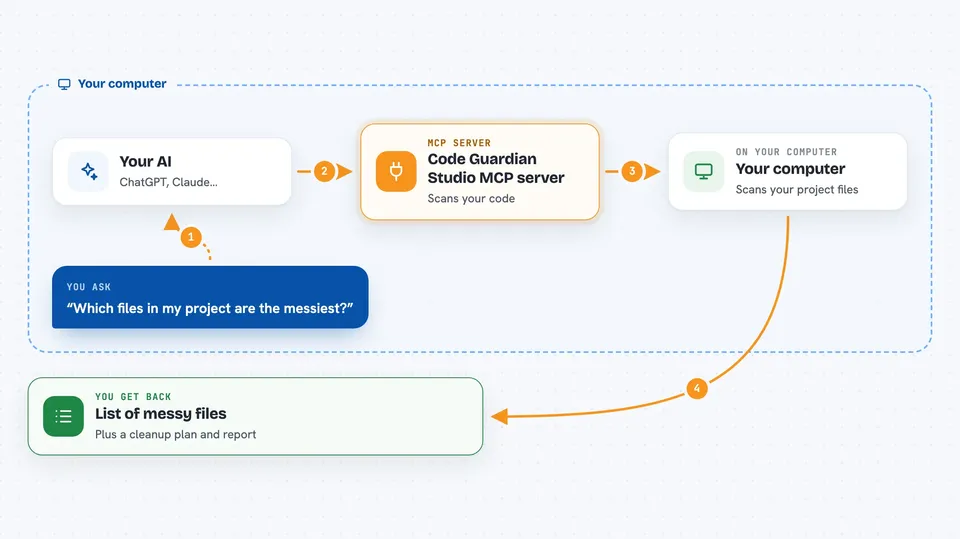
On its own, your AI can only chat with you. An MCP server is a small helper program that gives your AI a new skill or a connection to another tool. This one connects your AI to Code Guardian Studio, which reads through your code files. Once it is connected, you can ask your AI to look at your project, and it will use this helper to do the reading and counting for you.
What this MCP server does
You ask your AI something like which files in my project are the messiest. Your AI passes that request to Code Guardian Studio. The helper scans your code, counts things like how deeply nested the logic is and how many branches each file has, and finds the files that stand out. It then sends a list and a short report back to your AI, which explains it to you in plain words. You can also ask it to write a step by step plan for cleaning up a file.
 Click to zoom
What you can do with it
- Scan a whole project and list every file it finds
- Measure how complex each file is
- Point out the files that most need attention
- Write a step by step plan for refactoring a file
- Save notes about past cleanups so you can pick up later
- Generate a markdown report you can share with your team
- Block risky patterns like empty error handlers
Try asking your AI
- “Scan my project and tell me which files are the messiest”
- “Give me a refactor plan for the file with the highest complexity score”
- “Write a markdown report of the hotspots in this folder”
- “Remember that I already cleaned up the login module yesterday”
What it gives back to you
You get back plain answers in the chat, like a list of file names sorted by how much attention they need. It can also produce a markdown report file you can open or share. If you ask for a refactor plan, you get numbered steps. It also remembers past sessions, so you can ask what you did last time.
Before you start
What you need
- Node.js installed on your computer
- Build tools for your operating system (the README shows the exact commands for Linux, macOS, and Windows)
- The Claude desktop app or another AI tool that supports MCP servers
Good to know
It reads through your project files, so only point it at folders you are allowed to share with your AI tool.
Install it with your AI
Add Code Guardian Studio MCP server to your AI, no technical skills needed
You don't install anything by hand. You copy one prompt, paste it into an AI that can work on your computer, and it checks, installs and connects the server for you, asking you when it needs something.
Sign in to get the install prompt
Members get a ready-made prompt that lets the Claude desktop app check Code Guardian Studio MCP server, install it and connect it for them, step by step. You don't need any technical skills: you copy, paste and answer a few questions. Your connected AI can also find and install any of the 4,361 MCP servers here for you.
Who it's for
Developers and technical leads who work with large or messy codebases and want help finding where to start.