MCP server · Coding
Jupyter Notebook MCP server
by jjsantos01
Let your AI write and run code inside your Jupyter Notebook, cell by cell, and read the results.
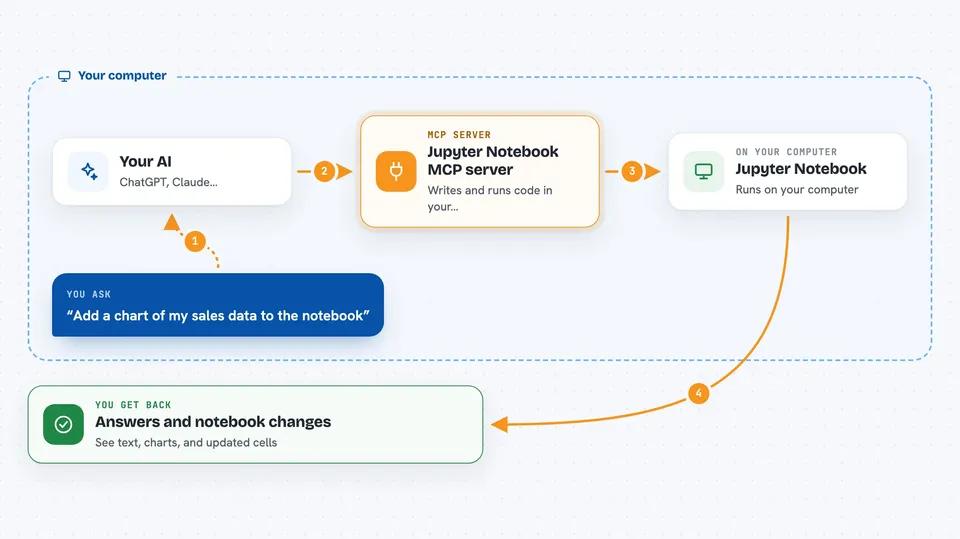
This is a small helper that connects your AI assistant to a Jupyter Notebook on your own computer. Once it is set up, you can ask your AI to add code cells, run them, and look at the output, all inside the notebook you already have open. It is handy for people who use notebooks for data work and would rather describe what they want than type every cell themselves.
What is an MCP server? The 30-second version
On its own, your AI can only chat with you. An MCP server is a small helper program that gives your AI a new skill or a connection to another tool. This one connects your AI to a Jupyter Notebook running on your machine, so the AI can add cells, run code, and read what comes back. You stay in charge: the AI only does things in the notebook you have opened and connected.
What this MCP server does
You keep a Jupyter Notebook open on your computer and start a small connection inside it. Your AI assistant, running in the Claude desktop app, is told about this helper. When you ask for something, like adding a chart, the AI sends the request to the helper, which passes it into your notebook. The notebook runs the code, and the result, text or an image, is sent back so the AI can read it and tell you what happened. You can also ask the AI to save the notebook or check what cells are already there.
 Click to zoom
What you can do with it
- Add a new code cell and run it right away
- Run one specific cell or run every cell in the notebook
- Read the text output of a cell you just ran
- Look at images a cell produced, like charts
- Edit the content of an existing cell
- List all cells and describe what is in the notebook
- Save the notebook when you are happy with it
Try asking your AI
- “Add a cell that loads my CSV file and shows the first five rows, then run it”
- “Make a bar chart of the sales column and show me the image”
- “Run all the cells in this notebook and tell me if any of them failed”
- “Edit cell number 3 so it uses a log scale on the y axis and run it again”
What it gives back to you
You get answers in the chat that describe what the notebook did. The AI can show you the text a cell printed, or the image a cell drew, like a chart. It can also tell you which cells exist and whether they ran without errors. When it edits or adds a cell, you will see that change appear in your notebook too.
Before you start
What you need
- Python 3.12 or newer installed on your computer
- The uv tool installed (a small program that runs Python projects)
- Jupyter Notebook version 6.x (not JupyterLab, not version 7, not Colab)
- The Claude desktop app
Good to know
This runs real Python code on your computer, so it can change or delete files if you are not careful; keep backups and only connect notebooks you trust.
Install it with your AI
Add Jupyter Notebook MCP server to your AI, no technical skills needed
You don't install anything by hand. You copy one prompt, paste it into an AI that can work on your computer, and it checks, installs and connects the server for you, asking you when it needs something.
Sign in to get the install prompt
Members get a ready-made prompt that lets the Claude desktop app check Jupyter Notebook MCP server, install it and connect it for them, step by step. You don't need any technical skills: you copy, paste and answer a few questions. Your connected AI can also find and install any of the 4,361 MCP servers here for you.
Who it's for
People who work in Jupyter Notebooks for data analysis, teaching, or research and want their AI to help write and run the code.