MCP server · Coding
pcq MCP server
by playidea-lab
Lets your AI run, check and compare machine learning experiments in your project and report back what happened.
pcq is a small helper that keeps track of machine learning experiments in a project. It reads a simple settings file called cq.yaml, runs your training script, and writes down what happened in a tidy set of files. It is handy if you run experiments often and want your AI assistant to help you start them, check them and compare them without you digging through folders.
What is an MCP server? The 30-second version
On its own, your AI can only chat. An MCP server is a small helper program that gives your AI a new skill or a connection to a tool. This one connects your AI to pcq, which manages machine learning experiments in your project. Once it is connected, your AI can ask pcq to run an experiment, check the results or compare two runs, and then tell you what it found.
What this MCP server does
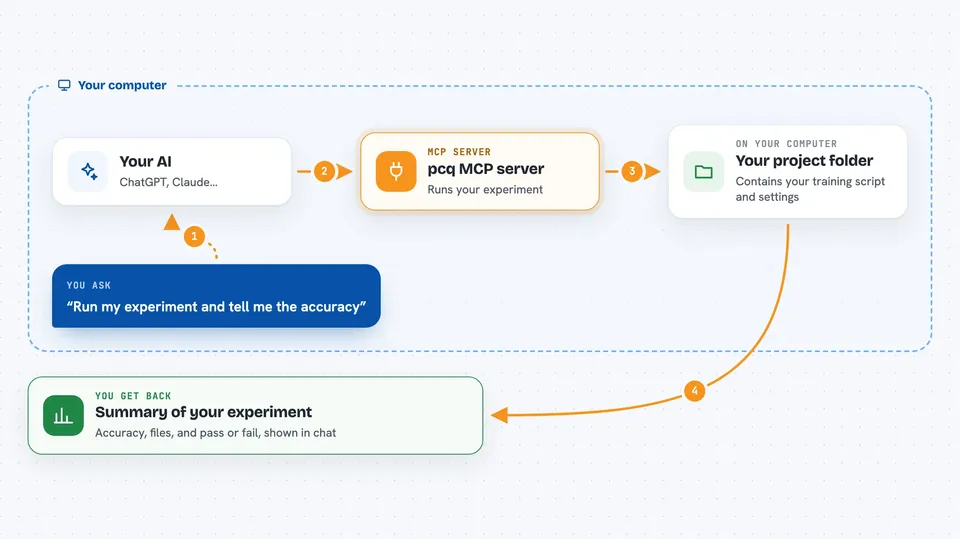
You ask your AI something like run my experiment or compare my last two runs. The AI passes that request to this helper. The helper looks at your project's cq.yaml file, runs your training script, and collects the numbers, files and notes that come out. It writes a standard set of result files so every run looks the same. Then it sends a short summary back to your AI, which shows it to you in the chat.
 Click to zoom
What you can do with it
- Run a machine learning experiment defined in your project
- Check whether a finished run is complete and valid
- Describe what happened in a run in plain terms
- Compare two runs side by side
- Show the history of how a run came to be
- Read your project settings and tell you what would run
- Apply a plan file to start several experiments in order
Try asking your AI
- “Run the experiment in this project and tell me the eval accuracy”
- “Validate the run in the output folder and list any problems”
- “Compare old_output and new_output and tell me which one did better”
- “Describe the run in output and summarize what happened”
What it gives back to you
You get back short, structured answers in the chat: numbers like accuracy or loss, a list of files the run produced, a pass or fail from validation, or a side by side comparison of two runs. The helper also writes the same information into files in your project, so you can open them later. Your AI usually shows you the key points and points you to the files for the full picture.
Before you start
What you need
- Python installed on your computer
- The uv tool for installing Python packages
- A project with a cq.yaml file describing your experiment
Good to know
It runs your training script on your computer, so it can use your files and computing power, and it can start long jobs if you ask it to.
Install it with your AI
Add pcq MCP server to your AI, no technical skills needed
You don't install anything by hand. You copy one prompt, paste it into an AI that can work on your computer, and it checks, installs and connects the server for you, asking you when it needs something.
Sign in to get the install prompt
Members get a ready-made prompt that lets the Claude desktop app check pcq MCP server, install it and connect it for them, step by step. You don't need any technical skills: you copy, paste and answer a few questions. Your connected AI can also find and install any of the 4,609 MCP servers here for you.
Who it's for
Data scientists, machine learning engineers and researchers who run many experiments and want an AI assistant to help start, check and compare them.