
MCP server · Notes
Personal Instagram Library (PIL)
by pjpoulose
Turn your Instagram saved posts into a private, searchable library your AI can read and answer questions from.
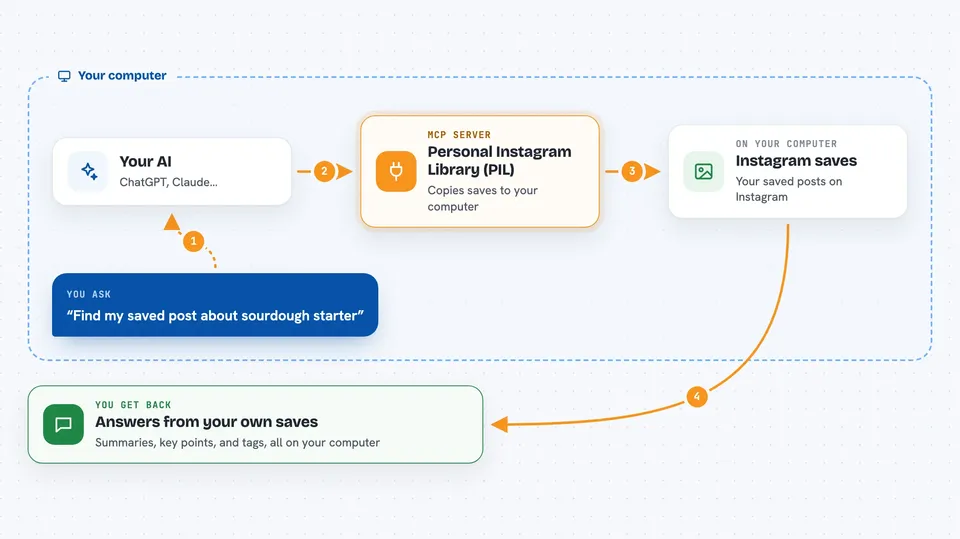
PIL stands for Personal Instagram Library. It takes the posts you saved on Instagram and turns them into a searchable knowledge base that lives on your own computer. It is handy if you save lots of posts and can never find the good ones again.
What is an MCP server? The 30-second version
On its own, your AI assistant can only chat with you. It cannot see your Instagram saves or anything else on your machine. An MCP server is a small helper program that gives your AI a new skill. This one connects your AI to your personal Instagram library, so it can look things up for you when you ask. The helper runs quietly on your computer and reads your library, nothing more.
What this MCP server does
You save posts on Instagram as usual. PIL copies those saved posts into a small database on your computer. Then an AI reads each post carefully and writes a short summary, the main points, any how-to steps, links it mentions, and tags. When you ask your AI a question, it uses this PIL helper to search that database and answer you. You can also open a dashboard or an app to browse everything yourself.
 Click to zoom
What you can do with it
- Search your saved posts by words in the caption or the AI summary
- Get a full summary, key points, and how-to steps for any saved post
- List your Instagram saved collections with counts
- See which tags you use most across your library
- Check totals and how many posts have been deep-read
- Ask your AI questions and get answers drawn from your own saves
- Export your library as a file or an offline app you can browse
Try asking your AI
- “Find the post I saved about making sourdough starter”
- “What were the key points in that pasta recipe I saved last month”
- “Show me all my saved posts tagged with travel”
- “How many posts are in my library and how many have summaries”
What it gives back to you
You get answers in plain chat: lists of matching posts, short summaries, key points, how-to steps, and links. You can also ask for counts and tag lists. If you use the dashboard or app, you get a browsable page with search and tags. Nothing is uploaded anywhere; everything stays on your computer.
Before you start
What you need
- Python 3.11 or newer
- An Instagram account linked through instagram-cli
- A copy of the PIL project on your computer
- The mcp package (version below 2) installed in the same Python
Good to know
The MCP server is read-only and cannot change your library, but the files it reads contain your personal Instagram data, so keep them on your own machine and only share them with tools you trust.
Install it with your AI
Add Personal Instagram Library (PIL) to your AI, no technical skills needed
You don't install anything by hand. You copy one prompt, paste it into an AI that can work on your computer, and it checks, installs and connects the server for you, asking you when it needs something.
Sign in to get the install prompt
Members get a ready-made prompt that lets the Claude desktop app check Personal Instagram Library (PIL), install it and connect it for them, step by step. You don't need any technical skills: you copy, paste and answer a few questions. Your connected AI can also find and install any of the 4,361 MCP servers here for you.
Who it's for
Anyone who saves a lot on Instagram and wants to actually find and use those posts later, especially people who already use an AI assistant like Claude or Cursor.





