
MCP server · Finance and crypto
Massive.com market data MCP server
by polygon-io
Lets your AI look up stock, options, forex and crypto market data from Massive.com for you.
This is a small helper that connects your AI assistant to Massive.com, a service full of financial market data. Once it is set up, you can just ask your AI for prices, volumes, market movers or option numbers and it will go fetch them. It is handy for anyone who works with markets and does not want to click around a data website all day.
What is an MCP server? The 30-second version
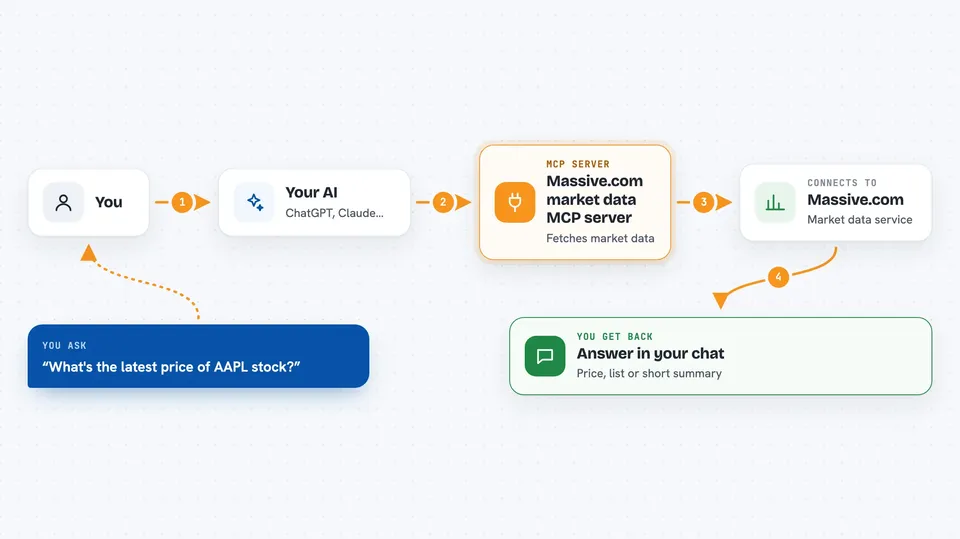
On its own, your AI can only chat with you using what it already knows. An MCP server is a small helper program that gives your AI one new skill, here the ability to talk to Massive.com's market data service. When you ask a question, your AI passes it to this helper, the helper asks Massive.com, and the answer comes back into your chat. You do not need to understand how it works under the hood, you just need it connected once.
What this MCP server does
You ask your AI something like the latest price of a stock. The AI uses this helper to search Massive.com for the right data endpoint, then calls it with your details. The helper sends the request to Massive.com and gets the raw data back. It can also save that data in a small temporary table so the AI can run simple calculations on it, like averages or returns. Then the AI turns it into a normal answer in your chat.
 Click to zoom
What you can do with it
- Look up the latest price of a stock, index, forex pair or crypto coin
- Check trading volume, trades and quotes for a ticker
- See today's biggest gainers and losers in the market
- Pull historical price data over a date range
- Get dividends, splits and IPO information
- Run simple math on the data, like moving averages or returns
- Calculate option pricing numbers such as delta or gamma
Try asking your AI
- “Get the latest price for AAPL stock”
- “Show me yesterday's trading volume for MSFT”
- “What were the biggest stock market gainers today?”
- “Calculate the 20-day moving average for AAPL closing prices over the last 3 months”
What it gives back to you
You get answers written in plain language in your chat, like a price, a list of tickers, or a short summary of market activity. When you ask for a calculation, you get the number back with a short explanation. If you ask for a bigger set of data, the AI can show it as a table or a list. Nothing is stored permanently, each request is fetched fresh from Massive.com.
Before you start
What you need
- A Massive.com account and API key (an API key is like a password that lets apps ask for data; you get one from your Massive.com account)
- Python 3.12 or newer installed on your computer
- The Astral UV tool installed (a small program that runs this helper)
- The Claude desktop app or Claude Code, if you want to use it there
Good to know
This helper only reads market data from Massive.com, so it will not change or delete anything, but your API key is used for every request and some Massive.com plans charge for data usage.
Install it with your AI
Add Massive.com market data MCP server to your AI, no technical skills needed
You don't install anything by hand. You copy one prompt, paste it into an AI that can work on your computer, and it checks, installs and connects the server for you, asking you when it needs something.
Sign in to get the install prompt
Members get a ready-made prompt that lets the Claude desktop app check Massive.com market data MCP server, install it and connect it for them, step by step. You don't need any technical skills: you copy, paste and answer a few questions. Your connected AI can also find and install any of the 4,609 MCP servers here for you.
Who it's for
People who work with markets, like analysts, traders, finance students or anyone who needs quick stock and crypto data without opening a data website.



