
MCP server · Notes
Memory MCP server
Give your AI a long-term memory so it remembers your tasks, decisions and code across chats.
This is a memory helper for your AI. It lets your assistant save notes, facts and past conversations in one place on your own computer, then look them up later. It is handy if you use ChatGPT or Claude for long projects and keep losing the thread when a chat gets cleared.
What is an MCP server? The 30-second version
On its own, your AI can only chat. It forgets everything the moment a conversation ends or gets too long. An MCP server is a small helper program that gives your AI a new skill. This one gives your AI a memory: a place to store what you told it and to search that store when you ask about something from before.
What this MCP server does
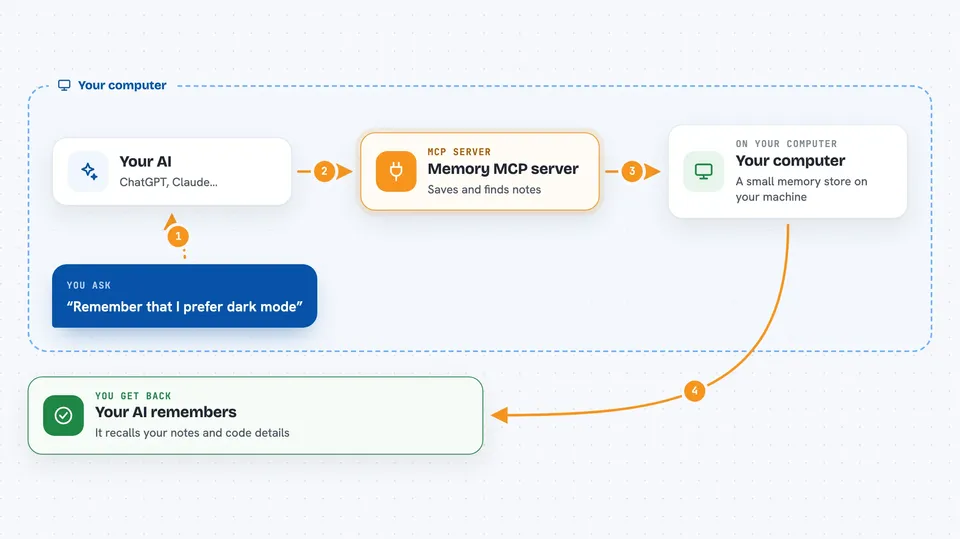
You tell your AI to remember something, or it decides to save a note. The AI sends that note to this helper program running quietly in the background. The helper stores it in a small database on your computer and also builds a map of how people, projects and tools relate to each other. Later, when you ask a question, the AI searches that store and brings back the most relevant notes. It can also read your code folder and remember what your files and functions are called.
 Click to zoom
What you can do with it
- Save notes, decisions and task updates so they survive a chat reset
- Search your saved notes by meaning, not just exact words
- Track how people, projects and tools connect to each other
- Index a code project so your AI can find functions and files
- Look up who calls a function or what it calls
- Mark old notes as no longer valid while keeping the history
- Check the status of the memory store
What it gives back to you
You get answers in plain chat text. When it searches, it shows the matching notes with a short summary of each. When it indexes code, it reports how many files and symbols it found. When it saves something, it simply confirms it was stored.
Before you start
What you need
- Docker installed, or Node.js if you prefer the npx option
- About 3 GB of free memory for the helper to run
- The folder path of any project you want it to read
Good to know
It can delete or reset your saved memories, and it reads the project folder you point it at, so only give it folders you are happy for it to see.
Install it with your AI
Add Memory MCP server to your AI, no technical skills needed
You don't install anything by hand. You copy one prompt, paste it into an AI that can work on your computer, and it checks, installs and connects the server for you, asking you when it needs something.
Sign in to get the install prompt
Members get a ready-made prompt that lets the Claude desktop app check Memory MCP server, install it and connect it for them, step by step. You don't need any technical skills: you copy, paste and answer a few questions. Your connected AI can also find and install any of the 4,609 MCP servers here for you.
Who it's for
People who work on long projects with an AI assistant and want it to remember context between sessions, especially developers and writers.





