
MCP server · Developer tools
Portainer MCP server
by portainer
Lets your AI look at and manage your Portainer environments, containers and deployments for you.
This is a small helper that connects your AI assistant to Portainer, the tool many teams use to run and watch their containers and Kubernetes clusters. Once it is connected, you can ask your AI plain questions about your environments and it can look things up or make changes for you. It is handy for anyone who already uses Portainer and wants to skip a lot of clicking around.
What is an MCP server? The 30-second version
On its own, your AI can only chat with you. An MCP server is a small helper program that gives your AI a new skill or a connection to an app or service. This one connects your AI to your Portainer instance, so when you ask a question about your containers or environments, the AI can actually go and check Portainer for you. You still use your normal chat window, the helper just runs quietly in the background.
What this MCP server does
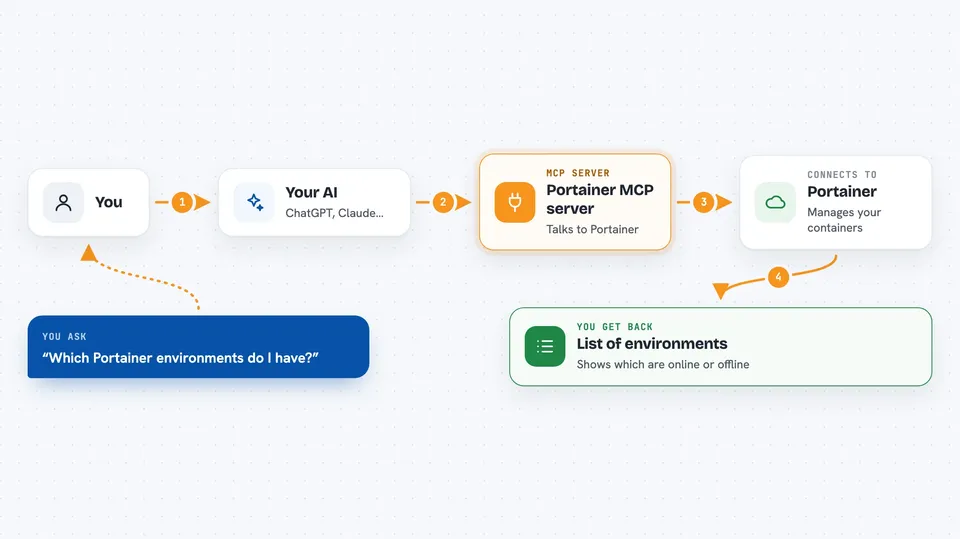
You ask your AI something about your Portainer setup, like which environments exist or what a container is doing. The AI sends that request to this helper, which talks to your Portainer instance using your own Portainer API key. Portainer answers, the helper passes the answer back, and the AI explains it to you in the chat. It can also pass requests through to the Docker or Kubernetes behind each environment, so you can troubleshoot deeper. If you ask it to change something, it can do that too, within what your Portainer account is allowed to do.
 Click to zoom
What you can do with it
- List and inspect your Portainer environments
- Check the status of Docker containers and Kubernetes resources
- Troubleshoot a container or workload that is not behaving
- Manage GitOps workflows in Portainer
- Look at Portainer settings and version information
- Proxy requests through to the Docker or Kubernetes API of an environment
Try asking your AI
- “Which Portainer environments do I have and are they all online?”
- “Show me the containers running in my production environment and which ones are unhealthy.”
- “Why is the web container in my staging environment restarting?”
- “List the GitOps stacks in Portainer and tell me if any failed to deploy.”
What it gives back to you
You get answers in your normal chat: lists of environments, containers or stacks, short summaries of what is running or failing, and details like status, image names or error messages. If you asked it to change something, it tells you what it did. You do not get files or dashboards, just the information written out for you.
Before you start
What you need
- A Portainer instance you can reach (the URL)
- A Portainer API key, which you create in Portainer under My Account, then Access tokens
- For the local uvx method: the uv tool installed on your computer
- For the container method: Docker and a way to reach the container over HTTPS
Good to know
It can change or delete things in your Portainer environments, so only connect it with an API key whose permissions you are comfortable giving your AI.
Install it with your AI
Add Portainer MCP server to your AI, no technical skills needed
You don't install anything by hand. You copy one prompt, paste it into an AI that can work on your computer, and it checks, installs and connects the server for you, asking you when it needs something.
Sign in to get the install prompt
Members get a ready-made prompt that lets the Claude desktop app check Portainer MCP server, install it and connect it for them, step by step. You don't need any technical skills: you copy, paste and answer a few questions. Your connected AI can also find and install any of the 4,609 MCP servers here for you.
Who it's for
People who already use Portainer at work, like developers, sysadmins and platform or DevOps engineers, and anyone who wants quick answers about their containers without clicking through the Portainer interface.



