MCP server · Developer tools
ProFullStack MCP server
by profullstack
Lets your AI run everyday developer helpers like SEO checks, file conversion, QR codes and email checks.
This is a helper server from ProFullStack that bundles a set of small developer utilities in one place. Once it is connected, your AI can do things like check a website's SEO, convert a document, look up a domain, validate an email address, make a QR code, fetch weather data, post to social media or run a security scan. It is handy for office workers and small teams who want these little jobs done without opening five different websites.
What is an MCP server? The 30-second version
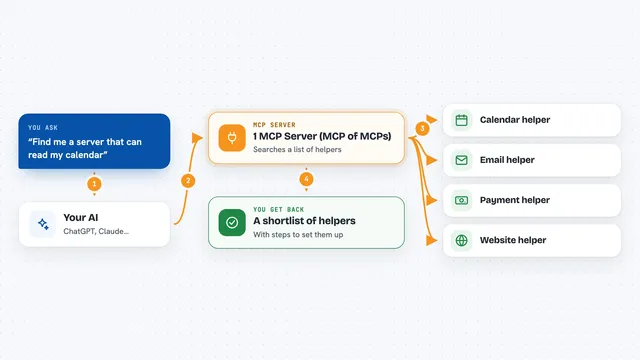
On its own, your AI can only chat with you. An MCP server is a small helper program that gives your AI a new skill or a connection to an app or service. This one connects your AI to a collection of developer tools, so when you ask for something like a QR code or an SEO check, the AI passes the request to this helper and brings the result back to your chat. You do not need to understand how it works inside; you just ask in normal words.
What this MCP server does
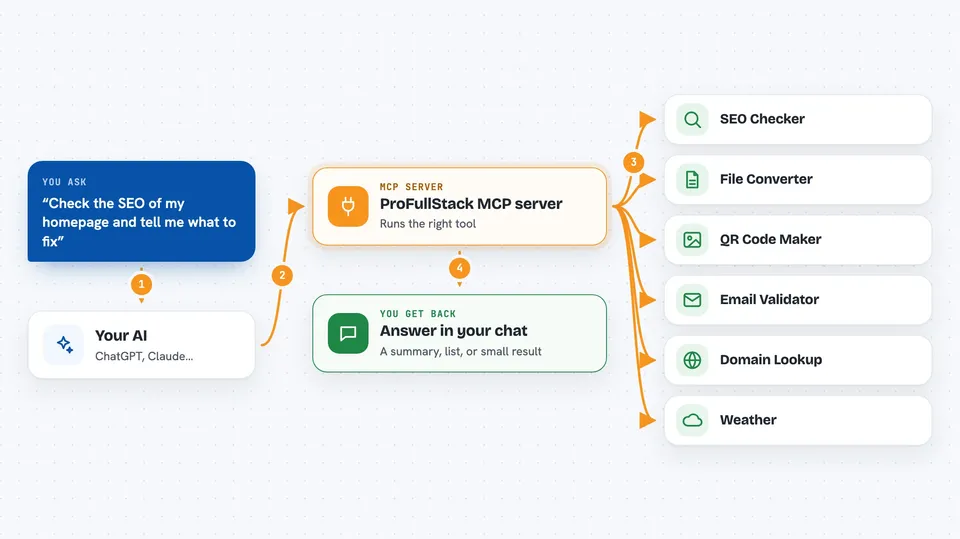
You ask your AI for something, like checking a page's SEO or making a QR code. The AI sends that request to this helper server. The server runs the matching tool, for example looking up a domain, validating an email, converting a document or scanning a site for security issues. When the tool finishes, the answer travels back to your AI and appears in your chat as a result, a list or a short summary. Some tools also make changes, like posting to social media or updating a README badge.
 Click to zoom
What you can do with it
- Check a web page for SEO problems
- Convert a document into another format
- Look up details about a domain name
- Validate whether an email address is real
- Create a QR code for a link
- Fetch current weather data for a place
- Run a basic security scan on a site
Try asking your AI
- “Check the SEO of my homepage and tell me what to fix”
- “Make a QR code for this link”
- “Is this email address valid”
- “What is the weather in Berlin right now”
What it gives back to you
You get the answer in your chat, usually as a short summary, a list of findings or a small result like a QR code image or converted file. For SEO and security scans you get a list of issues or a report. For lookups like domain or email checks you get a yes or no plus some details. When a tool makes a change, like posting to social media, it tells you that it was done.
Before you start
What you need
- Node.js 18 or newer and pnpm 10 or newer if you run it yourself
- API keys from the model providers you want to use, such as OpenAI, Stability AI, Anthropic or Hugging Face (these are like passwords for apps; each site gives you one for free or paid)
- A hosted option is available on Fronteir AI if you prefer not to install anything
Good to know
The server has no built-in login, and some tools can change things or reach out to the internet, so keep it on your own machine or behind a password-protected proxy.
Install it with your AI
Add ProFullStack MCP server to your AI, no technical skills needed
You don't install anything by hand. You copy one prompt, paste it into an AI that can work on your computer, and it checks, installs and connects the server for you, asking you when it needs something.
Sign in to get the install prompt
Members get a ready-made prompt that lets the Claude desktop app check ProFullStack MCP server, install it and connect it for them, step by step. You don't need any technical skills: you copy, paste and answer a few questions. Your connected AI can also find and install any of the 4,609 MCP servers here for you.
Who it's for
Office workers, marketers and small teams who want quick developer-style jobs done through their AI without installing lots of separate tools.