MCP server · Developer tools · official
Publee MCP server
by publee-dev · official
Turn an AI-made web page into a shareable link, with optional password or members-only access.
Publee is a service that takes an HTML page and gives you back a short web address you can share, like https://your-name.publee.site. This MCP server connects your AI assistant to Publee, so when your AI writes a page for you, it can publish it and hand you the link in the same breath. It is handy for anyone who wants to send a quick page to a client, a teammate, or a friend without setting up a website.
What is an MCP server? The 30-second version
On its own, your AI can only chat with you. An MCP server is a small helper program that gives your AI one new skill or one new connection. This one connects your AI to Publee, a publishing service. So when you ask your AI to make a page and share it, the AI can actually send it to Publee and come back with a real link you can open in your browser.
What this MCP server does
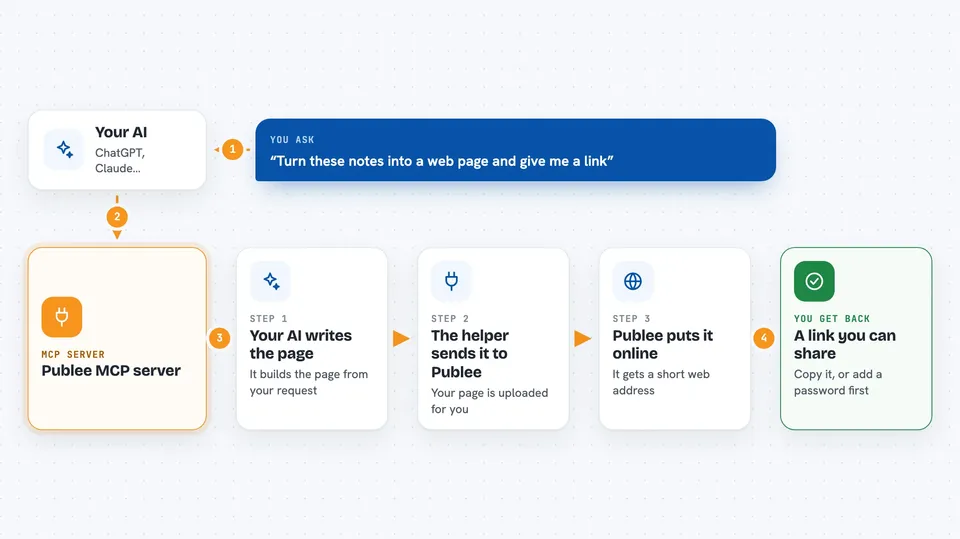
You ask your AI to build a page, maybe a simple report, a landing page, or a small set of files. The AI writes the HTML and then uses this helper to send it to Publee. Publee puts it online at a short address and sends that address back. Your AI shows you the link in the chat, and you can copy it and share it with anyone. If you have an account and a token, the page can stay up for good and you can update it later without changing the link.
 Click to zoom
What you can do with it
- Publish an AI-written HTML page and get a shareable link
- Upload a small set of static files (like a page with images or styles)
- Update an existing page while keeping the same URL
- Protect a page with a password
- Limit a page to specific email addresses or your workspace
- Publish anonymously, with the link expiring after 7 days
- Keep a page online permanently when you use an account token
Try asking your AI
- “Make a one-page summary of this report and give me a link I can send to my client.”
- “Turn these notes into a simple web page and publish it with a password.”
- “Update the page at my-project.publee.site with this new version, same link please.”
- “Build a small landing page with our logo and publish it so only my team can see it.”
What it gives back to you
You get back a short web address, like https://your-slug.publee.site, right in the chat. If you published without an account, you also get a claim link that lets you move the page into an account later. If you asked for a password or members-only access, the reply tells you that the page is protected. You can click the link or copy it to share.
Before you start
What you need
- Nothing special to start: you can publish anonymously and the page expires after 7 days
- A free Publee account and an API token (a kind of password for apps) if you want pages to stay online and be updatable
- An AI tool that supports MCP, like Claude Desktop, Claude Code, or Cursor
Good to know
Anything you publish goes on the public web unless you set a password or limit it to specific people, so do not publish private or sensitive information by accident.
Install it with your AI
Add Publee MCP server to your AI, no technical skills needed
You don't install anything by hand. You copy one prompt, paste it into an AI that can work on your computer, and it checks, installs and connects the server for you, asking you when it needs something.
Sign in to get the install prompt
Members get a ready-made prompt that lets the Claude desktop app check Publee MCP server, install it and connect it for them, step by step. You don't need any technical skills: you copy, paste and answer a few questions. Your connected AI can also find and install any of the 4,066 MCP servers here for you.
Who it's for
Anyone who wants to share a quick web page made by their AI, such as freelancers, marketers, consultants, and small teams sending drafts or reports to clients.