MCP server · No-code
QR Maker MCP server
by qr-maker-io
Ask your AI to make QR codes, create trackable short links, check clicks, and put simple web pages online.
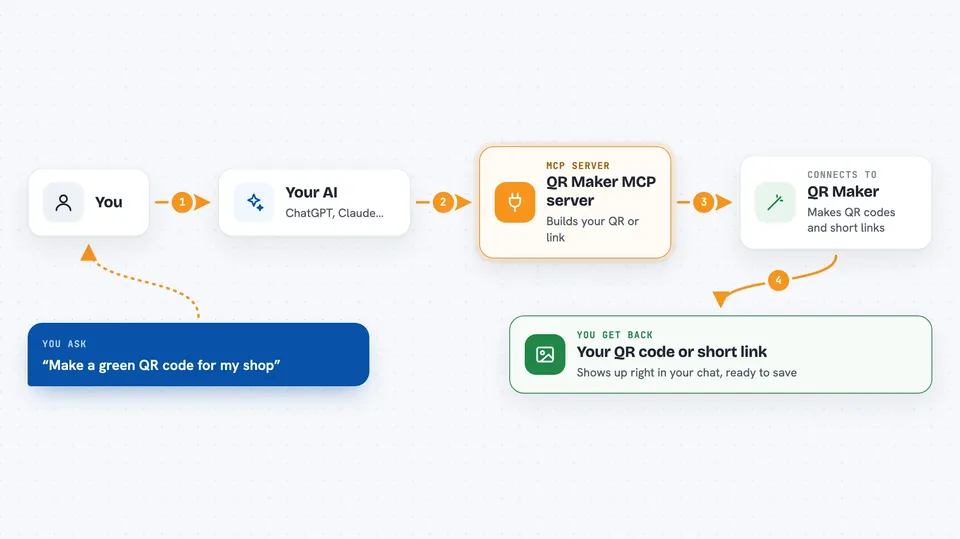
This connects your AI assistant to QR Maker, a service that makes QR codes and short links. Once it is hooked up, you just describe what you want in normal words and the AI takes care of creating it through QR Maker. It is handy if you send out flyers, menus, posters or campaigns and want scannable codes plus some idea of how many people clicked.
What is an MCP server? The 30-second version
On its own, your AI can only talk and answer questions based on what it already knows. An MCP server is a small helper program that runs alongside your AI and gives it a new ability, sort of plugging a new tool into it. This particular helper plugs your AI into QR Maker's system, where all the actual QR images, short links and little web pages live. So instead of doing everything yourself inside the QR Maker website, you tell your AI what you need and it asks QR Maker behind the scenes.
What this MCP server does
When you ask something like 'make me a green QR code pointing to my shop', your AI sends those instructions to this helper. The helper then calls QR Maker's servers over the internet and tells them what image or link to build. A moment later the result comes straight back into your chat window. For more involved tasks such as publishing a mini webpage together with a matching short link and QR code, the same thing happens across several steps while you watch. You never have to open a browser tab or fill in forms yourself.
 Click to zoom
What you can do with it
- Make a styled QR code with chosen colours, dot shapes and a logo
- Turn a long address into a short tracking link
- See how many times each short link was opened, broken down by country and device
- Save a favourite QR design as a template and reuse it anytime
- Change where an existing short link points after printing has happened
- Put a tiny landing page online along with its own short link and QR code
Try asking your AI
- “Generate a blue square QR code linking to our summer sale page”
- “Shorten this product URL and give me last week's click totals”
- “Build a QR code I can print on table cards that opens our digital tip jar”
- “Show me my saved templates and pick the round red dotted one”
What it gives back to you
Depending on what you asked, you might see a picture of the finished QR code right in the conversation, ready to save. Link creation returns the shortened address itself, sometimes wrapped around whatever destination you gave. Analytics come back as readable lists showing total clicks per day, top countries and common phone types. If you published a landing page, you receive its public address and confirmation that it went live.
Before you start
What you need
- A QR Maker account (free tier works, paid plans allow bigger batches)
Good to know
Deleting a short link cannot be undone and instantly breaks every place that code appears, including physical prints.
Install it with your AI
Add QR Maker MCP server to your AI, no technical skills needed
You don't install anything by hand. You copy one prompt, paste it into an AI that can work on your computer, and it checks, installs and connects the server for you, asking you when it needs something.
Sign in to get the install prompt
Members get a ready-made prompt that lets the Claude desktop app check QR Maker MCP server, install it and connect it for them, step by step. You don't need any technical skills: you copy, paste and answer a few questions. Your connected AI can also find and install any of the 4,361 MCP servers here for you.
Who it's for
Small business owners, marketers and anyone producing printed material who wants quick QR codes and basic campaign stats without leaving the chat.