MCP server · No-code
Google Tag Manager MCP server
by dhawalshah
Lets your AI look at and update your Google Tag Manager tags, triggers and variables for you.
This is a helper that connects your AI assistant to Google Tag Manager, the tool marketers use to manage tracking tags on a website. Once it is set up, you can ask your AI in plain English to list your tags, create a new trigger, or publish a version, and it does the clicking for you. It is handy for marketers and analysts who spend a lot of time inside Tag Manager and would rather just describe what they want.
What is an MCP server? The 30-second version
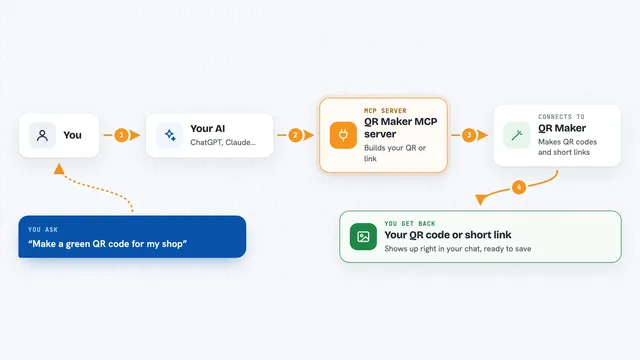
On its own, your AI can only chat. It cannot see your Tag Manager account or change anything in it. An MCP server is a small helper program that gives your AI a new skill, and here that skill is talking to Google Tag Manager. You ask a question in the chat, the AI passes it to this helper, and the helper goes to Google Tag Manager to look things up or make the change you asked for.
What this MCP server does
You type a request in plain words, like asking to see every tag in a workspace. Your AI sends that request to this helper program. The helper signs in to Google Tag Manager using your Google account and asks Google for the information or the change. Google sends the answer back, and the helper hands it to your AI, which explains it to you in the chat. If the request would change or delete something, the helper asks you to confirm first before it goes ahead.
What you can do with it
- List the tags, triggers and variables in a workspace
- Create a new tag, trigger or variable
- Update an existing tag or trigger
- Create a new workspace or version
- Publish a version to make changes live
- List your containers and accounts
- Check user permissions on an account
Try asking your AI
- “List all the tags in my main container's workspace”
- “Create a new trigger that fires when someone clicks the signup button”
- “Show me the variables in this workspace and what they do”
- “Publish the latest version of my container”
What it gives back to you
You get answers written back in the chat, usually as a list or a short summary. For example, it might list every tag with its name and type, or confirm that a new trigger was created. When you ask for a version or a status, it gives you the details in plain text. Any change it makes is reported back to you so you know what happened.
Before you start
What you need
- A Google Tag Manager account you can sign in to
- A Google Cloud project (free to create, needed to get permission to connect)
- Python 3.10 or newer if you run it on your own computer
- The Claude desktop app, or a Claude plan that supports custom connectors
Good to know
It can change, publish and delete things in your live Tag Manager account, so read what it plans to do before you confirm, and test in a workspace rather than straight in your live container.
Install it with your AI
Add Google Tag Manager MCP server to your AI, no technical skills needed
You don't install anything by hand. You copy one prompt, paste it into an AI that can work on your computer, and it checks, installs and connects the server for you, asking you when it needs something.
Sign in to get the install prompt
Members get a ready-made prompt that lets the Claude desktop app check Google Tag Manager MCP server, install it and connect it for them, step by step. You don't need any technical skills: you copy, paste and answer a few questions. Your connected AI can also find and install any of the 4,361 MCP servers here for you.
Who it's for
Marketers, analysts and agency teams who manage tracking tags in Google Tag Manager and want to do it by describing what they need.