
MCP server · Finance and crypto
QuantOracle MCP server
Lets your AI run exact finance math like option prices, risk numbers, and portfolio simulations.
QuantOracle is a finance calculator service for your AI. It does the math that language models often get wrong, like option pricing, risk metrics, and portfolio simulations. It is handy for anyone who works with numbers and wants answers they can trust.
What is an MCP server? The 30-second version
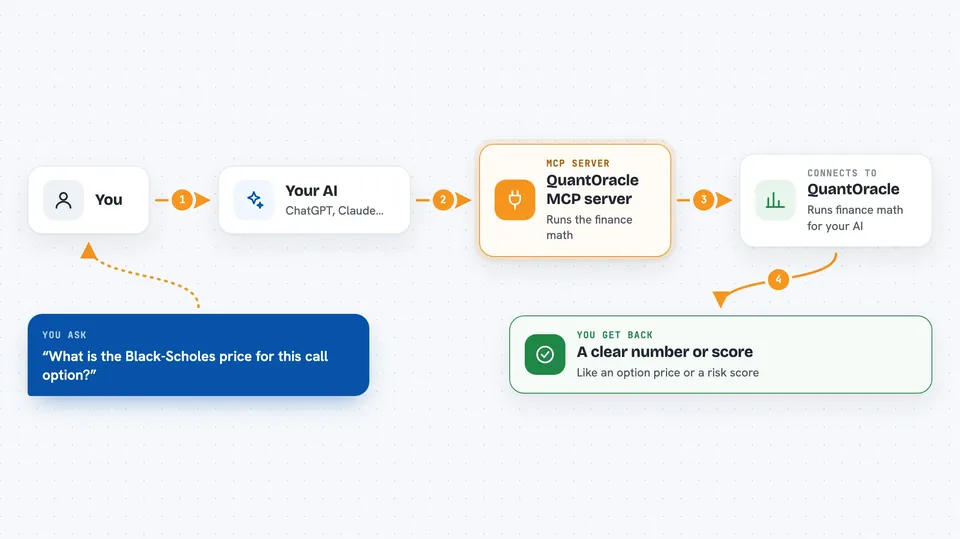
On its own, your AI can only chat. It cannot reliably do complex finance math. An MCP server is a small helper program that gives your AI a new skill or a connection to a service. This one connects your AI to QuantOracle, so when you ask a finance question, the AI sends the numbers to QuantOracle and gets exact results back.
What this MCP server does
You ask your AI a finance question in plain words. The AI figures out which QuantOracle calculator fits. It sends the numbers to QuantOracle, which runs the formula. QuantOracle sends back the answer, like a price or a risk score. Your AI then explains that answer to you in the chat.
 Click to zoom
What you can do with it
- Price options and see the Greeks
- Calculate risk metrics for a portfolio
- Run Monte Carlo simulations for future scenarios
- Size a position using the Kelly Criterion
- Compute technical indicators like RSI and MACD
- Find the value at risk (VaR) for your holdings
- Backtest a simple trading strategy
Try asking your AI
- “What is the Black-Scholes price for a call option with spot 100, strike 105, 6 months to expiry, 5% interest rate, and 20% volatility?”
- “Calculate the Sharpe ratio for these monthly returns: 1%, -0.5%, 0.8%, -0.3%, 1.2%.”
- “How much should I bet if my win rate is 55% and my average win is 1.5 times my average loss?”
- “Run a Monte Carlo simulation for a $100,000 portfolio with 8% expected return, 15% volatility, over 10 years.”
What it gives back to you
You get back clear numbers, like a price, a percentage, or a list of metrics. The AI shows these in the chat, often with a short explanation. For simulations, you might see a range of outcomes or a median value. For risk, you get scores like Sharpe ratio or VaR.
Before you start
What you need
- An AI tool that supports MCP, like Claude Desktop or Cursor
- Node.js installed on your computer (the free software that runs the helper)
Good to know
Some advanced features like composite workflows and live data cost money per call, so keep an eye on usage if you enable them.
Install it with your AI
Add QuantOracle MCP server to your AI, no technical skills needed
You don't install anything by hand. You copy one prompt, paste it into an AI that can work on your computer, and it checks, installs and connects the server for you, asking you when it needs something.
Sign in to get the install prompt
Members get a ready-made prompt that lets the Claude desktop app check QuantOracle MCP server, install it and connect it for them, step by step. You don't need any technical skills: you copy, paste and answer a few questions. Your connected AI can also find and install any of the 4,609 MCP servers here for you.
Who it's for
This is most useful for finance professionals, analysts, and anyone who needs quick, accurate financial calculations without doing them by hand.



