MCP server · Analytics
ReplenishRadar MCP server
Lets your AI check stockout risks, forecasts, and purchase orders from your ReplenishRadar inventory data.
This is a helper that connects your AI assistant to ReplenishRadar, a tool that tracks inventory for Shopify and Amazon sellers. Once it is set up, you can ask your AI plain questions about your stock, and it will look up the answers in your ReplenishRadar account. It is handy if you manage stock, buying, or suppliers and want quick answers without clicking around a dashboard.
What is an MCP server? The 30-second version
On its own, your AI can only chat with you. An MCP server is a small helper program that gives your AI a new skill or a connection to an app. This one connects your AI to ReplenishRadar, so when you ask about your inventory, the AI can look things up there and bring the answer back to your chat. You do not need to understand how it works under the hood; you just add it once and then talk to your AI like normal.
What this MCP server does
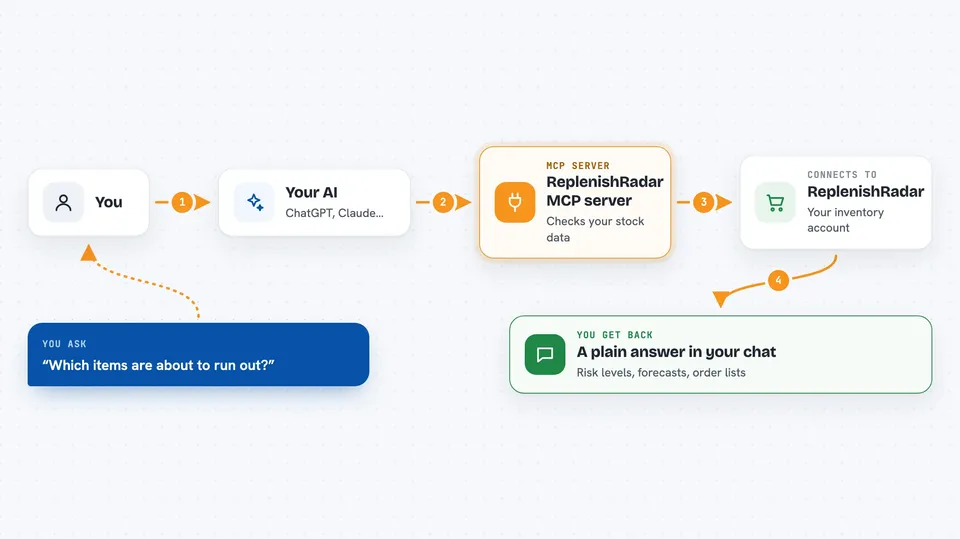
You ask your AI something like which items are about to run out. The AI sends that question to this helper, which talks to your ReplenishRadar account. ReplenishRadar sends back the numbers, like risk levels, forecasts, or a list of purchase orders. The AI then explains it to you in the chat in plain words. Some actions, like creating a draft purchase order or adding a note, can also be done this way when you ask.
 Click to zoom
What you can do with it
- Check which products are at risk of running out of stock
- See demand forecasts for your items
- List your suppliers and purchase orders
- Look at sales history and top sellers
- Find slow-moving items and estimate lost sales
- Create a draft purchase order or add a note to one
- Acknowledge alerts or request approval for a purchase order
Try asking your AI
- “What are my top stockout risks right now?”
- “Show me the demand forecast for my best-selling item”
- “List my open purchase orders and their status”
- “Which items are slow movers this month?”
What it gives back to you
You get answers in your chat, like a list of items with risk levels, a table of purchase orders, or a short summary of your sales. It can also show numbers like inventory value or estimated lost sales. If you ask it to create a draft purchase order, it will tell you it made the draft and give you the details. Nothing is sent to a supplier unless a human has approved it first.
Before you start
What you need
- A ReplenishRadar account (paid plans start at $99/mo)
- An API key from ReplenishRadar (Settings > API Keys)
- The Claude desktop app or another MCP-compatible client
- Node.js installed on your computer (the setup uses a command called npx)
Good to know
Some actions can change your inventory or send purchase orders, but purchase orders always start as drafts and sending only works after a human approves them. Be careful with your API key and check any draft before sending.
Install it with your AI
Add ReplenishRadar MCP server to your AI, no technical skills needed
You don't install anything by hand. You copy one prompt, paste it into an AI that can work on your computer, and it checks, installs and connects the server for you, asking you when it needs something.
Sign in to get the install prompt
Members get a ready-made prompt that lets the Claude desktop app check ReplenishRadar MCP server, install it and connect it for them, step by step. You don't need any technical skills: you copy, paste and answer a few questions. Your connected AI can also find and install any of the 4,361 MCP servers here for you.
Who it's for
Shopify and Amazon sellers, inventory managers, and buyers who want to ask their AI quick questions about stock, forecasts, and purchase orders.