MCP server · Analytics
MLflow MCP server
by us-all
Lets your AI look up MLflow experiments, runs, models, and traces and summarize them for you.
This is a helper that connects your AI assistant to MLflow, the tool data teams use to keep track of machine learning experiments. Once it is connected, you can ask your AI questions about your experiments and runs in plain English instead of clicking around the MLflow website. It is handy for data scientists, ML engineers, and anyone who works with model training results.
What is an MCP server? The 30-second version
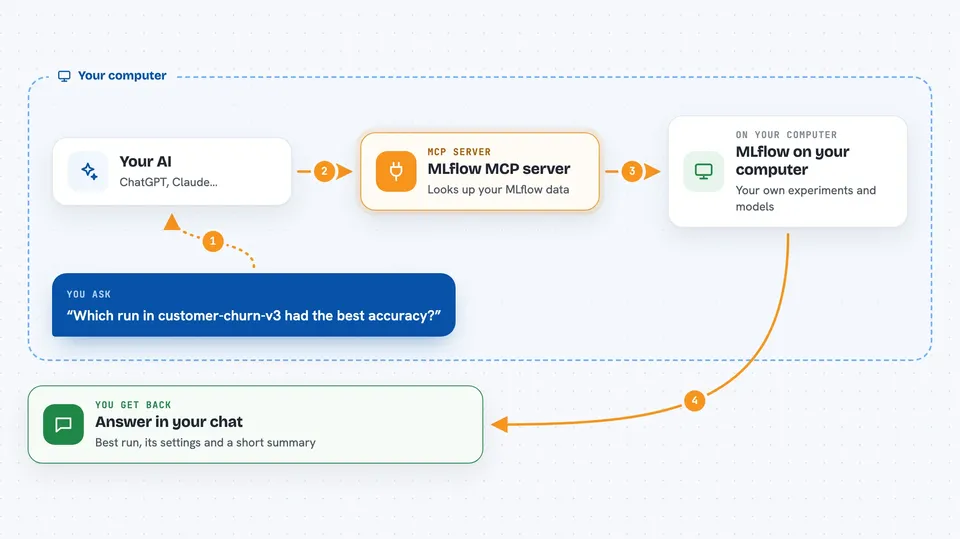
On its own, your AI can only chat. An MCP server is a small helper program that gives your AI a new skill or a connection to another app. This one connects your AI to MLflow, so when you ask about an experiment, a run, or a registered model, the AI can actually go look it up and bring the answer back. You do not need to understand how it works under the hood; you just ask, and it fetches.
What this MCP server does
You ask your AI something like which run in an experiment had the best accuracy. The AI uses this helper, and the helper talks to your MLflow server. MLflow sends back the runs, metrics, parameters, and other details. The helper tidies that up and hands it to the AI, which shows you the answer in the chat. It can also summarize a whole experiment in one go, so you get the top runs and metric stats without waiting for several separate lookups.
 Click to zoom
What you can do with it
- Find the best run in an experiment by a metric like accuracy or loss
- Compare several runs side by side and show which settings differ
- Summarize an experiment with its top runs and metric statistics
- Look up a registered model, its versions, and its aliases
- Inspect traces from AI apps and group failed ones by error type
- Read and write feedback notes on traces
- Create or update experiments, runs, and models when write mode is turned on
Try asking your AI
- “In the customer-churn-v3 experiment, find the run with the highest val_accuracy and show its hyperparameters.”
- “Compare the top 5 runs of experiment 12 by validation_loss and show which hyperparameters differ.”
- “Get the latest version of the recommendation_v2 registered model with the champion alias and show its training metrics.”
- “Find traces with status ERROR from the last 24 hours in experiment 12 and group the failures by exception type.”
What it gives back to you
You get answers in the chat: lists of runs, tables of metrics and parameters, summaries with the best values, and details about models and traces. For comparisons, it can show a side-by-side card with the differences highlighted. If you turn on write mode, it can also report the changes it made, like a new tag or an updated model version.
Before you start
What you need
- An MLflow server you can reach (a web address like http://localhost:5000 or your Databricks workspace URL)
- Node.js 18 or newer if you install it with npx, or Docker if you prefer that route
- A token or username and password if your MLflow server requires sign-in
Good to know
By default it can only read, but if you turn on write mode it can create, change, or delete experiments, runs, models, and traces, so be careful with what you ask it to do.
Install it with your AI
Add MLflow MCP server to your AI, no technical skills needed
You don't install anything by hand. You copy one prompt, paste it into an AI that can work on your computer, and it checks, installs and connects the server for you, asking you when it needs something.
Sign in to get the install prompt
Members get a ready-made prompt that lets the Claude desktop app check MLflow MCP server, install it and connect it for them, step by step. You don't need any technical skills: you copy, paste and answer a few questions. Your connected AI can also find and install any of the 4,361 MCP servers here for you.
Who it's for
Data scientists, machine learning engineers, and analysts who use MLflow and want to ask questions about their experiments in plain language.