
MCP server · Developer tools
Repo Test Architect MCP server
by RepoAssay
Let your AI review your codebase and suggest which tests to write next, with evidence.
Repo Test Architect is a helper that looks at your code project and tells you where tests are missing or weak. It works on many languages, including JavaScript, Python, C#, Go, Ruby, PHP, Swift, Rust, Kotlin, and Elixir. It is handy if you work on a codebase and want a clear, honest picture of your test coverage before you start writing new tests.
What is an MCP server? The 30-second version
On its own, your AI can only chat with you. An MCP server is a small helper program that gives your AI a new skill or a connection to a tool. This one connects your AI to Repo Test Architect, which reads your project files and builds a picture of your tests. Once connected, your AI can ask it to review your repository and come back with findings and a test plan.
What this MCP server does
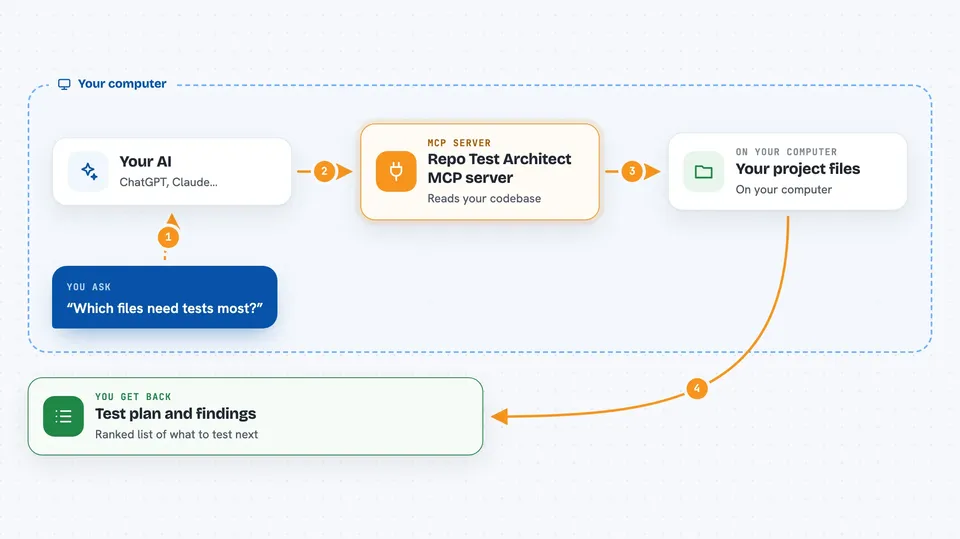
You ask your AI to review your codebase for test gaps. Your AI passes that request to Repo Test Architect. The helper reads your project files locally, spots the languages and test frameworks in use, and builds a map of what is tested and what is not. It then ranks the most valuable test work and writes a plan with suggested commands. Your AI shows you the findings and the plan right in the chat.
 Click to zoom
What you can do with it
- Review a whole repository and list test gaps
- Rank which files most need tests
- Generate a step-by-step test plan
- Show which test frameworks your project uses
- Report project stats like candidate counts and commands
- Point out test placement issues across project boundaries
- Run a readiness check on your local setup
Try asking your AI
- “Analyze my repository and tell me which files need tests most.”
- “Give me a test plan for the Python part of my project.”
- “What test frameworks are used in this codebase?”
- “Show me the top findings from a test architecture review.”
What it gives back to you
You get back a written summary of findings, a ranked list of test candidates, and a suggested test plan. It also includes project stats and the exact commands you can run to verify things. In the chat, this looks like a structured report with headings and bullet points, not raw code.
Before you start
What you need
- Node.js 20 or newer installed on your computer
- An MCP-capable client like Claude Desktop or another AI app that supports MCP servers
- Your project files on the same computer where the helper runs
Good to know
This tool only reads your files and gives advice; it does not change your code, but treat its findings as review input rather than automatic instructions.
Install it with your AI
Add Repo Test Architect MCP server to your AI, no technical skills needed
You don't install anything by hand. You copy one prompt, paste it into an AI that can work on your computer, and it checks, installs and connects the server for you, asking you when it needs something.
Sign in to get the install prompt
Members get a ready-made prompt that lets the Claude desktop app check Repo Test Architect MCP server, install it and connect it for them, step by step. You don't need any technical skills: you copy, paste and answer a few questions. Your connected AI can also find and install any of the 4,361 MCP servers here for you.
Who it's for
Developers, tech leads, and anyone who works on a codebase and wants a clear, evidence-based view of test coverage.





