
MCP server · Research
amenbo MCP server
by Rererr
Let your AI read Japanese web pages in small, token-friendly pieces instead of dumping whole pages into the chat.
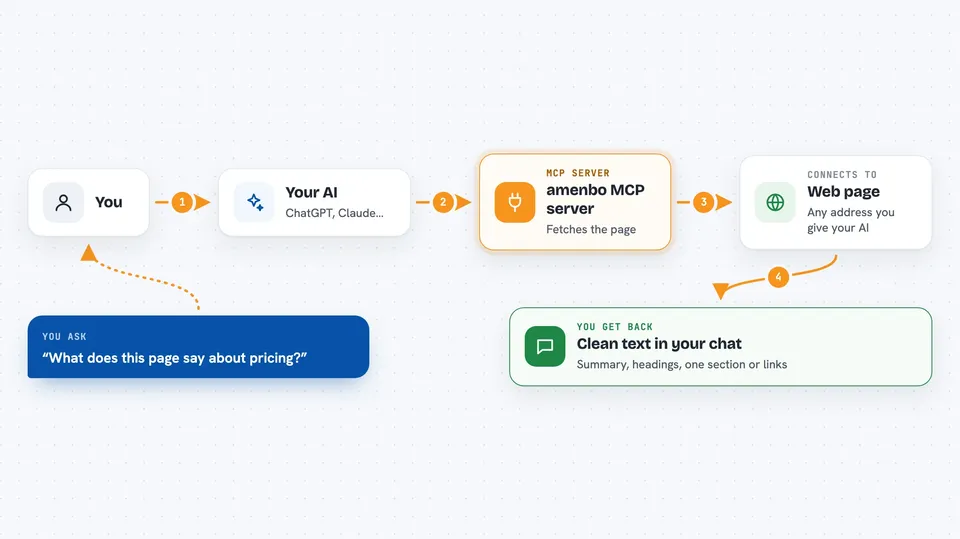
amenbo is a small helper that lets your AI assistant open web pages and bring back just the parts you need. It is built with Japanese sites in mind, so pages that usually come back as garbled text or messy blobs tend to work better here. It is handy if you often ask your AI to look things up on Japanese websites.
What is an MCP server? The 30-second version
On its own, your AI can only chat with what it already knows. An MCP server is a small helper program you connect once, and it gives your AI a new skill. This one gives your AI the ability to fetch web pages, list links, and take screenshots. So when you ask about a page, the AI quietly uses amenbo to go get the content and then answers you.
What this MCP server does
You ask your AI something like "what does this page say about pricing?" and give it a web address. The AI passes that address to amenbo, which fetches the page politely and turns it into clean text. For long pages, amenbo can first show just the headings and how big each part is, so the AI can pick only the section you care about. It also handles Japanese text encodings, removes furigana clutter, and can take a screenshot when a page is mostly images. If you ask about the same page again and nothing changed, it tells the AI so instead of repeating everything.
 Click to zoom
What you can do with it
- Fetch a web page and turn it into clean readable text
- Show just the outline of a long page with headings and sizes
- Pull out one specific section of a page by its heading
- List the links on a site, filtered by keyword or pattern
- Take a screenshot of a page when text extraction is not enough
- Read PDF files from a web address
- Tell you when a page has not changed since last time
Try asking your AI
- “Summarize this Japanese news article for me: <url>”
- “Show me the outline of this long page first, then the pricing section”
- “List the blog links on this site that mention 料金”
- “Take a screenshot of this page so I can see the layout”
What it gives back to you
You get back text in the chat: a summary, a list of headings, a single section, or a list of links. Screenshots come back as images you can look at. If a page has not changed since you last fetched it, the AI just tells you that instead of repeating the whole thing. Sometimes you get only the parts that changed.
Before you start
What you need
- Node.js installed on your computer
- The amenbo package installed (npm install -g amenbo)
- A one-time browser download if you want screenshots (npx -y amenbo install-browser)
Good to know
It only reads public web pages and will not bypass sites that block bots, so some pages simply will not load.
Install it with your AI
Add amenbo MCP server to your AI, no technical skills needed
You don't install anything by hand. You copy one prompt, paste it into an AI that can work on your computer, and it checks, installs and connects the server for you, asking you when it needs something.
Sign in to get the install prompt
Members get a ready-made prompt that lets the Claude desktop app check amenbo MCP server, install it and connect it for them, step by step. You don't need any technical skills: you copy, paste and answer a few questions. Your connected AI can also find and install any of the 4,609 MCP servers here for you.
Who it's for
Anyone who asks their AI to look things up on Japanese websites, like researchers, writers, marketers, and office workers gathering information.


