
MCP server · Developer tools
GroundTruth MCP server
by rm-rf-prod
Lets your AI pull live library docs and audit your code for outdated or unsafe patterns.
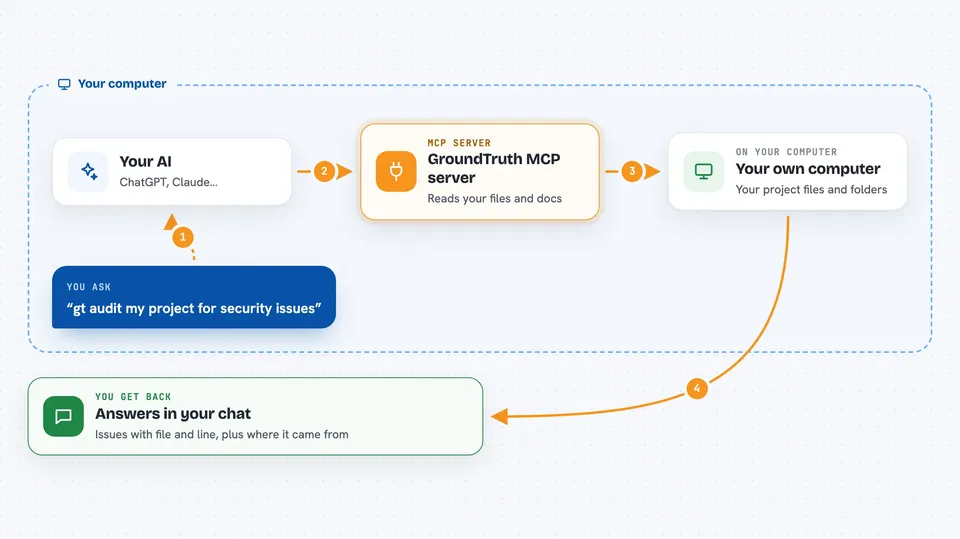
GroundTruth is a helper you add to your AI assistant so it can look up current documentation for the libraries you use and check your code for common mistakes. It runs on your own computer, needs no account, and works with tools like Claude Code, Cursor, Claude Desktop, and VS Code. It is handy if you write code with AI help and keep getting answers based on old versions.
What is an MCP server? The 30-second version
On its own, your AI can only chat with what it already learned. An MCP server is a small helper program that gives your AI a new skill or a connection to something outside the chat. This one connects your AI to live documentation sources and to the files in your project. So when you ask about a library or want your code checked, the AI can go look it up for real instead of guessing.
What this MCP server does
You ask your AI something like "use gt for nextjs" or "gt audit". The AI passes that request to GroundTruth, which runs on your machine. GroundTruth then fetches current docs from the library's own sources, or reads your project files and checks them against a list of known problem patterns. It hands the results back to your AI, which explains them to you in the chat. Every answer includes where it came from and when it was fetched, so you can see the source.
 Click to zoom
What you can do with it
- Look up live documentation for a library and a specific topic
- Audit your project files and point to issues at exact file and line
- Read your dependency list and pull best practices for each one
- Check release notes before you upgrade a library
- Compare two or three libraries side by side
- Search security and web standards topics like OWASP or WCAG
- Find real code examples from GitHub for a library and pattern
Try asking your AI
- “use gt for nextjs caching”
- “gt audit my project for security issues”
- “use gt to check if CSS container queries work in Safari”
- “use gt for drizzle migrations and show me an example”
What it gives back to you
You get answers in the chat: documentation summaries, lists of issues with the file and line number, code examples, or comparisons. Audit results show each problem, how serious it is, and a suggested fix. Successful doc answers include a short evidence footer with the source links and the date they were fetched. If nothing useful was found, it tells you that plainly and suggests what to try instead.
Before you start
What you need
- Node.js version 24 or newer installed on your computer
- The Claude desktop app, Claude Code, Cursor, or VS Code with MCP support
- Optional: a GitHub token to raise the GitHub lookup limit from 60 to 5,000 requests per hour
Good to know
The audit tool reads the files in the project folder you point it at, so only run it on folders you are comfortable letting it look through.
Install it with your AI
Add GroundTruth MCP server to your AI, no technical skills needed
You don't install anything by hand. You copy one prompt, paste it into an AI that can work on your computer, and it checks, installs and connects the server for you, asking you when it needs something.
Sign in to get the install prompt
Members get a ready-made prompt that lets the Claude desktop app check GroundTruth MCP server, install it and connect it for them, step by step. You don't need any technical skills: you copy, paste and answer a few questions. Your connected AI can also find and install any of the 4,609 MCP servers here for you.
Who it's for
Developers and technical teams who use AI coding assistants and want answers based on current library documentation instead of outdated training data.




