MCP server · Analytics · official
RooQuiz MCP server
by rooquiz · official
Build quizzes, capture leads, and check how people move through your quiz funnels, right from your AI chat.

RooQuiz is a simple online tool for making quizzes that collect leads and get shared around. This MCP server connects your AI assistant to your RooQuiz account so you can build quizzes, look at leads, and check your numbers just by asking. It is handy if you run quizzes for marketing, coaching, or lead generation and want to skip all the clicking around.
What is an MCP server? The 30-second version
On its own, your AI can only chat. An MCP server is a small helper that gives your AI a new skill or a connection to an app. This one connects your AI to RooQuiz, so when you ask about your quizzes or leads, the AI can actually go look them up and do things there for you. You sign in with your RooQuiz account once, and after that you just talk normally.
What this MCP server does
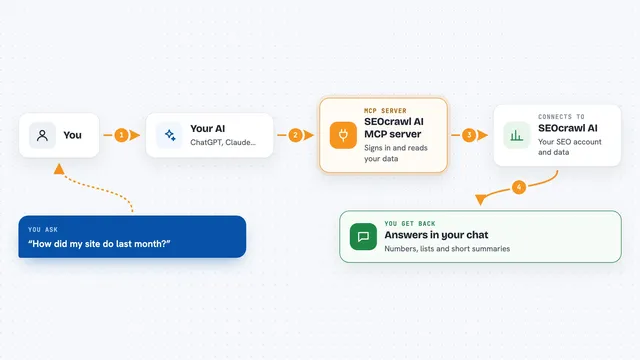
You ask your AI something in plain words, like which quiz is losing the most people. The AI passes that request to this helper, which talks to your RooQuiz account. RooQuiz sends back the details, such as your quiz list, lead records, or funnel numbers. The AI then turns that into a normal answer in your chat. If you ask it to change something, like tagging a lead, it makes that change in RooQuiz for you.
 Click to zoom
What you can do with it
- Create knowledge, scored, and outcome quizzes, including from templates
- Edit questions, scoring rules, and dimension analysis
- List, tag, assign, and comment on leads captured from quiz results
- Look up respondents, submissions, and quiz statistics
- Check funnel analytics to see where people drop off
- Review and reschedule bookings made through results pages
- Translate a quiz into other languages while keeping question codes
Try asking your AI
- “Show me my coaching templates and create a scored quiz from the readiness one”
- “List the leads my Wheel of Life quiz captured this week and tag anyone who scored under 40”
- “Which of my quizzes has the worst completion rate, and where do people drop off?”
- “Translate my promotion-readiness quiz into Spanish and German, keeping the question codes”
What it gives back to you
You get back plain answers in your chat: lists of quizzes or leads, summaries of how people answered, funnel numbers, or confirmation that a change was made. Respondent names, emails, and phone numbers come back partly hidden, like j***g@example.com, so you refer to a person by their id instead. If you ask for a preview quiz without signing in, you get a shareable link you can open right away.
Before you start
What you need
- A RooQuiz account (you sign in when your AI asks, no API key needed)
- An AI client that can add a custom connector, such as Claude, ChatGPT, Cursor, or VS Code
Good to know
It can change things in your RooQuiz account, like tagging or assigning leads, so check before you confirm a request that edits data.
Install it with your AI
Add RooQuiz MCP server to your AI, no technical skills needed
You don't install anything by hand. You copy one prompt, paste it into an AI that can work on your computer, and it checks, installs and connects the server for you, asking you when it needs something.
Sign in to get the install prompt
Members get a ready-made prompt that lets the Claude desktop app check RooQuiz MCP server, install it and connect it for them, step by step. You don't need any technical skills: you copy, paste and answer a few questions. Your connected AI can also find and install any of the 4,361 MCP servers here for you.
Who it's for
Marketers, coaches, and small teams who use quizzes to capture leads and want to check or manage them without leaving their AI chat.