
MCP server · Security
IntoDNS MCP server
by RoscoNL
Lets your AI run live DNS and email security checks on any domain and explain what is wrong.
This is a helper that connects your AI assistant to IntoDNS.ai, a free service that checks how a domain is set up for DNS and email security. Once it is connected, you can just ask your AI to scan a domain and it will go and run the checks for you. It is handy for anyone who has to look after a website or email setup but does not want to read raw DNS records by hand.
What is an MCP server? The 30-second version
On its own, your AI can only chat with you. An MCP server is a small helper program that gives your AI a new skill or a connection to an app or service. This one connects your AI to IntoDNS.ai, so when you ask about a domain, the AI can actually go and look things up there instead of guessing. You do not need an account or a key for the public checks.
What this MCP server does
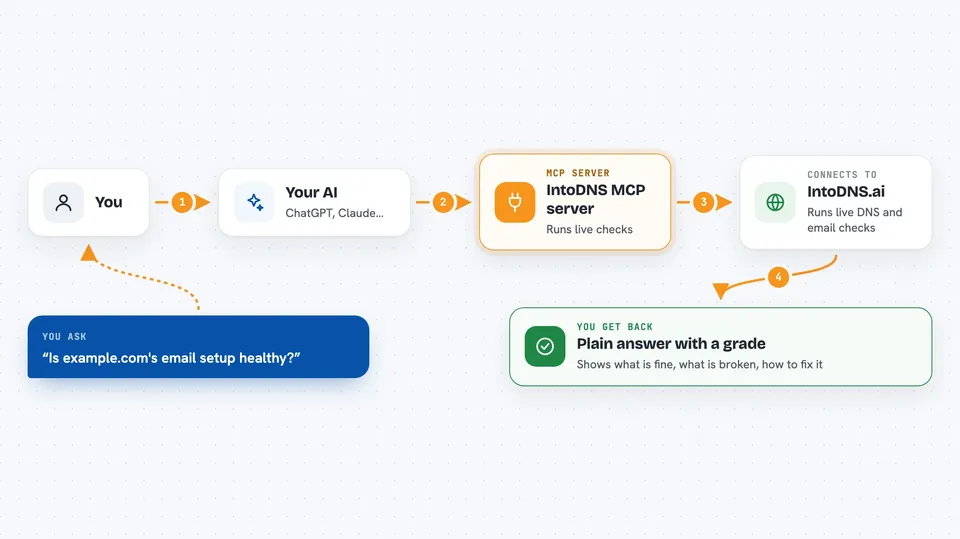
You ask your AI something like whether a domain's email setup is healthy. The AI passes that request to this helper, and the helper talks to IntoDNS.ai on your behalf. IntoDNS.ai runs live checks on the domain's DNS records, email settings, and website security headers. The results come back and the AI turns them into a plain answer, a list of issues, or a report you can read or copy.
 Click to zoom
What you can do with it
- Scan a domain and get a grade, score, and list of issues
- Check SPF, DKIM, and DMARC email settings
- Look up DNS records like MX, TXT, CAA, and DNSSEC
- Check whether a domain meets Google and Yahoo sender rules
- Check SMTP TLS certificates and reverse DNS for mail servers
- Audit a website's HTTP security headers and get a suggested setup
- Create a fixed report snapshot you can cite in a ticket
Try asking your AI
- “Scan example.com and summarize the top DNS and email security issues”
- “Give me the full DNS and email security report for example.com as Markdown”
- “Check whether example.com meets Google and Yahoo sender requirements”
- “Show the SPF lookup graph and tell me if example.com is close to the 10 lookup limit”
What it gives back to you
You get back a written answer in the chat, usually with a grade or score, a list of what is fine and what is broken, and suggestions for fixing it. Some tools return structured reports you can read as Markdown or copy as JSON, plus links you can cite. It can also hand you a PDF report link or a small SVG badge for a domain.
Before you start
What you need
- The Claude desktop app or another app that supports MCP servers
- Node.js 18 or newer installed on your computer
- An internet connection so the helper can reach IntoDNS.ai
Good to know
Most of what it does is read-only checks, but a few tools create test addresses or report snapshots on the IntoDNS.ai side, so only run those on domains you are allowed to test.
Install it with your AI
Add IntoDNS MCP server to your AI, no technical skills needed
You don't install anything by hand. You copy one prompt, paste it into an AI that can work on your computer, and it checks, installs and connects the server for you, asking you when it needs something.
Sign in to get the install prompt
Members get a ready-made prompt that lets the Claude desktop app check IntoDNS MCP server, install it and connect it for them, step by step. You don't need any technical skills: you copy, paste and answer a few questions. Your connected AI can also find and install any of the 4,609 MCP servers here for you.
Who it's for
People who look after websites or email setups, like IT admins, support staff, and anyone who has to check why email is landing in spam.



