
MCP server · API
x402 Service Discovery MCP server
by rplryan
Lets your AI search a live catalog of pay-per-call web services and check their health and trust scores.
This is a helper that connects your AI to x402Scout, an online catalog of web services that charge small per-use fees. It is handy if you or your team work with these pay-per-call services and want your AI to find, check, and compare them for you. You do not need to be a programmer to understand what it does.
What is an MCP server? The 30-second version
On its own, your AI can only chat with you using what it already knows. An MCP server is a small helper program that gives your AI a new skill or a connection to an outside service. This particular helper connects your AI to the x402Scout catalog, a public list of pay-per-call web services. Once connected, your AI can look things up in that catalog and bring answers back to your chat.
What this MCP server does
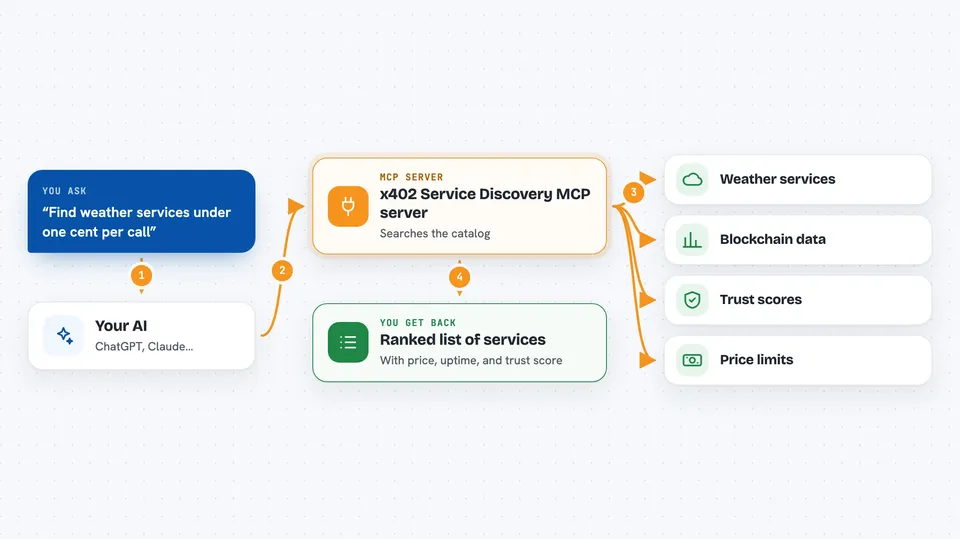
You ask your AI a question, like which services offer weather data under a certain price. Your AI passes that request to this helper. The helper talks to the x402Scout catalog over the internet and searches it by keyword, category, or price limit. It also checks whether a service is currently online and how quickly it responds. Then your AI shows you a ranked list with details like price, uptime, and trust score.
 Click to zoom
What you can do with it
- Search the catalog for services by keyword or category
- Filter results by a maximum price per call
- Check whether a service is online and how fast it responds
- Look up trust and reputation signals for a service
- Run a compliance scan on a service before you rely on it
- Register a new service in the catalog
- View a spend log and budget status for routed payments
Try asking your AI
- “Find blockchain analytics services under one cent per call”
- “Is the CoinGecko x402 service online right now”
- “Show me the top ten services by trust score in the data category”
- “Scan this service URL for x402 compliance and tell me the trust score”
What it gives back to you
You get back a ranked list of services with their price, uptime percentage, response time, and trust score. For a health check, you get a simple online or offline answer with a speed number. For a scan, you get a compliance grade and any mismatches found. Everything shows up as text in your chat, ready to read or copy.
Before you start
What you need
- The Claude desktop app, Cursor, or Windsurf (an app that supports MCP servers)
- Docker or Node.js installed, depending on which setup option you pick
- A small amount of USDC cryptocurrency if you use the paid search, health, or scan tools
Good to know
Some tools cost real money in USDC (small amounts per call), and the routing tools can spend from your budget, so set a sensible limit before you use them.
Install it with your AI
Add x402 Service Discovery MCP server to your AI, no technical skills needed
You don't install anything by hand. You copy one prompt, paste it into an AI that can work on your computer, and it checks, installs and connects the server for you, asking you when it needs something.
Sign in to get the install prompt
Members get a ready-made prompt that lets the Claude desktop app check x402 Service Discovery MCP server, install it and connect it for them, step by step. You don't need any technical skills: you copy, paste and answer a few questions. Your connected AI can also find and install any of the 4,609 MCP servers here for you.
Who it's for
Developers, analysts, and anyone who works with pay-per-call web services and wants their AI to find and check them quickly.


