MCP server · Analytics
Search Console MCP server
Ask your AI about your site's search traffic, rankings, and ad earnings without exporting CSVs.

This is a helper that connects your AI assistant to Google Search Console, Bing Webmaster Tools, Google Analytics 4, and Google AdSense. Instead of logging into four dashboards and copying numbers into a spreadsheet, you just ask a question in plain English. It is handy for anyone who looks after a website and wants quick answers about traffic, rankings, or revenue.
What is an MCP server? The 30-second version
On its own, your AI can only chat. It cannot see your website data. An MCP server is a small helper program that gives your AI a new skill or a connection to an app or service. This one connects your AI to Google Search Console, Bing Webmaster Tools, Google Analytics 4, and AdSense, so it can look things up and run checks for you when you ask.
What this MCP server does
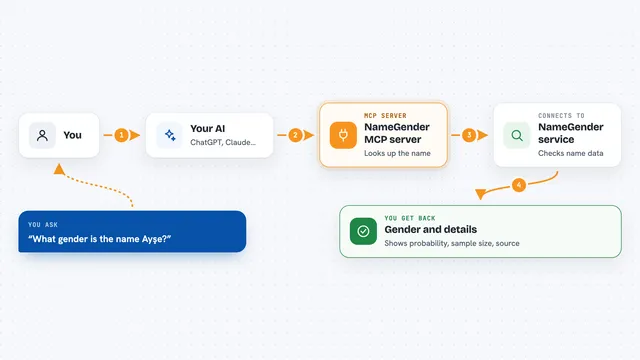
You type a question in your AI chat, like asking why traffic dropped last week. Your AI passes that request to this helper program. The helper talks to the search engines and analytics services using your own accounts, then does some of the math itself, like spotting sudden drops or finding pages that compete for the same keyword. The result comes back to your AI, which explains it to you in the chat.
 Click to zoom
What you can do with it
- See which pages lost traffic and when the drop started
- Find keywords sitting just outside the top results that could be quick wins
- Check whether two of your pages are competing for the same search term
- Compare how your site performs on Google versus Bing
- Submit new URLs for indexing on Google and Bing
- Review your AdSense earnings, payments, and account alerts
- Run a full site health check and get a summary
Try asking your AI
- “My traffic dropped this week vs. last. Find exactly when it started and which pages are responsible.”
- “Find keywords for example.com ranking positions 8 to 15 with 1,000 or more impressions.”
- “Check for keyword cannibalization. Are two of my pages competing for the same query?”
- “Compare Google vs Bing performance for the last 30 days. Where is Bing winning?”
What it gives back to you
You get answers in your chat, not raw files. That might be a short summary of what changed, a list of pages or keywords, a table of numbers, or a note that an action was done, like a URL being submitted for indexing. The helper does some analysis before the data reaches your AI, so you often see findings rather than just rows.
Before you start
What you need
- A Google account with access to your Search Console properties
- Node.js installed on your computer (the setup command uses npx)
- A Bing Webmaster Tools API key if you want Bing data (the Bing site gives you one for free)
- An MCP client like Claude Desktop or Cursor to add the server to
Good to know
It can submit URLs for indexing and change site settings, and it reads your private search and revenue data, so only connect accounts you are allowed to share with your AI tool.
Install it with your AI
Add Search Console MCP server to your AI, no technical skills needed
You don't install anything by hand. You copy one prompt, paste it into an AI that can work on your computer, and it checks, installs and connects the server for you, asking you when it needs something.
Sign in to get the install prompt
Members get a ready-made prompt that lets the Claude desktop app check Search Console MCP server, install it and connect it for them, step by step. You don't need any technical skills: you copy, paste and answer a few questions. Your connected AI can also find and install any of the 4,361 MCP servers here for you.
Who it's for
Website owners, SEO specialists, content managers, and small marketing teams who want quick answers about search traffic and ad revenue without juggling dashboards.