
MCP server · Research
ScraperAPI MCP server
by scraperapi
Lets your AI fetch web pages and pull structured results from Google, Amazon, Walmart and eBay for you.
This is a helper that connects your AI assistant to ScraperAPI, a service that fetches web pages for you. Once it is set up, you can ask your AI to grab a page, search Google, or look up a product, and it will bring the results back into the chat. It is handy for anyone who does research, price checks, or competitor watching without wanting to click around all day.
What is an MCP server? The 30-second version
On its own, your AI can only chat with you using what it already learned. An MCP server is a small helper program that gives your AI a new skill or a connection to an outside service. This one connects your AI to ScraperAPI, which is a service that loads web pages and returns their content. So when you ask your AI to look something up online, it can hand that job to this helper, and the helper does the fetching for you.
What this MCP server does
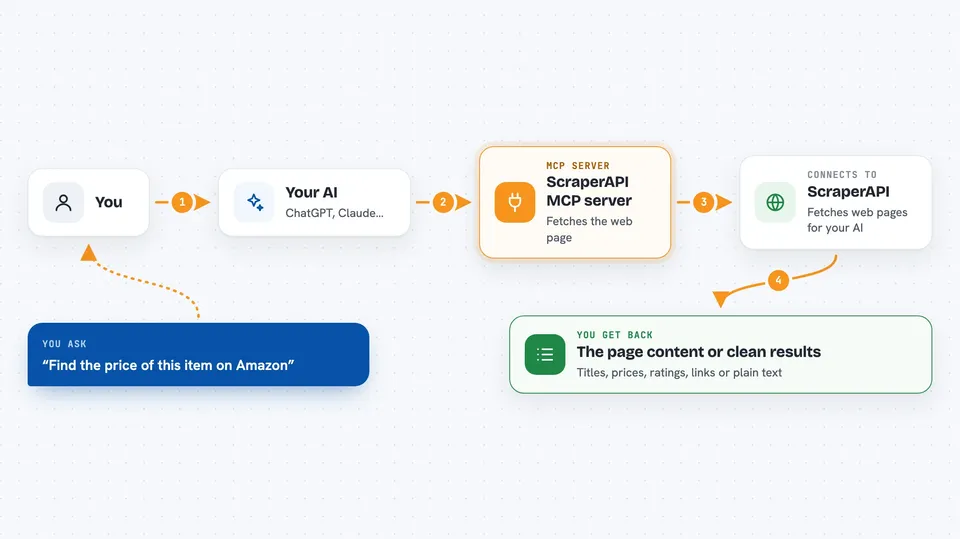
You ask your AI something like find the price of this item on Amazon or grab the text of this article. Your AI passes the request to this helper program running on your computer. The helper sends the request to ScraperAPI, which loads the page, gets past basic blocking, and returns the content. For supported sites, ScraperAPI can also hand back neatly organized data instead of raw page text. Your AI then reads that and gives you the answer in the chat.
 Click to zoom
What you can do with it
- Fetch the text or content of almost any web page
- Search Google and get back the results as clean data
- Look up an Amazon product by its product code and get details
- Search Amazon, Walmart or eBay and get product listings
- Pull customer reviews for a Walmart product
- Search Google News, Jobs, Shopping or Maps for a topic
- Download an image from a URL
Try asking your AI
- “Grab the main text of this article and summarize it for me: <url>”
- “Search Google for best noise cancelling headphones and list the top 5 results”
- “Look up this Amazon product B08N5WRWNW and tell me the price and rating”
- “Search eBay for used mechanical keyboards under 50 dollars and show me the top listings”
What it gives back to you
It gives back the content of the page you asked for, or a clean list of results for searches. For product and search lookups, you get organized details like titles, prices, ratings and links, which your AI can turn into a short summary or a table. For a plain page, you get the text or markdown, and your AI can read it and answer your question. You see all of this right in the chat, as a written answer or a list.
Before you start
What you need
- A ScraperAPI account and API key (a kind of password for apps; you get it from your ScraperAPI dashboard)
- Python 3.11 or newer, or Docker if you prefer that route
- An AI client that supports MCP servers, like the Claude desktop app
Good to know
ScraperAPI is a paid service, so each lookup uses up some of your account credits, and some sites may block scraping or have rules about it.
Install it with your AI
Add ScraperAPI MCP server to your AI, no technical skills needed
You don't install anything by hand. You copy one prompt, paste it into an AI that can work on your computer, and it checks, installs and connects the server for you, asking you when it needs something.
Sign in to get the install prompt
Members get a ready-made prompt that lets the Claude desktop app check ScraperAPI MCP server, install it and connect it for them, step by step. You don't need any technical skills: you copy, paste and answer a few questions. Your connected AI can also find and install any of the 4,361 MCP servers here for you.
Who it's for
People who do online research, price comparisons, or competitor checks, like marketers, analysts, e-commerce sellers and writers.


