
MCP server · Browser automation
ScrapeUnblocker MCP server
Lets your AI fetch web pages that normally block bots, and run Google searches for you.
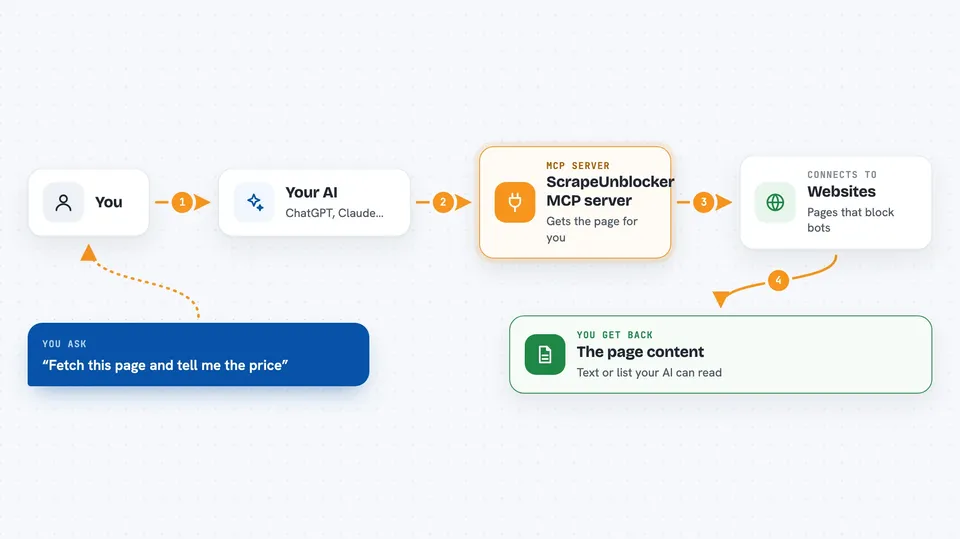
This is a small helper that lets your AI grab the contents of web pages that usually refuse to load for automated tools. It is handy if you have ever asked your AI to look something up online and it came back saying the page blocked it. You bring your own ScrapeUnblocker account and key, and the helper does the fetching for you.
What is an MCP server? The 30-second version
On its own, your AI can only chat with you using what it already knows. An MCP server is a small helper program that gives your AI a new skill or a connection to an outside service. This one connects your AI to ScrapeUnblocker, a service that fetches web pages for you even when those pages try to block automated visitors. So when you ask your AI to look at a page, it can actually go get that page instead of guessing.
What this MCP server does
You ask your AI something like fetch this page or search Google for this. Your AI passes that request to this helper, which talks to the ScrapeUnblocker service using your own key. ScrapeUnblocker loads the page in a real browser, gets past the anti-bot checks, and sends the page back. Your AI then reads that page and answers you, or shows you the raw page content if you asked for it.
 Click to zoom
What you can do with it
- Fetch the full HTML of a web page that normally blocks bots
- List the clickable and fillable parts of a page with ready-made selectors
- Click buttons, type into search boxes, and scroll before capturing a page
- Get a page back as structured data instead of raw HTML
- Run a Google search and get the organic results as a list
- Wait for a specific element or text to appear before grabbing the page
Try asking your AI
- “Fetch the HTML of https://www.example-shop.com/product/123 and tell me the price.”
- “This page keeps blocking me: https://example.com/article. Use fetch_html to get it.”
- “List the elements on https://example.com, then type laptop into the search box, press Enter, wait for results, and give me the HTML.”
- “Search Google for best running shoes 2026 and give me the top 5 links.”
What it gives back to you
You get back whatever you asked for: the page's HTML as text, a list of the page's elements with their selectors, structured data pulled from a page, or a list of Google search results. In the chat it usually shows up as text or a formatted list your AI can then summarise or pick apart for you. If a browser step fails, you get told which step failed, why, and the page content at that moment so you can try again.
Before you start
What you need
- A ScrapeUnblocker account and API key (sign up at app.scrapeunblocker.com; the key is like a password for the service)
- Node.js installed on your computer so the npx command can run
- An MCP client like Claude Desktop or Claude Code
Good to know
Your API key is tied to your ScrapeUnblocker account, so keep it private and be aware that heavy use may count against your plan or cost money.
Install it with your AI
Add ScrapeUnblocker MCP server to your AI, no technical skills needed
You don't install anything by hand. You copy one prompt, paste it into an AI that can work on your computer, and it checks, installs and connects the server for you, asking you when it needs something.
Sign in to get the install prompt
Members get a ready-made prompt that lets the Claude desktop app check ScrapeUnblocker MCP server, install it and connect it for them, step by step. You don't need any technical skills: you copy, paste and answer a few questions. Your connected AI can also find and install any of the 4,361 MCP servers here for you.
Who it's for
People who regularly ask their AI to look things up online and keep hitting pages that block automated visitors, like researchers, marketers, and anyone doing web research.


