
MCP server · Analytics
System Monitor MCP server
by seekrays
Lets your AI check your computer's CPU, memory, disk, network, and running programs for you.
This is a small helper program that lets your AI look at what is happening inside your computer. It reads things like how busy your processor is, how much memory is free, how full your disk is, and which programs are running. It is handy for anyone who wants a quick health check of their machine without opening a bunch of system tools.
What is an MCP server? The 30-second version
On its own, your AI can only chat with you. An MCP server is a small helper program that gives your AI a new skill or a connection to something. This one connects your AI to your own computer's system information, so it can look up things like CPU usage or disk space when you ask. You stay in the chat, and the helper does the looking.
What this MCP server does
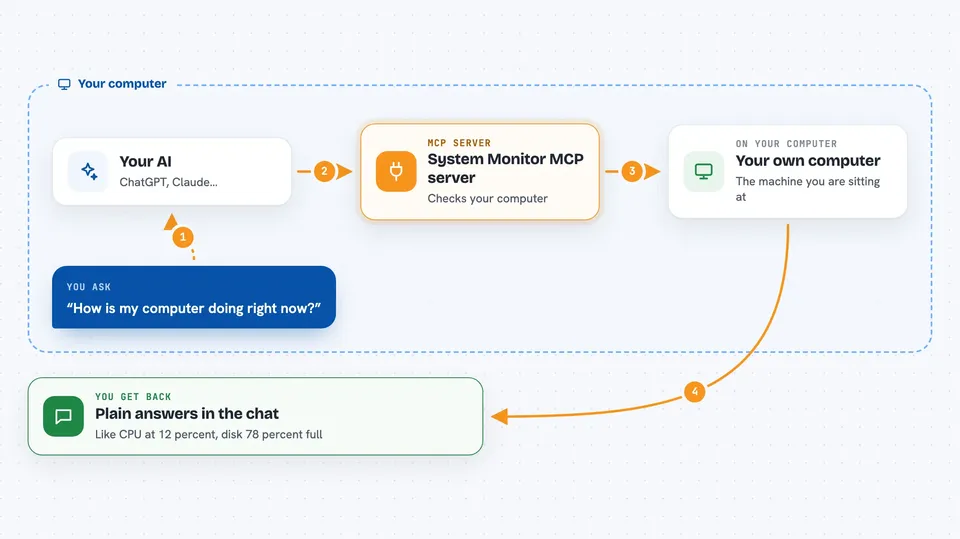
You ask your AI something like how your computer is doing. The AI sends that request to this helper program running on your machine. The helper reads the real numbers from your operating system, like CPU load, memory use, disk space, network traffic, and running processes. It sends those numbers back to the AI, and the AI explains them to you in plain words. No dashboards or menus to click through, just a question and an answer.
 Click to zoom
What you can do with it
- Check how much of your CPU is being used right now
- See how much memory and swap space is free
- Look at disk usage and how full your partitions are
- Review network interfaces and traffic numbers
- Get basic host details like uptime and boot time
- List the top running processes by CPU or memory
- Ask for details about one specific process by its ID
Try asking your AI
- “How is my computer doing right now? Check the CPU and memory.”
- “Is my disk getting full? Show me the disk usage.”
- “Which programs are using the most memory at the moment?”
- “What is my network traffic looking like today?”
What it gives back to you
You get answers in the chat, written in normal sentences. The AI might say your CPU is at 12 percent, or that your main disk is 78 percent full, or list the top five programs by memory with their numbers. Sometimes it will show a short list or table. It reads information only, so nothing on your computer gets changed.
Before you start
What you need
- The mcp-monitor program built and running on your computer
- An MCP-compatible AI app, like the Claude desktop app
- Basic comfort with running a command in a terminal
Good to know
It only reads information about your computer and does not change anything, but the details it shows can be technical, so ask your AI to explain anything you do not understand.
Install it with your AI
Add System Monitor MCP server to your AI, no technical skills needed
You don't install anything by hand. You copy one prompt, paste it into an AI that can work on your computer, and it checks, installs and connects the server for you, asking you when it needs something.
Sign in to get the install prompt
Members get a ready-made prompt that lets the Claude desktop app check System Monitor MCP server, install it and connect it for them, step by step. You don't need any technical skills: you copy, paste and answer a few questions. Your connected AI can also find and install any of the 4,609 MCP servers here for you.
Who it's for
Anyone who wants a quick, plain-language health check of their own computer, especially people who support or manage machines and like asking questions in chat.



