MCP server · Browser automation
SeleniumBase MCP server
by seleniumbase
Let your AI drive a real Chromium browser to test pages, fill forms, and get past bot checks.
SeleniumBase is a tool for controlling a real web browser with code. This MCP server connects that tool to your AI, so your AI can open pages, click buttons, and read what is on screen for you. It is handy if you test websites, gather information from pages, or check that a site still works.
What is an MCP server? The 30-second version
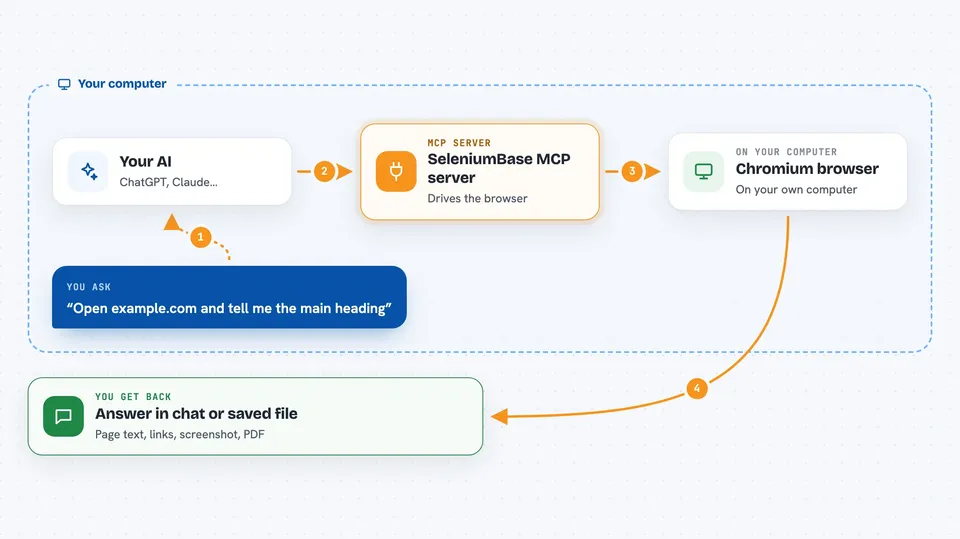
On its own, your AI can only chat. An MCP server is a small helper program that gives your AI a new skill or a connection to another tool. This one connects your AI to SeleniumBase, which drives a real Chromium browser. So when you ask your AI to visit a page or click something, the helper actually does it in a browser and reports back.
What this MCP server does
You ask your AI to open a web page or do something on it. Your AI passes that request to this helper. The helper starts a Chromium browser, goes to the page, and performs the steps, like typing in a field, clicking a button, or reading text. Then it sends the result back to your AI, which tells you what happened. It can also handle pages that try to block automated browsers.
 Click to zoom
What you can do with it
- Open a web page and read its text
- Click buttons and links on a page
- Type into forms and search boxes
- Take screenshots of pages
- Save a page as a PDF or HTML file
- Check that an element appears on a page
- Get past some bot checks and CAPTCHAs
Try asking your AI
- “Open example.com and tell me the main heading”
- “Go to the demo page and click the button labeled Submit”
- “Take a screenshot of the login page and save it”
- “Search Google for SeleniumBase and give me the first result title”
What it gives back to you
You get answers in the chat, like the text from a page, a list of links, or a short confirmation that a step worked. It can also save files such as screenshots, PDFs, or page source to a logs folder. If something fails, it tells you what went wrong.
Before you start
What you need
- Python 3.8 or newer installed on your computer
- The SeleniumBase package installed (pip install seleniumbase)
- A Chromium-based browser (Chrome is the default; Chromium or Chrome-for-testing can be downloaded automatically)
Good to know
It can click and type on real websites, so make sure you only use it on pages you are allowed to automate.
Install it with your AI
Add SeleniumBase MCP server to your AI, no technical skills needed
You don't install anything by hand. You copy one prompt, paste it into an AI that can work on your computer, and it checks, installs and connects the server for you, asking you when it needs something.
Sign in to get the install prompt
Members get a ready-made prompt that lets the Claude desktop app check SeleniumBase MCP server, install it and connect it for them, step by step. You don't need any technical skills: you copy, paste and answer a few questions. Your connected AI can also find and install any of the 4,361 MCP servers here for you.
Who it's for
People who test websites, gather information from web pages, or want their AI to interact with a browser for them.