
MCP server · Research
Domain Check MCP server
by Seomarlboro
Check if a domain name is free, compare registrar prices and look up when a domain was registered.
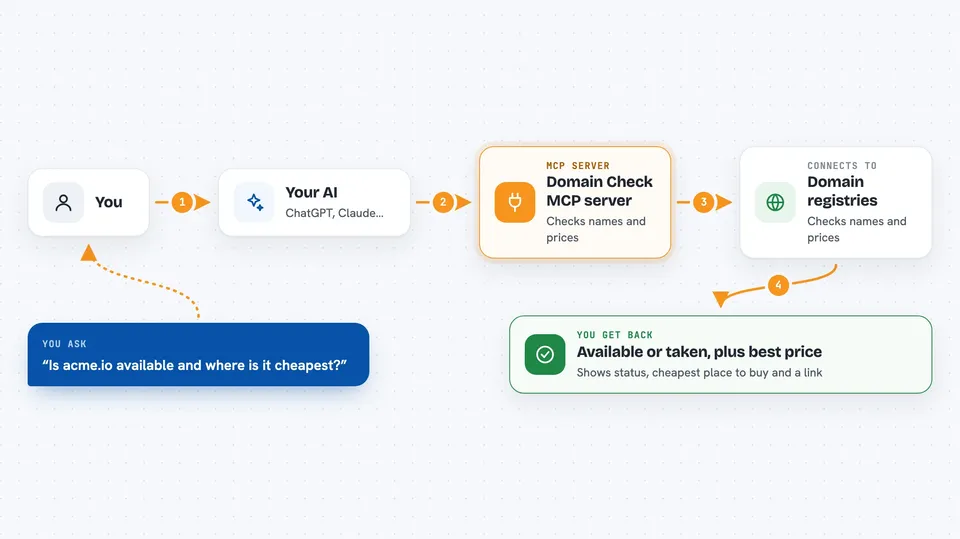
This is a small helper that lets your AI check domain names for you. You ask about a name, and it tells you if it is available, what it costs and where to buy it. Handy if you are picking a name for a project, a business or a personal site.
What is an MCP server? The 30-second version
On its own, your AI can only chat with you. An MCP server is a small helper program that gives your AI a new skill or a connection to a service. This one connects your AI to DigMyName, a domain lookup service. Once it is set up, your AI can check domain names and prices for you whenever you ask.
What this MCP server does
You ask your AI something like whether a name is available. The AI passes your question to this helper. The helper talks to domain registries and registrar price lists through the DigMyName service. It comes back with an answer: available or taken, the cheapest place to buy, and a link. If the name is taken, it can also tell you when it was first registered.
 Click to zoom
What you can do with it
- Check if a single domain name is available
- Search one name across many endings like .com, .io and .ai
- Compare prices across several registrars for one ending
- Get a direct link to buy an available domain
- Look up when a taken domain was first registered
- See the renewal price, not just the first-year price
Try asking your AI
- “Is acme.io available and where is it cheapest?”
- “Check nebula across com, io, ai, dev and app.”
- “Compare registrar prices for .ai.”
- “When was stripe.com registered?”
What it gives back to you
You get a short answer in the chat. For an available name, it shows the status, the cheapest registrar and price, and a buy link. For a taken name, it can show the registration year. For a price comparison, it lists each registrar with registration, renewal and three-year totals.
Before you start
What you need
- Node.js 18 or newer on your computer
- An MCP-capable app like Claude Desktop, Cursor, Windsurf, Continue, Zed or VS Code
Good to know
It only looks things up and gives you links; it does not buy anything for you, and prices can change, so double-check on the registrar's site before you pay.
Install it with your AI
Add Domain Check MCP server to your AI, no technical skills needed
You don't install anything by hand. You copy one prompt, paste it into an AI that can work on your computer, and it checks, installs and connects the server for you, asking you when it needs something.
Sign in to get the install prompt
Members get a ready-made prompt that lets the Claude desktop app check Domain Check MCP server, install it and connect it for them, step by step. You don't need any technical skills: you copy, paste and answer a few questions. Your connected AI can also find and install any of the 4,609 MCP servers here for you.
Who it's for
Anyone picking a domain name, like founders, freelancers, marketers and developers comparing prices or checking a name before buying.


