
MCP server · Productivity
Job Search MCP server
by Servation
Ask your AI to hunt real job listings, score each one for fit, and give you a ranked board to sort through.
This is a little helper that plugs into Claude Desktop and turns it into a personal job-hunting sidekick. You tell it what kind of roles you want and where, and it digs through real job boards, rates each posting for how well it matches you, then lays them out on a tidy board inside the chat. It's aimed mostly at US software engineering folks, though anyone hunting online might find pieces useful.
What is an MCP server? The 30-second version
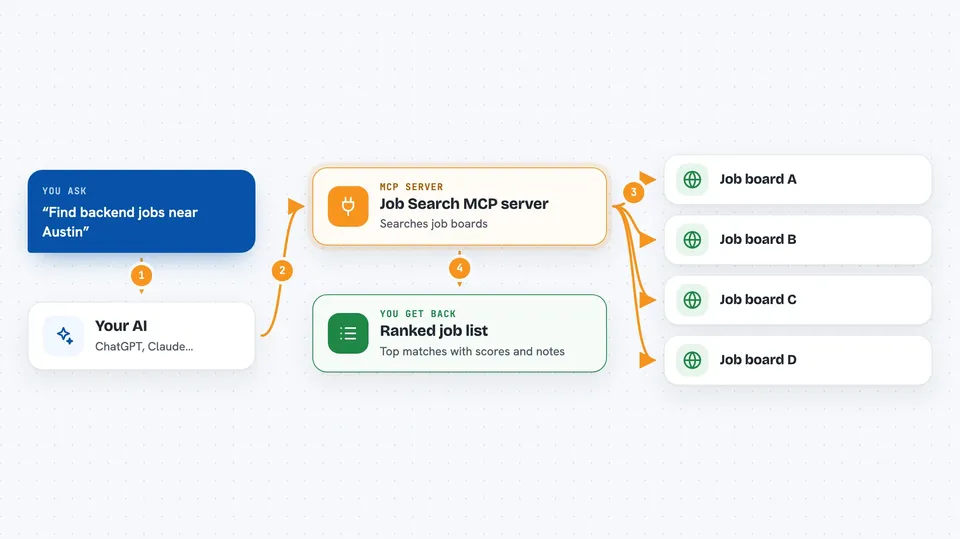
On its own, your AI can only chat based on what it already knows. An MCP server is a small program that sits next to your AI and hands it extra abilities, like reaching outside the conversation. This particular one connects your AI to live job boards such as LinkedIn, Greenhouse, and Lever. Once it's set up, asking "find me jobs" actually makes those sites get searched for you.
What this MCP server does
First you share your details, ideally pasting your resume so the tool learns your skills, roles, years, and city. Then whenever you say something like "find backend jobs near Austin," the helper queries several big job boards behind the scenes. Next, your AI reads each matching description carefully and grades it from zero to a hundred for how suited it seems to you. Finally, the top ones appear on a visual board in the chat window, sorted best-first, ready for quick yes-or-no calls. Anything below your comfort zone you dismiss in batches, and whatever you mark Applied lands safely in a separate tracking area.
 Click to zoom
What you can do with it
- Search multiple major job boards at once for specific titles and locations
- See each result rated out of 100 alongside a brief note on why it suits you
- Approve promising cards instantly while dismissing weak options individually or wholesale
- Keep tabs on positions you have marked as applied-to in one place
- Prevent duplicate sightings because seen entries rest quietly for six months
- Narrow down further using signals like freshness date range pay bracket applicant volume or telecommute status
- Refresh ratings any time circumstances shift perhaps following a résumé update
Try asking your AI
- “Help me locate product manager openings around Seattle Washington paying above ninety thousand yearly”
- “Filter today's stack toward junior developer spots allowing hybrid schedules within twenty miles”
- “Drop off every candidate sitting beneath fifty-five points please”
- “Display items currently waiting among applications submitted recently”
What it gives back to you
What comes back depends slightly upon request style yet generally includes structured lists carrying title company compensation summary link address rating badge justification line etcetera arranged descending according quality metric computed moments prior possibly accompanied totals count category breakdowns if explicitly sought otherwise straight textual rundown summarizing standings suffices adequately too regardless chosen presentation format ultimately delivering actionable overview immediately usable decision-making purposes throughout session duration thereafter additionally persisting underlying records securely awaiting future interactions naturally.
Install it with your AI
Add Job Search MCP server to your AI, no technical skills needed
You don't install anything by hand. You copy one prompt, paste it into an AI that can work on your computer, and it checks, installs and connects the server for you, asking you when it needs something.
Sign in to get the install prompt
Members get a ready-made prompt that lets the Claude desktop app check Job Search MCP server, install it and connect it for them, step by step. You don't need any technical skills: you copy, paste and answer a few questions. Your connected AI can also find and install any of the 4,609 MCP servers here for you.





