
MCP server · Research
LegiScan MCP server
by sh-patterson
Ask your AI to search US state and Congress bills, look up sponsors, and check how legislators voted.
This is a small helper that connects your AI assistant to LegiScan, a service that keeps track of bills and votes from all 50 US states and Congress. Once it is set up, you can just ask your AI questions about legislation in plain English instead of clicking around a website. It is handy for anyone who follows laws for work, like policy researchers, journalists, lobbyists, or students.
What is an MCP server? The 30-second version
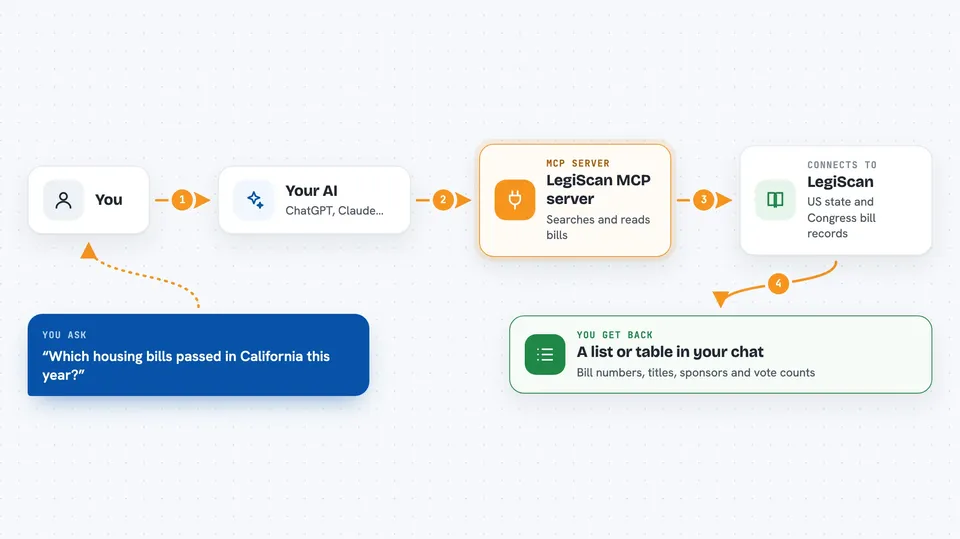
On its own, your AI can only chat with you using what it already knows. An MCP server is a little helper program that gives your AI a new skill, in this case a connection to LegiScan. When you ask a question, your AI sends the request to this helper, the helper asks LegiScan for the data, and the answer comes back into your chat. So your AI is not guessing, it is reading real legislative records for you.
What this MCP server does
You ask your AI something like which housing bills passed in California this year. Your AI uses this helper to search LegiScan for matching bills, then pulls details like the title, sponsors, latest action, and any recorded votes. The helper can also look up a specific legislator by name and gather how they voted on a list of bills. Everything comes back into your chat as text, usually as a list or table you can read or copy.
 Click to zoom
What you can do with it
- Search bills by keyword across a state or Congress
- Look up a bill by its number, like AB 858 or SB 525
- Get a bill's sponsors, history, and latest action
- See how each legislator voted on a specific bill
- Find a legislator by name and get their ID
- List bills a legislator personally authored
- List all legislators active in a session
Try asking your AI
- “Find major California housing bills in the current session and show bill number, title, latest action, and top sponsors.”
- “Track climate resilience bills in New York this session. Return the top 15 with sponsor party and any roll calls.”
- “For Texas, find legislator Jane Smith, list her primary-authored bills, and summarize each one's topic and status.”
- “For California session 2172, resolve AB 858, SB 525, and SB 616, then report how people_id 21719 voted on each.”
What it gives back to you
You get answers written in your chat, usually as a list or table: bill numbers, titles, dates, sponsors, vote counts, and how individual legislators voted. If you ask for a table or CSV-ready format, your AI can shape the output that way. The helper also shows IDs like bill_id and people_id when you ask, so you can check where the information came from. It does not change anything on LegiScan, it only reads.
Before you start
What you need
- A free LegiScan account
- A LegiScan API key (a kind of password for apps; LegiScan gives you one for free after you register for API access)
- An AI app that supports MCP servers, like Claude Desktop, Claude Code, or Codex CLI
- Node.js installed on your computer if you use the npx setup
Good to know
Free LegiScan API keys allow 30,000 queries a month, so very large research jobs can use up your quota, and results can change between pages if LegiScan updates its lists.
Install it with your AI
Add LegiScan MCP server to your AI, no technical skills needed
You don't install anything by hand. You copy one prompt, paste it into an AI that can work on your computer, and it checks, installs and connects the server for you, asking you when it needs something.
Sign in to get the install prompt
Members get a ready-made prompt that lets the Claude desktop app check LegiScan MCP server, install it and connect it for them, step by step. You don't need any technical skills: you copy, paste and answer a few questions. Your connected AI can also find and install any of the 4,361 MCP servers here for you.
Who it's for
Policy researchers, journalists, lobbyists, students, and anyone who needs to follow bills and votes across US states or Congress.





