MCP server · Finance and crypto
ShareSeer MCP server
by shareseer
Ask your AI about SEC filings, insider trades, and company info, and get answers from ShareSeer.
ShareSeer is a service that keeps track of public company paperwork and insider stock trades. This MCP server connects your AI assistant to ShareSeer, so you can just ask questions in plain English and get answers back. It is handy for anyone who follows companies, stocks, or the people who run them.
What is an MCP server? The 30-second version
On its own, your AI can only chat with you. An MCP server is a small helper that gives your AI a new skill or a connection to another service. This one connects your AI to ShareSeer, a place that collects SEC filings and insider trading data. Once it is connected, your AI can look things up at ShareSeer for you when you ask.
What this MCP server does
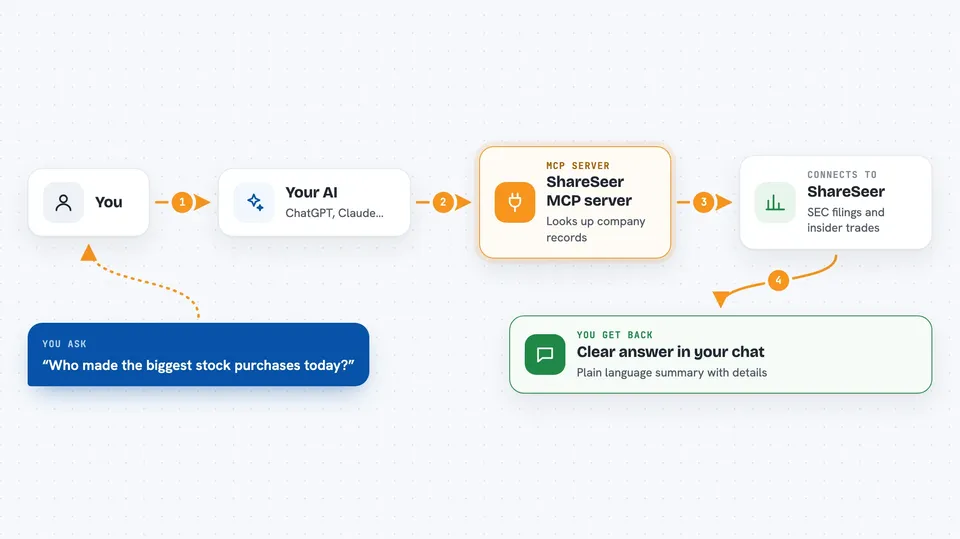
You ask your AI a question, like who has been buying stock in a certain company. Your AI sends that request to this ShareSeer helper. The helper talks to ShareSeer, which looks through its records of SEC filings and insider trades. ShareSeer sends the results back, and your AI turns them into a clear answer in your chat. You never have to visit a website or fill in a form yourself.
 Click to zoom
What you can do with it
- Look up basic information about a company by its ticker symbol
- See recent SEC filings for a specific company
- Check insider trading transactions for a company
- Browse recent SEC filings across all companies
- See recent insider trading activity market-wide
- Find the largest daily insider buys or sells
- Find the largest weekly insider buys or sells
Try asking your AI
- “Tell me about NVIDIA”
- “Show me recent insider trading for Tesla”
- “Who made the biggest stock purchases today?”
- “What are the most recent 10-K filings?”
What it gives back to you
You get answers written in plain language right in your chat. Depending on what you ask, that could be a short company summary, a list of recent filings with dates, or a table of insider trades with names and amounts. Your AI pulls the numbers and details from ShareSeer and explains them to you. Nothing is changed on ShareSeer's side; it is all read-only.
Before you start
What you need
- A ShareSeer account (free signup at shareseer.com/signup)
- For Claude web, desktop, or mobile: nothing else, you sign in during setup
- For other MCP clients: an API key from your ShareSeer profile page (it starts with sk-shareseer-)
Good to know
Free accounts have limits on how many lookups you can do per hour and per day, and some data is delayed or shortened unless you upgrade to Premium.
Install it with your AI
Add ShareSeer MCP server to your AI, no technical skills needed
You don't install anything by hand. You copy one prompt, paste it into an AI that can work on your computer, and it checks, installs and connects the server for you, asking you when it needs something.
Sign in to get the install prompt
Members get a ready-made prompt that lets the Claude desktop app check ShareSeer MCP server, install it and connect it for them, step by step. You don't need any technical skills: you copy, paste and answer a few questions. Your connected AI can also find and install any of the 4,609 MCP servers here for you.
Who it's for
Anyone who follows stocks or companies and wants quick answers about filings and insider trades without digging through websites.