MCP server · Productivity
SHAR Production Metadata MCP server
Your AI can check a video production manifest and tell you whether it is ready to be released.
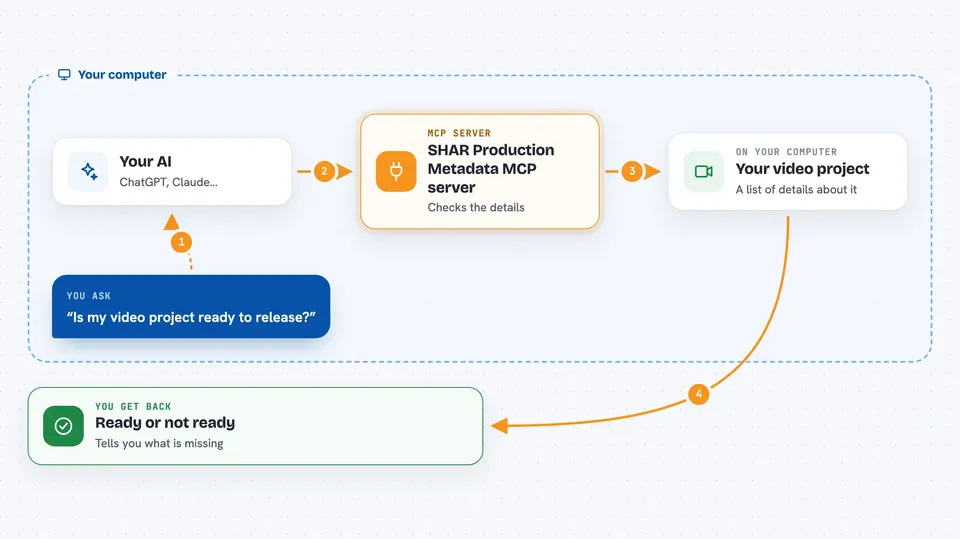
This is a small helper for people who work with video production paperwork. It lets your AI look at a production manifest, which is a structured list of details about a video project, and give you a releasability result. It is handy if you deal with rights information and need a quick check before something goes out.
What is an MCP server? The 30-second version
On its own, your AI can only chat with you. An MCP server is a small helper program that gives your AI a new skill or a connection to an app or service. This one connects your AI to SHAR Production's metadata checking rules, so when you ask about a manifest, the AI can run the check and tell you what it found. You do not need to understand the technical parts; you just ask in plain words.
What this MCP server does
You give your AI a production manifest, which is a block of structured information about a video project. The AI passes it to this helper. The helper looks at the fields, especially the rights status, and decides whether the project can be released. Then it sends back a releasability result that your AI shows you in the chat. It does not read files on your computer, call the internet, or publish anything.
 Click to zoom
What you can do with it
- Check if a production manifest is complete enough to be released
- See whether a rights status of unknown blocks release
- Validate the structure of a manifest before sending it on
- Get a clear yes or no on releasability for a video project
- Test a manifest you are drafting without sharing it anywhere
Try asking your AI
- “Here is my production manifest. Can you check if it is releasable?”
- “Does this manifest have everything needed for release?”
- “The rights status is unknown. Will that stop the release?”
- “Validate this manifest and tell me what is missing.”
What it gives back to you
You get back a releasability result, which is a short answer about whether the manifest passes the check. It may also point out which fields are a problem, like a rights status that is not settled. Your AI shows this as a plain message in the chat, so you can act on it right away.
Before you start
What you need
- Node.js installed on your computer
- The project files from the GitHub page, since there is no public npm release yet
- A production manifest in the expected format
Good to know
This tool only checks the manifest you give it and does not read your files or the internet, so make sure the manifest you paste in is the one you mean to check.
Install it with your AI
Add SHAR Production Metadata MCP server to your AI, no technical skills needed
You don't install anything by hand. You copy one prompt, paste it into an AI that can work on your computer, and it checks, installs and connects the server for you, asking you when it needs something.
Sign in to get the install prompt
Members get a ready-made prompt that lets the Claude desktop app check SHAR Production Metadata MCP server, install it and connect it for them, step by step. You don't need any technical skills: you copy, paste and answer a few questions. Your connected AI can also find and install any of the 4,361 MCP servers here for you.
Who it's for
This is most useful for production coordinators, rights managers, and anyone who prepares video project paperwork and needs a quick readiness check.