
MCP server · Generative video
Deckrun MCP server
by agenticdecks
Turn Markdown your AI writes into a branded PDF deck, a narrated video, or an MP3 audio file.
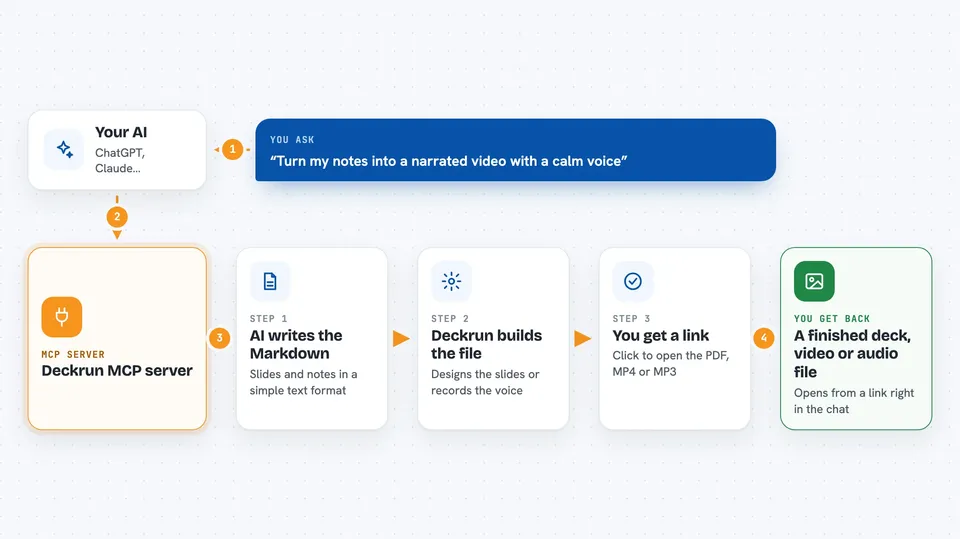
Deckrun is a helper that turns plain Markdown text into finished presentations, narrated videos, and audio files. Your AI writes the words, and Deckrun does the design work for you. It is handy if you often need slides, a short explainer video, or a voiceover but do not want to open a slide editor or a video tool.
What is an MCP server? The 30-second version
On its own, your AI can only chat with you. An MCP server is a small helper program that gives your AI a new skill or a connection to another service. This one connects your AI to Deckrun, a service that builds documents. So when you ask for a deck or a video, your AI can hand the text to Deckrun and bring the finished file back to you.
What this MCP server does
You ask your AI for a presentation, a narrated video, or an audio file. The AI first asks Deckrun how the slide format works, then writes the Markdown for you. It sends that Markdown to Deckrun, which renders it into a designed PDF, an MP4 video, or an MP3 file. For videos and audio, Deckrun works in the background and gives back a job number, which the AI checks until the file is ready. Then the AI replies in the chat with a link you can click.
 Click to zoom
What you can do with it
- Turn a topic into a finished slide deck as a PDF
- Create a narrated video from your Markdown
- Generate an MP3 voiceover from slide notes
- Check how a video or audio job is going
- Validate your Markdown before you render it
- Browse available themes and narration voices
- See your plan and how many render units you have left
Try asking your AI
- “Create a 6-slide deck on the future of edge computing”
- “Turn this Markdown into a narrated video with a calm voice”
- “Make an MP3 voiceover from the notes on these slides”
- “Check if my video job is done yet”
What it gives back to you
For a deck, you get a clickable link to a PDF that stays online for 90 days. For videos and audio, you get a job number first, then a link to the finished MP4 or MP3 once it is ready. You can also ask for lists of themes and voices, or a summary of your account and remaining render units. Everything shows up as text and links right in the chat.
Before you start
What you need
- Python installed if you want to run it on your own computer
- An internet connection for the hosted version
- A Deckrun API key for videos, audio, and account tools (a kind of password you get after subscribing)
Good to know
Videos and audio use render units from your paid plan, so each one can cost you money, and the free PDF links expire after 90 days.
Install it with your AI
Add Deckrun MCP server to your AI, no technical skills needed
You don't install anything by hand. You copy one prompt, paste it into an AI that can work on your computer, and it checks, installs and connects the server for you, asking you when it needs something.
Sign in to get the install prompt
Members get a ready-made prompt that lets the Claude desktop app check Deckrun MCP server, install it and connect it for them, step by step. You don't need any technical skills: you copy, paste and answer a few questions. Your connected AI can also find and install any of the 4,361 MCP servers here for you.
Who it's for
People who need presentations, short explainer videos, or voiceovers but do not want to use a slide editor or video tool, such as trainers, marketers, and small teams.




