MCP server · Productivity
Clipy MCP server
Lets your AI search your Clipy screen recordings and read their transcripts, summaries and key moments.
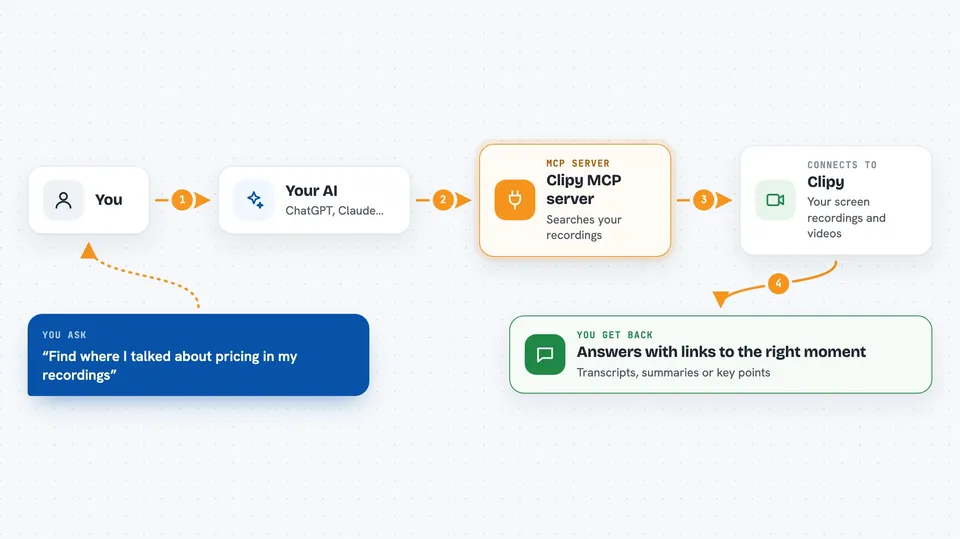
This is a small helper that connects your AI assistant to your Clipy account, where your screen recordings live. Once it is set up, you can ask your AI things like "find the recording where I showed the login bug" and it will actually look through your library. It is handy for anyone who records their screen a lot and then struggles to find or reuse what is in those videos.
What is an MCP server? The 30-second version
On its own, your AI can only chat with you. An MCP server is a small helper program that gives your AI a new skill or a connection to an app or service. This one connects your AI to Clipy, your screen recording library, so it can search your videos and read what was said and shown in them. You just ask in plain words, and the helper does the looking for you.
What this MCP server does
You ask your AI a question about something you recorded or watched. The AI uses this helper to search your Clipy library, which includes your own screen recordings and any videos you imported. The helper finds matching moments and pulls back the transcript, the AI summary, or the key moments with timestamps. Your AI then reads all that and answers you in the chat, often with a link that opens the video at the right second.
 Click to zoom
What you can do with it
- Search all your recordings and imported videos at once by meaning, not just exact words
- Read the full timestamped transcript of any recording
- Get the AI summary with its TL;DR, key points and action items
- Find key moments with timestamps, captions and click coordinates
- Download a recording as an MP4 so you can clip it or pull frames
- List your most recent recordings and check their status
- Read imported YouTube videos and local video files you added to Clipy
What it gives back to you
You get answers in the chat, built from your actual recordings. That can be a list of matching moments with timestamps and links that open the video at that point, a full transcript, or the AI summary with key points and action items. If you ask for a file, it can download the MP4 to your machine. Everything shows up as normal text and links in the conversation.
Before you start
What you need
- A Clipy account with at least one recording
- The Clipy CLI logged in once (run npx @clipy/cli@latest login and click Approve in the browser)
- Node.js installed on your computer
- An MCP-capable app like Claude Desktop, Claude Code, Cursor or Windsurf
Good to know
The read tools only look at your recordings, but some tools can also record a new video or replace a transcript, and those need a key with extra permission, so keep an eye on which key you use.
Install it with your AI
Add Clipy MCP server to your AI, no technical skills needed
You don't install anything by hand. You copy one prompt, paste it into an AI that can work on your computer, and it checks, installs and connects the server for you, asking you when it needs something.
Sign in to get the install prompt
Members get a ready-made prompt that lets the Claude desktop app check Clipy MCP server, install it and connect it for them, step by step. You don't need any technical skills: you copy, paste and answer a few questions. Your connected AI can also find and install any of the 4,361 MCP servers here for you.
Who it's for
People who record their screen often, like developers, designers, QA testers and product folks who want to reuse what is inside those videos.