
MCP server · Developer tools
Vibie MCP server
by shdomi8599
Let your AI upload a folder of web files and give you a live web link you can share.
Vibie is a service that takes a folder of web files and puts it online at a permanent web address ending in vibie.page. This MCP server connects your AI assistant to Vibie, so you can just ask your AI to publish a folder for you. It is handy if you have a small website, a landing page, or a set of HTML files you want to share with a link, without learning any hosting tools.
What is an MCP server? The 30-second version
On its own, your AI can only chat with you. An MCP server is a small helper program that gives your AI a new skill or a connection to another service. This one connects your AI to Vibie, a place where web folders get published online. Once it is set up, you can ask your AI in plain words to put a folder online, and it will use this helper to do it for you.
What this MCP server does
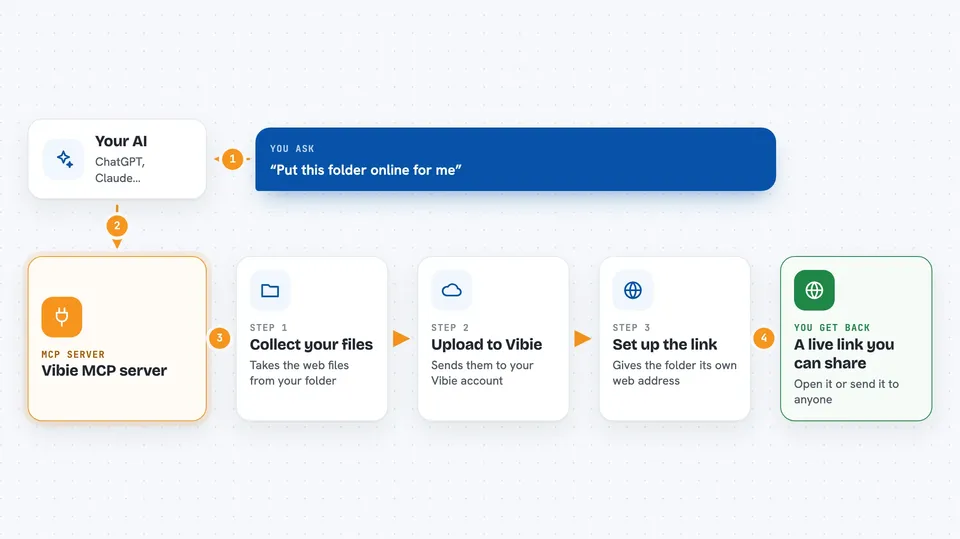
You tell your AI something like "deploy this folder to Vibie." The AI uses this helper, which talks to Vibie on your behalf. Vibie uploads the files from that folder and gives back a live web address. The first time, it also writes a small marker file inside the folder so later updates go to the same address. After that, when you ask your AI to push your changes, it updates the same link with the new content.
 Click to zoom
What you can do with it
- Publish a folder of HTML, CSS, and images to a live web address
- Get back a shareable link ending in vibie.page
- Re-deploy updates to the same link after you change files
- List all the sites you have published
- Look up details about one of your sites by its slug
- Skip hidden files, node_modules, and other clutter automatically
Try asking your AI
- “Deploy this folder to Vibie”
- “Push my latest changes to my Vibie site”
- “List all my Vibie sites”
- “Show me the details for my portfolio site”
What it gives back to you
You get back a live web address you can open or share, plus a short confirmation in the chat. When you ask for a list, you get the names and links of your sites. When you ask for details, you get basic information about one site. Updates return the same link with a note that the content was replaced.
Before you start
What you need
- A Vibie account (you sign in with Google when the browser asks you to authorize)
- Node.js installed on your computer so npx works
- The Claude Desktop or Cursor app, or another app that supports MCP servers
Good to know
This server can publish and replace files on a live website under your account, so double-check the folder before you ask it to deploy.
Install it with your AI
Add Vibie MCP server to your AI, no technical skills needed
You don't install anything by hand. You copy one prompt, paste it into an AI that can work on your computer, and it checks, installs and connects the server for you, asking you when it needs something.
Sign in to get the install prompt
Members get a ready-made prompt that lets the Claude desktop app check Vibie MCP server, install it and connect it for them, step by step. You don't need any technical skills: you copy, paste and answer a few questions. Your connected AI can also find and install any of the 4,609 MCP servers here for you.
Who it's for
Anyone who has a small folder of web files and wants a quick, permanent link to share, without dealing with hosting setup.



