
MCP server · Notes
ContextLattice MCP server
by sheawinkler
Give your AI a private memory so it remembers your project between chats and picks up where you left off.
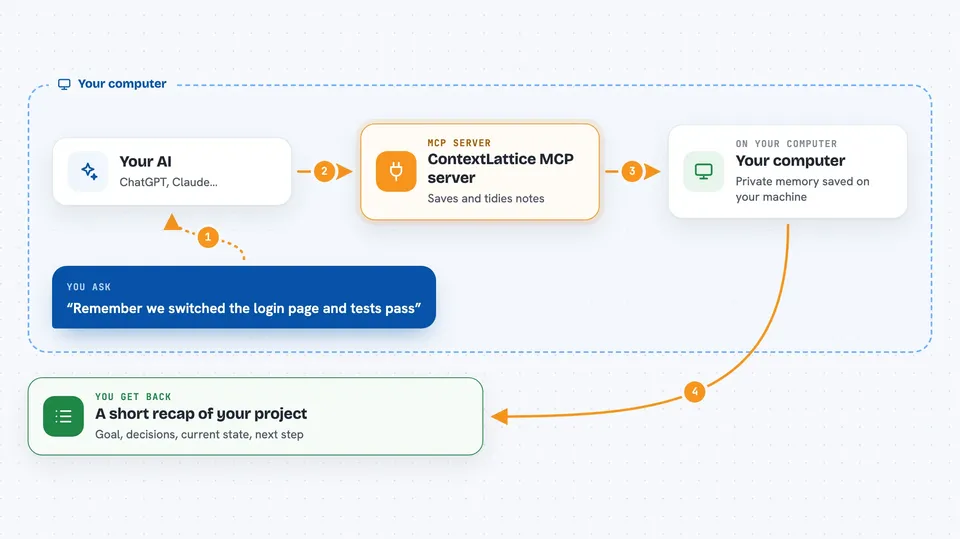
ContextLattice is a memory layer that runs on your own computer. It helps your AI hold on to the goal, decisions, and progress of a piece of work, so you do not have to explain everything again every time you open a new chat. It is handy if you work on longer projects with an AI assistant and keep losing the thread.
What is an MCP server? The 30-second version
On its own, your AI can only chat. It forgets everything the moment you close the window. An MCP server is a small helper program that gives your AI a new skill or a connection to something outside the chat. This one connects your AI to ContextLattice, a memory store on your own machine, so it can save notes about your work and look them up again later when you ask.
What this MCP server does
You ask your AI to remember something about your project, like a decision you made or a problem you fixed. The AI passes that to ContextLattice through this helper. ContextLattice saves it on your computer and keeps it tidy. Later, when you start a new chat or ask about that project, the AI asks ContextLattice what it knows, and ContextLattice sends back the most useful bits. You get a short, relevant recap instead of a wall of old chat text.
 Click to zoom
What you can do with it
- Save a short note about progress on a project
- Ask for a recap of where a project stands
- Look up earlier decisions or fixes
- Correct a memory that turned out to be wrong or out of date
- Mark a task as finished with the result
- Search your saved skills and notes without loading everything
- Keep your memory on your own machine instead of the cloud
Try asking your AI
- “Remember that we switched the login page to the new design and the tests pass.”
- “What do you know about the billing project so far?”
- “That note about the old deployment is out of date, please correct it.”
- “We finished the regression fix, mark it as done.”
What it gives back to you
You get back short, readable answers in the chat: a recap of the goal, the key decisions, the current state, and the next step. When you save something, it confirms what it stored. When you ask a question, it shows the notes it used, so you can see where the answer came from. If some information is missing or old, it tells you that too.
Before you start
What you need
- A computer running macOS, Linux, or Windows with WSL2
- A container runtime that works with Compose v2, such as Docker or OrbStack
- A few command line tools: gmake, jq, rg, python3, and curl
- Enough memory and disk space for the profile you pick, for example 8 to 12 GB of RAM and 25 to 80 GB of disk for the Lite core
Good to know
It saves notes about your work on your own computer, so treat that folder as private, and remember that corrections change what the AI will recall later.
Install it with your AI
Add ContextLattice MCP server to your AI, no technical skills needed
You don't install anything by hand. You copy one prompt, paste it into an AI that can work on your computer, and it checks, installs and connects the server for you, asking you when it needs something.
Sign in to get the install prompt
Members get a ready-made prompt that lets the Claude desktop app check ContextLattice MCP server, install it and connect it for them, step by step. You don't need any technical skills: you copy, paste and answer a few questions. Your connected AI can also find and install any of the 4,609 MCP servers here for you.
Who it's for
People who work on longer projects with an AI assistant and want it to remember the context without sending their notes to the cloud.





