MCP server · Productivity
saga-mcp project tracker
by spranab
Lets your AI keep a real project plan in a file on your computer, so it remembers what is done and what is blocked.

saga-mcp is a small helper that gives your AI a proper project tracker, stored in a single file inside your project folder. It keeps projects, epics, tasks, subtasks, dependencies, comments and notes in one place. It is handy if you use an AI assistant for coding or planning and keep losing track of where you left off between sessions.
What is an MCP server? The 30-second version
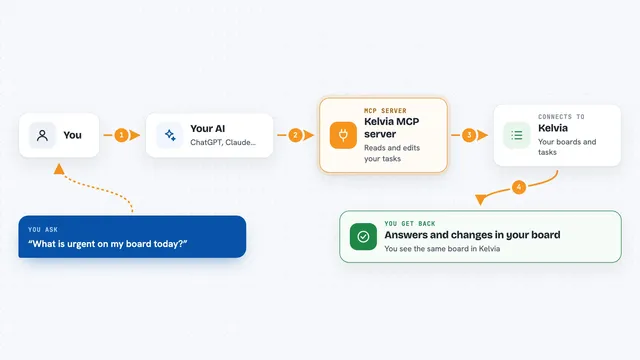
On its own, your AI can only chat. It forgets everything the moment you close the window. An MCP server is a small helper program that gives your AI a new skill or a connection to something outside the chat. This one connects your AI to a tracker file on your own computer, so it can write down tasks and read them back later when you ask.
What this MCP server does
You ask your AI something like where were we or what should I do next. The AI uses this helper to look inside a tracker file in your project folder. The helper reads the projects, tasks, dependencies and comments stored there. Then the AI tells you the next thing to work on, what is blocked, or what changed since last time. When the AI finishes something, it can mark it done and write a comment about what it did.
 Click to zoom
What you can do with it
- Set up a new project with epics, tasks and subtasks
- Mark tasks as blocked or unblocked based on what they depend on
- Ask what to work on next and get one clear recommendation
- Add comments to a task to record decisions and progress
- Save reusable task templates with placeholders you fill in later
- Archive finished work so it stops cluttering your plan
- Look up the full history of what changed on any task
Try asking your AI
- “Set up tracking for my new website project and plan out the design work”
- “Where were we on the checkout feature”
- “What should I work on next”
- “Mark the login task as done and add a comment saying I tested it”
What it gives back to you
You get plain answers in the chat: the next task to work on with a reason, a list of tasks that are blocked, a summary of what is overdue, or the full thread of comments on a task. When the AI changes something, like marking a task done or adding a dependency, it tells you what it changed. You can also open the same tracker in your browser with a separate command if you would rather look than ask.
Before you start
What you need
- Node.js version 20, 22 or 24 installed on your computer
- An MCP client like Claude Desktop or Claude Code
- A folder path where you want the tracker file to live
Good to know
The AI can change, archive or delete tasks and comments in your tracker file, though deletions are kept and can be restored.
Install it with your AI
Add saga-mcp project tracker to your AI, no technical skills needed
You don't install anything by hand. You copy one prompt, paste it into an AI that can work on your computer, and it checks, installs and connects the server for you, asking you when it needs something.
Sign in to get the install prompt
Members get a ready-made prompt that lets the Claude desktop app check saga-mcp project tracker, install it and connect it for them, step by step. You don't need any technical skills: you copy, paste and answer a few questions. Your connected AI can also find and install any of the 4,361 MCP servers here for you.
Who it's for
People who use an AI assistant for coding or planning and want it to remember the plan between sessions, especially solo developers and small teams.